


Your team has outgrown Harvest. Lucen Track is built for what's next.
Deeper reporting. Transparent pricing that doesn’t punish
growth. And time tracking built natively into the Microsoft
tools your team already uses.
14-day free trial · No credit card required · Free migration support


Where should your time tracking live?
Harvest is a well-established time tracker with strong invoicing features. Billable time becomes a client invoice, with payment collected in the same place, which works well if billing end to end inside one tool is a priority.
Track is purpose-built for teams already working inside Microsoft 365, meeting them where their work already happens, so the harder problem of accurately capturing time in the first place gets solved first.
Move from Harvest without losing a thing
Import your projects and time entries, keep your history, and get your team tracking in Track the same week.
Create your free account
Start a 14-day trial in minutes. No credit card, no setup call required to begin.
Import from Harvest
Bring your projects and time entries across via CSV import. Our team helps make sure nothing gets left behind.
Get your team tracking
Most teams are up and running within a day, tracking time inside the Microsoft tools they already use.

“Another significant benefit of using Track [formerly Timeneye] is that I receive weekly reports directly in my inbox... Ultimately, this helps ensure that we are pricing our projects correctly.”
Adam Fraser Technical manager - DACI
Bringing a larger team?
For teams migrating dozens of seats, our team can run a guided, done-for-you migration so your projects, rates, and history land exactly where they should.
Track vs Harvest
See how the two tools compare across the features that matter most for agencies and project-based teams.
Familiar frustrations, finally fixed
We’ve heard from hundreds of teams who loved Harvest until it started
getting in the way.
Growing team? Don’t pay more just to track more time.
Harvest’s per-seat pricing adds up fast as your team grows. Track’s straightforward $7/user/month model means no surprises at billing time, and a free plan for teams just getting started.
See more than hours logged. Get the insights your team actually needs.
Harvest shows you what happened. Track helps you understand why it happened and what to do next, with dashboards, customizable filters, and automated reports you can share with clients or leadership in one click.
Time tracking that connects to billing without the workarounds.
If your invoicing process involves exporting CSVs, copying rows, or switching between tabs, that’s time you’re not getting back. Track keeps your time data, costs, and billable hours connected so your billing workflow actually flows.
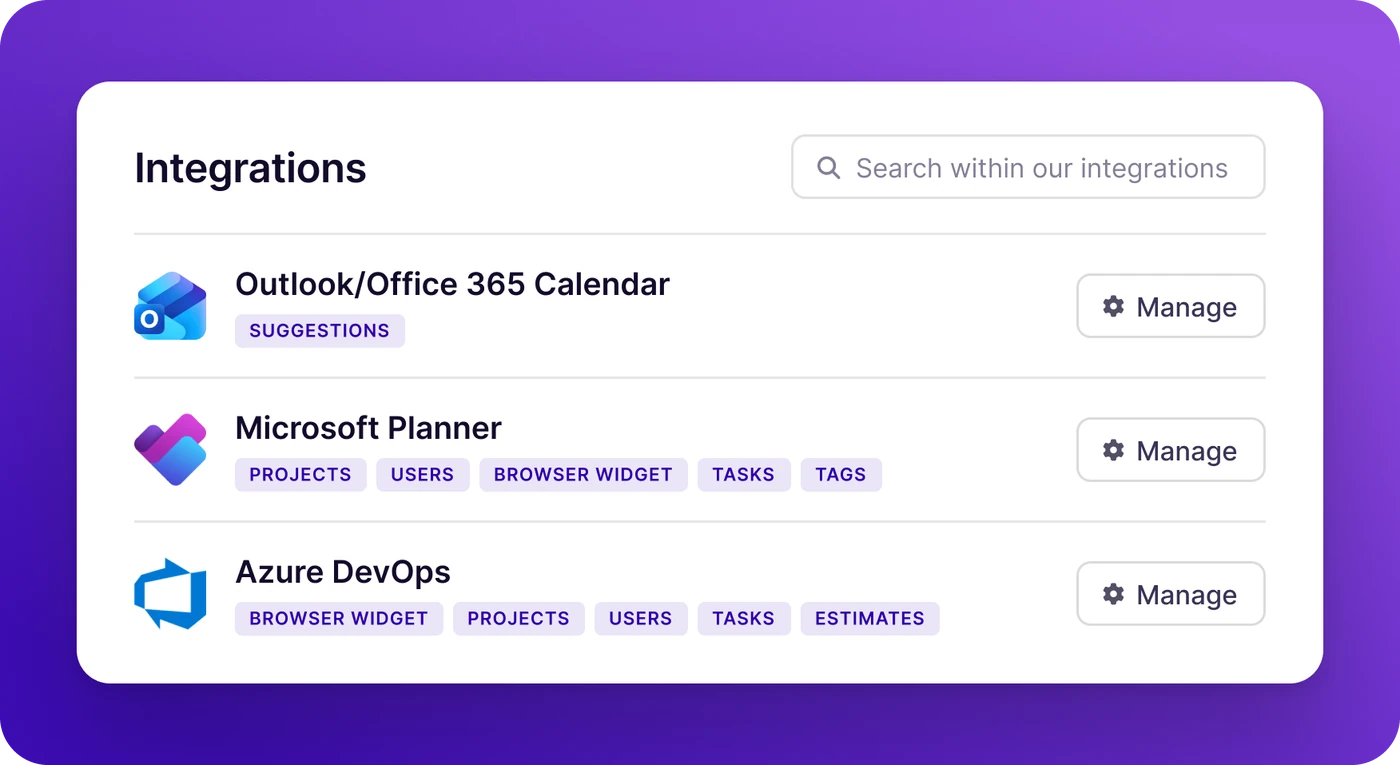
Track time inside the tools you already live in.
Harvest was built before Microsoft 365 became the backbone of how most teams work. Track was designed for it from the ground up, which means no tab-switching, no copy-pasting, and no double entry.
Log time directly from a Teams call. Pull projects from Planner. Capture meetings from Outlook automatically. Connect your data to Power BI for reporting that goes wherever your stakeholders are.
- Microsoft Teams - Log time and check project status without leaving your workspace.
- Outlook Calendar - Automatically capture meetings as time entries.
- Microsoft Planner - Sync tasks and projects directly into your time tracking workflow.
- PowerBI - Connect Track data to your existing dashboards and reports.
- Azure DevOps - Keep dev teams and project teams in sync, with work items and tracked time in one place.
Trusted by professionals worldwide





What our customers say
Common questions
Harvest is a standalone time tracker with built-in invoicing. Track is built for Microsoft 365. It runs as a native Teams app, suggests time entries from your calendar and Teams calls, and connects to Outlook, Planner, Azure DevOps and Power BI, so people log time where they already work. Track also goes further on reporting, with dashboards, customizable filters and automated reports. If you want to invoice and collect payment in the same tool, Harvest does that. If your team lives in Microsoft 365, Track is the better fit.
Yes. Track supports importing your projects and time entries from Harvest via CSV, and our team is available to help you through the migration. Most teams are up and running within a day. We'll make sure nothing gets left behind.
For most teams, yes. Track starts at $7 per user per month, compared to Harvest Pro at $9 per user per month. Track also offers a free plan, which Harvest effectively limits to 1 user and 2 projects. As your team scales, the difference compounds quickly.
You can create a Track account and start tracking in minutes. No credit card is required to start your 14-day free trial, and our onboarding resources will get your team productive on day one.
Track is built to scale, from solo freelancers to enterprise organizations with thousands of users. It's particularly well-suited for agencies, consultancies, and project-based teams of 5–200 people who want real visibility into where their time goes, not just a log of hours.

Switch from Harvest in minutes.
We’ll help you migrate.
Start a free 14-day trial and see why 800+ teams made the move to Track.
No credit card required · Free migration support · Cancel anytime