


Legal litigation timeline template
A legal litigation timeline for PowerPoint showing a three-day sequence of case events, with color-coded milestones, timestamped entries and a swimlane bar illustrating overlapping activities - all on a single presentation slide.
Powered by Lucen Timeline (formerly Office Timeline)

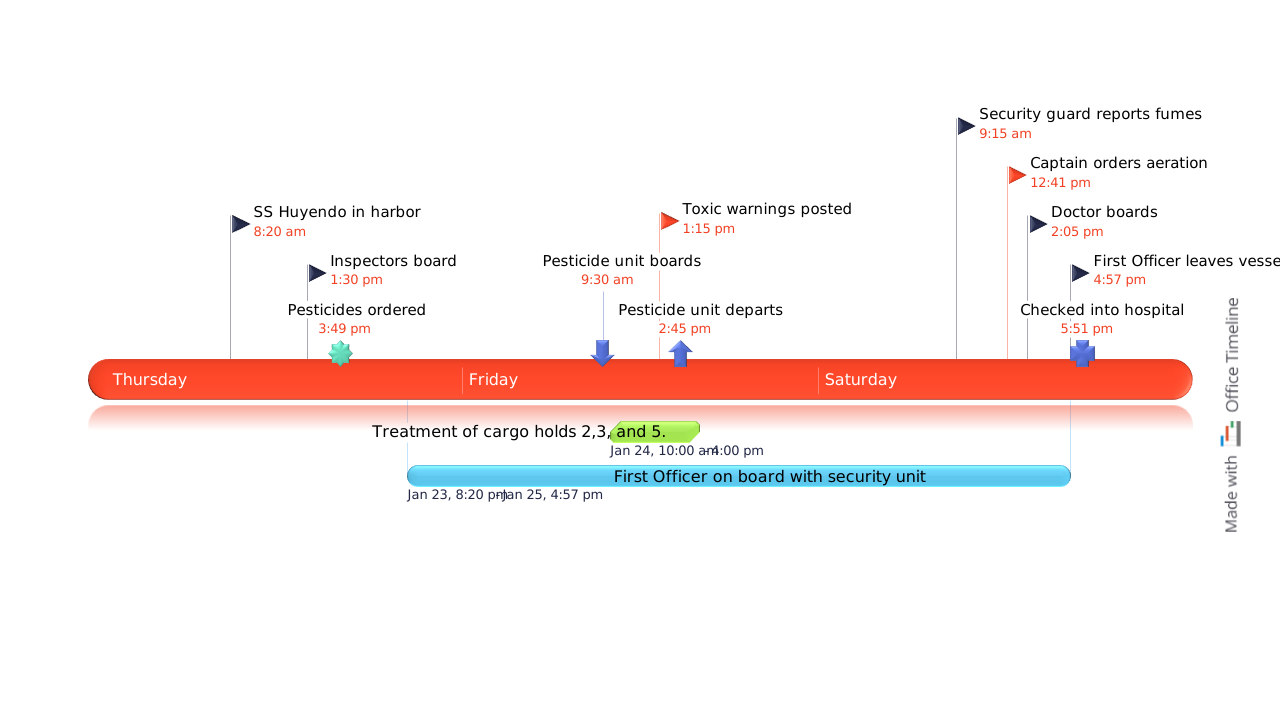
Litigation cases generate large volumes of facts, evidence, testimonies, and key events - often spanning days, months, or years. Presenting all of that information clearly and convincingly to a judge or jury is one of the core challenges any litigator faces.
A legal litigation timeline helps attorneys organize all relevant case events in chronological order and present them as a clear visual narrative. Instead of walking a jury through piles of documents and transcripts, a well-structured timeline allows them to quickly grasp the sequence of events and understand how the facts connect.
On this page, you can download a free legal timeline template for PowerPoint that you can customize with your own case events, parties, and key dates.
What is a legal timeline?
A legal timeline - also called a litigation timeline or case chronology - is a visual tool that organizes the key events of a case in the order they occurred. Depending on the nature of the case, it can include:
- Parties and players - individuals or legal entities involved in the litigation, such as witnesses, experts, or attorneys.
- Issues and topics - specific documents, communications, or elements of the case that help clarify the situation.
- Facts and sources - confirmed events, their sources, and their relationship to the parties involved.
- Evidence - key documents, communications, transcripts, and other supporting materials.
By mapping these elements onto a timeline, attorneys can build a coherent narrative that is easier for jurors and judges to follow.
Tips for creating an effective legal case timeline
A strong litigation timeline is built on clarity, logical structure, and a coherent narrative. Here are four practical guidelines to keep in mind:
Keep it readable
Avoid decorative or unconventional fonts that reduce legibility. Pay attention to contrast between text and background - low contrast makes timestamps and labels difficult to read, particularly on a projected slide.
Use color coding deliberately
Colors carry psychological associations that can reinforce your narrative. Red, for instance, tends to signal urgency or danger, while neutral tones convey objectivity. Choose a consistent color palette that supports the story you are telling without distracting from it.
Be consistent with shapes
The shapes used for milestone markers influence how the audience perceives the information. Mixing different shapes without a clear system can confuse jurors about the significance of different events. Establish a consistent visual logic and stick to it throughout the timeline.
Trim to the critical path
It can be tempting to include every event that seems relevant to the case. However, overloading the timeline with detail makes it harder for jurors to follow the main narrative. Review all case events and include only those that mark the critical path - the events that directly support your argument.
When to use a litigation timeline
This template is flexible enough to be used across a wide range of legal contexts, including:
- business litigation;
- construction litigation;
- personal injury litigation;
- intellectual property litigation;
- liability litigation.
Because it is built as a native PowerPoint slide, it can also be easily embedded into legal documentation, case reports, or client presentations.
Using the legal timeline template
The timeline template on this page was created with the Lucen Timeline add-in for PowerPoint. Once downloaded, you can customize it directly in PowerPoint by adding your own case events, adjusting milestone dates, applying color coding, and modifying labels to match the specifics of your case.
For faster updates as a case develops, the Office Timeline add-in allows you to modify milestone dates, change styles, and refresh the timeline in just a few clicks - without rebuilding the slide from scratch each time new information comes to light.
You can try the full functionality of the add-in with its free 14-day trial.
Frequently asked questions
A litigation timeline organizes the key events of a legal case in chronological order and presents them visually.
It helps attorneys:
- present facts in a clear sequence;
- connect evidence and testimony to specific events;
- build a logical narrative for judges and jurors.
Litigation timelines are commonly used in:
- personal injury cases;
- business litigation;
- intellectual property disputes;
- construction litigation;
- liability cases.
A legal timeline typically includes the most important elements of a case, such as:
- key parties involved in the litigation;
- confirmed facts and their sources;
- relevant documents or communications;
- major case events with precise dates and times.
For courtroom presentations, it is usually more effective to focus on the critical path of events rather than including every detail.
There are several ways to build a timeline for a legal case.
Common tools include:
- PowerPoint;
- Excel;
- Word;
- Microsoft Project;
- Apple tools such as Keynote or Pages.
For presentations to juries or clients, PowerPoint timelines are often preferred because they provide a clear visual format.
The fastest approach is to start from a timeline template and customize it with your own case events.
For automated timeline creation and easier updates, the Lucen Timeline add-in allows you to generate and refresh timeline slides directly in PowerPoint.
Color coding helps audiences quickly distinguish between different types of events.
For example:
- one color for actions taken by the plaintiff;
- another for actions taken by the defendant;
- a third color for third-party events or evidence.
The most important rule is consistency. Once you establish a color system, apply it throughout the timeline so jurors can interpret the information quickly.
Yes. Litigation timelines are useful in many legal contexts beyond courtroom presentations.
They are commonly used for:
- internal case reviews;
- client briefings;
- mediation sessions;
- deposition preparation;
- legal strategy discussions.
Because this template is built as a PowerPoint slide, it can easily be shared, printed, or embedded in documents such as case reports or legal briefs.

Your download should start now. If it doesn’t start click here and check your inbox for tips to get started.