


Project budget template
Budget-and-timeline template displaying the major phases and tasks of a project, each accompanied by their duration, cost estimation and budget utilization (%).
Powered by Lucen Timeline (formerly Office Timeline)

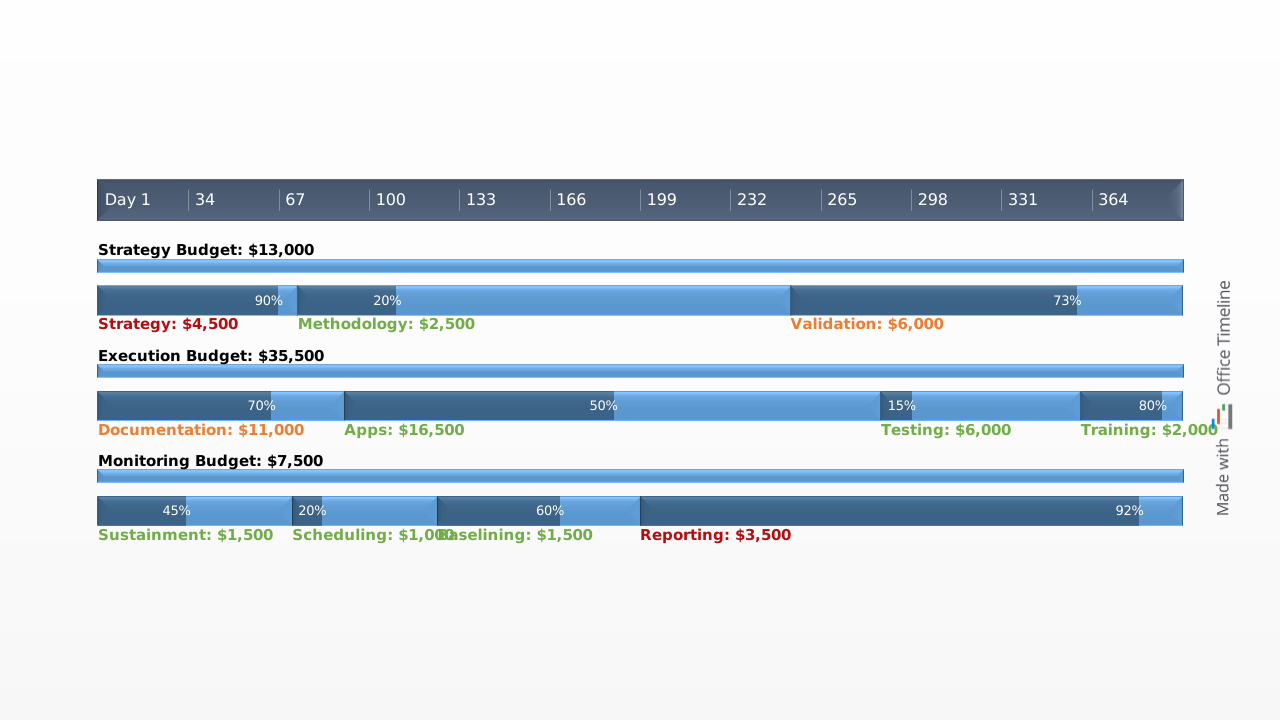
A project budget template is a pre-structured document that helps project managers estimate, organize, and track all the costs associated with delivering a project — from labor and materials to overhead and contingency funds. Instead of building a budget framework from scratch for every new initiative, a template gives you a ready-made structure with the essential categories already in place, so you can focus on filling in the numbers rather than designing the format.
The most useful project budget templates go beyond static spreadsheets by connecting costs to the project timeline. When you can see how spending is distributed across phases — and when each expense is expected to hit — it becomes much easier to manage cash flow, flag potential overruns early, and communicate the financial plan to stakeholders in a way that's clear and compelling.
Our free project budget timeline template is built as a native PowerPoint slide that maps budget phases against a timeband, with milestones marking key financial checkpoints. It gives you a professional, presentation-ready visual that connects your spending plan directly to the project schedule — something a spreadsheet alone can't do.
How to use this project budget template
Download the PowerPoint file and replace the default phase names, cost labels, and dates with your own project data. The template is designed as a high-level visual, so it works best for communicating the budget narrative — which phases cost what and when the money is needed — rather than line-item detail. Because it's a native .pptx slide, you can drop it straight into a budget proposal deck or project kickoff presentation and share it with stakeholders immediately. When budget allocations shift mid-project, you can update the timeline on the spot to reflect the new figures. For faster editing, the Lucen Timeline add-in lets you make changes in a few clicks: enter your updated data, and the add-in automatically repositions phases, adjusts the timeband, and recalculates the layout so your budget timeline always stays current.
Why use a timeline for your project budget?
Stakeholders and executives rarely want to read through a detailed cost tracking spreadsheet — they want to understand the financial story of the project at a glance. A timeline-based budget visual gives them exactly that. It shows how spending is phased over the life of the project, when major financial commitments fall, and how the budget aligns with key deliverables and milestones.
This format also makes the budget a more practical management tool. When you can see costs mapped against the project schedule, it's easier to spot phases where spending is front-loaded or stretched thin, evaluate progress against the original financial plan, and make a convincing case for budget approval by showing not just how much the project costs but how and when the investment delivers results. Lucen Timeline's timeline templates are designed specifically for this kind of high-level project communication — turning complex data into visuals that drive decisions.
Frequently asked questions
A project budget is a financial plan that estimates the total cost of completing a project within a defined scope and timeframe. It accounts for all anticipated expenses — including labor, materials, equipment, overhead, and contingency funds — and serves as a baseline for tracking actual spending throughout the project's lifecycle. A well-constructed project budget gives project managers a clear picture of where money needs to go and when, and provides stakeholders with the financial justification they need to approve and fund the work. When presented on a timeline, the budget also reveals how costs are distributed across project phases, making it easier to manage cash flow and flag potential overruns before they become problems.
A project budget should include every category of expense required to deliver the project successfully. At a minimum, this means direct costs (such as salaries, contractor fees, materials, and equipment), indirect costs (such as rent, utilities, and administrative expenses), overhead costs that are shared across the organization, and a contingency fund to cover unforeseen expenses. For each cost category, the budget should specify estimated amounts, the project phase or task they relate to, and the timeframe in which they're expected to be incurred. Lucen Timeline's free project budget template organizes these elements visually by mapping budget phases along a timeband with milestones, so you can see at a glance how spending aligns with the project schedule — and present that view to stakeholders on a single PowerPoint slide.
Start by defining the project scope and objectives so you know exactly what needs to be delivered. Then break the work down into phases or tasks, and estimate the cost of each one — covering labor, materials, equipment, and any external services. Add indirect and overhead costs, then set aside a contingency fund (typically 5–10% of the total) to account for unexpected expenses. Once you have your numbers, arrange them against the project timeline so you can see how spending is distributed over time and where financial pressure points may fall. Finally, establish a process for monitoring actual costs against your estimates throughout the project so you can catch variances early and adjust before they escalate. Using a visual tool like the Lucen Timeline add-in makes the last step much easier — you can update your budget timeline in a few clicks and instantly see how changes affect the overall financial picture.
Lead with an executive summary that highlights the total budget, major cost categories, and the project timeframe — most stakeholders want the big picture before they see the details. Then provide a visual breakdown that shows how spending is phased across the project schedule, using a format like a timeline or Gantt chart so the audience can immediately see when costs are concentrated and how they align with key milestones and deliverables. Be transparent about your assumptions, risk areas, and contingency provisions, and be prepared to explain the rationale behind major line items. A timeline-based visual is particularly effective for budget presentations because it tells the financial story of the project in a way that's intuitive and easy to follow — no one has to parse rows of spreadsheet data. Lucen Timeline's project budget template is built as a native PowerPoint slide specifically for this purpose, so it integrates directly into your presentation deck and looks polished from the start.
The fastest way is to download a pre-built template — like Lucen Timeline's free project budget template — and customize it with your own data. The template is designed as a native PowerPoint slide, so it works with any version of PowerPoint and drops straight into your existing presentations. Replace the default phase names, cost labels, and milestone dates with your project's specifics, then adjust colors and styles to match your organization's branding. For more efficient editing, the Lucen Timeline add-in lets you enter or import your budget data and automatically generates a polished timeline layout — and when your numbers change, you can update the visual in a few clicks without manually repositioning anything on the slide.

Your download should start now. If it doesn’t start click here and check your inbox for tips to get started.