


Building timeline template
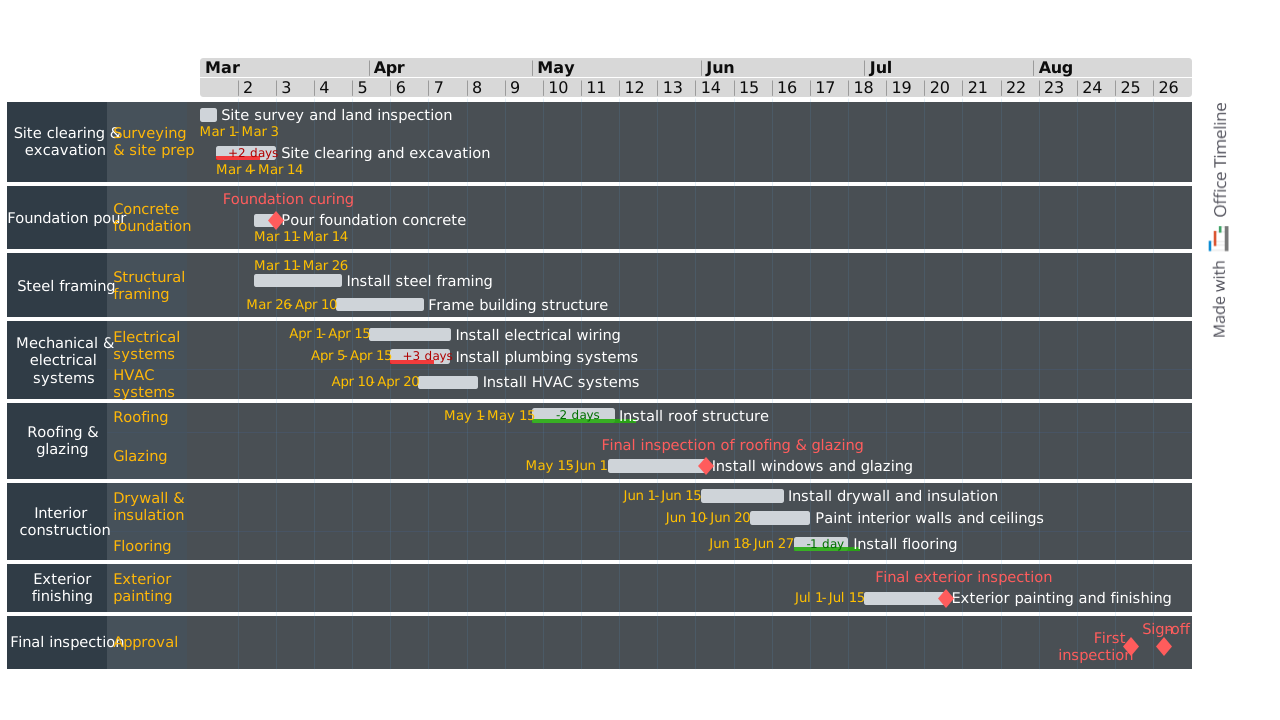
Professional PowerPoint timeline for building construction projects, showing major stages from site preparation through final inspection.
Powered by Lucen Timeline (formerly Office Timeline)

Picture this: it's a Monday morning and you're standing on an empty lot that will soon become a state-of-the-art medical facility. Your client is breathing down your neck, your CFO needs a detailed cash flow projection, your superintendent is asking when to order the structural steel… meanwhile, your subcontractors are already asking when they'll need their crews on site.
You pull out a crumpled spreadsheet with dates that made sense three weeks ago. But that was before the permit delay, before the design change, before you discovered the site has different soil conditions than anticipated. Everyone's looking at you for answers, but your "timeline" is already obsolete.
Sounds familiar?
Every construction professional has been there at some point: juggling competing demands, managing expectations and trying to keep dozens of moving parts synchronized. The difference between projects that finish on time and on budget versus those that spiral into costly delays often comes down to one thing: a decent, actively managed project timeline.
This building timeline template gives you a structured, visual overview of the entire construction process, from early site preparation to final inspection and sign-off. It’s built for real-world use across both commercial and residential projects and works straight in PowerPoint, so it’s easy to update and share.
Whether you’re managing a large commercial build or planning a new residential home, this template gives you a professional and easy-to-understand view of the project without forcing you to master complex scheduling software.
Why construction timelines matter more than ever
Construction has always been complicated, but today's projects face challenges that make effective scheduling more critical than ever. Supply chains are a nightmare, skilled labor is getting scarcer, material costs fluctuate wildly, and regulatory requirements are getting tighter all the time. And through it all, clients expect you to deliver faster and without compromising quality. In this environment, winging it just isn't an option. You need a construction project management timeline that does more than list upcoming tasks and dates in a spreadsheet. You need a visual, dynamic tool that helps you anticipate problems, coordinate resources, communicate with stakeholders, and adapt when things change. That's where a professional building timeline template comes in.
Why you need a building timeline template
Better project visibility
A construction project timeline gives you a bird’s-eye view of your entire building schedule, so you can spot potential bottlenecks, resource constraints, and critical activities before they become problems. With clear visualization of project phases, your team can anticipate challenges and address them while they’re easily manageable, not when they’re already costing you time and money.
Improved stakeholder communication
From architects and engineers to subcontractors and clients, everyone involved in your construction project needs to understand the schedule. A building timeline template creates a single source of truth that keeps expectations aligned around activities, deadlines and major deliverables.
Better resource planning
Construction projects depend on tight coordination of labor, materials, equipment and budget. A well-structured construction project timeline helps you manage resources more efficiently, avoid scheduling conflicts, and optimize workforce deployment across multiple work streams.
Risk mitigation
The construction industry faces numerous risks, from weather delays and material shortages, to permit issues and design changes. A good timeline template allows you to build in contingency plans, identify potential delays early, and develop mitigation strategies before they impact your critical milestones. You can’t prevent every problem, but you can be ready for most of them.
What this free template includes
The PowerPoint template presents a construction project using a clear, visual building timeline that’s easy to read and simple to explain.
At the core of the template is a horizontal timescale that shows both months and weeks, so you can easily discuss high-level planning with executives while still answering tactical questions from project teams.
The timeline is broken down into clearly defined phases, each shown as a distinct swimlane on the graphic. This gives a better view of sequencing and overlaps, so your audiences immediately understand how work progresses from start to finish.
Key milestones (like inspections or major handoffs) are emphasized using colored markers and labels, making them easy to spot and reference during discussions.
Together, these visual elements help you:
- Clarify the overall structure of the construction schedule
- Make complex timelines easier to communicate to non-technical audiences
- Help approvals, reviews and compliance discussions go smoothly
Because the template is built in PowerPoint, all visual elements can be easily customized to match your project and presentation needs. Change labels and colors, adjust dates, add your logo - whatever you need to make it yours.
Designed for construction project management
This construction project management timeline reflects how building projects are actually planned and executed. Instead of overwhelming with excessive detail, it focuses on the key stages and milestones that drive progress and decision-making.
The template helps project teams:
- Communicate schedules clearly to non-technical stakeholders
- Track progress against planned dates
- Identify critical milestones and inspection points
- Support planning discussions and risk management
It can work just as well as a high-level executive overview or a simple planning tool for project teams.
How you can use the template
A building timeline helps you plan ahead, explain, and manage construction schedules more clearly. This template is designed to give everyone on your project a clear understanding of how the work is going to progress over time and to coordinate your activities with multiple stakeholders.
You can use this building timeline template to:
- Outline a construction project timeline during early planning and feasibility discussions
- Present a clear building schedule in project kick-off meetings
- Communicate timelines and key milestones to clients, executives, and external stakeholders
- Support approvals, reviews, and compliance discussions
Because the template is built in PowerPoint, it’s easy to adapt as your schedules change. You can adjust dates, extend or shorten phases, and highlight the critical path directly in the slide, making it great for ongoing updates and presentations.
The template was built with Lucen Timeline, a plugin that lets you generate and customize professional construction timelines directly in PowerPoint. This makes it way easier to keep schedules accurate and presentation-ready as project conditions evolve. Try Lucen Timeline free for 14 days to see how visual timeline tools can streamline your project communication.
Suitable for commercial and residential construction
You can use this building timeline template across a wide range of construction projects, including:
- Commercial offices and mixed-use buildings
- Retail and industrial facilities
- Residential developments and renovations
- Single-family and multi-unit house construction
Basically, you can use it for any project when presenting project timelines to clients, investors, regulatory bodies, or other stakeholders who need to see the big picture without getting lost in the weeds.
Types of construction projects and their timelines
Understanding how timelines differ by project type helps set realistic expectations and build a solid plan to move the project forward.
Residential house construction timeline
A typical single-family house construction timeline takes anywhere from 4 months to a year, depending on size, complexity, and local conditions. Custom homes with complex designs might need 12-18 months, while production homes in development communities can be completed in as little as 3-4 months using streamlined processes and prefabricated components.
Typical residential timeline breakdown:
- Pre-construction and permits: 2-8 weeks
- Site preparation and foundation: 4-6 weeks
- Framing and roof: 4-8 weeks
- MEP rough-in: 2-4 weeks
- Exterior finishing: 3-6 weeks
- Interior finishing: 6-10 weeks
- Final inspections and close-out: 1-2 weeks
Commercial building construction schedule
Commercial construction projects typically take 12-36+ months depending on building size, use type, and complexity. A small retail building might be completed in 8-12 months, while a large office tower or hospital could take 24-36 months or longer.
Typical commercial timeline factors:
- Building size and height
- Complexity of MEP systems (Mechanical, Electrical and Plumbing)
- Specialty equipment requirements
- Tenant improvement coordination
- Local permitting timelines
- Site conditions and constraints
New construction timelines
New construction timelines differ from renovation projects because they start from bare land. Key factors that impact the timeline include zoning and permit approvals, environmental studies, utility connections, site access requirements, seasonal weather impacts, and material lead times.
Frequently asked questions
A building timeline is a visual diagram that shows a construction project's schedule from start to finish, highlighting all the major phases, tasks, and milestones. It helps construction teams plan work, track progress, and communicate schedules clearly. It shows when each activity will start and finish, how specific tasks relate to one another (task dependencies), and when critical milestones will be achieved. Construction timelines help project managers coordinate resources, communicate with stakeholders, and ensure project completion on schedule and within budget.
L1 through L4 schedules represent increasing levels of detail in project planning:
- L1 (Master Schedule) high-level project milestones and major phases viewed monthly or quarterly, used by executives and owners
- L2 (Phase Schedule) – a breakdown of major phases into sub-phases with monthly or bi-weekly detail, used by project managers and general contractors
- L3 (Activity Schedule) weekly detail on specific activities and work packages, used by superintendents and subcontractors for day-to-day management
- L4 (Work Package Schedule) - daily or shift-level detail for complex activities requiring precise coordination
Most building projects stick to L2 or L3 as their primary management tool and create L1 summaries for reporting and L4 detail only for critical activities.
The 13 common construction milestones that mark major achievements in building projects are:
- Site acquisition and permits approved
- Site preparation complete
- Foundation complete
- Framing complete
- Rough-in MEP complete
- Exterior enclosure complete (building weather-tight)
- Insulation and drywall complete
- Interior finishes complete
- MEP trim-out complete
- Final inspections passed
- Punch list complete
- Certificate of occupancy issued
- Project handover and close-out
These milestones help you keep the entire project on track and make it easier to monitor progress over the construction lifecycle. However, the exact number and definition of milestones may vary by project type. Don't treat this as gospel if your project has different needs.
Yes, but only certain types of buildings under specific conditions. Projects feasible in 3 months include small commercial buildings (5,000-10,000 sq ft) with simple designs, pre-engineered metal buildings, modular or prefabricated structures, and tenant improvements in existing buildings.
Fast-track approaches like design-build delivery, extensive prefabrication, and concurrent permitting can compress schedules significantly. However, large commercial buildings, complex custom homes, projects requiring extensive site work, and buildings in jurisdictions with lengthy permit processes usually can’t be completed in 3 months. Accelerated schedules also carry trade-offs including higher costs (usually an extra 5-15%), increased coordination complexity, and potential quality risks if not managed carefully.
The most common causes of building delays include:
- Weather-related delays. Rain, snow, extreme heat, and other conditions that prevent outdoor work or affect material performance.
- Material shortages and supply chain issues. Delayed deliveries of materials and equipment, particularly specialty items with long lead times.
- Labor availability. Skilled trade shortages and difficulty securing qualified subcontractors during peak construction periods.
- Permit and inspection delays. Waiting for plan reviews, permit approvals, and scheduled inspections from building officials.
- Design changes. Modifications to plans and specifications after construction has begun, requiring rework and schedule adjustments.
- Unforeseen site conditions. Discovering unexpected soil conditions, contamination, utilities, or other subsurface surprises requiring additional work.
- Coordination issues. Conflicts between trades and poor sequencing that leads to rework and inefficiency.
- Inadequate planning. Unrealistic schedules and insufficient project planning from the outset. Optimism is great, but it doesn't pour concrete.
Effective construction timeline management is all about anticipating these common delays and building contingencies into the schedule.
CMP (Construction Management Plan) is a comprehensive document that outlines how a building project will be executed, monitored, and controlled. It typically includes project organization structure, construction methodology, schedule management procedures, quality assurance protocols, safety programs, construction site logistics, and communication protocols. Think of it as the operational playbook for getting the project done right.
DMP (Document Management Plan) defines how project documents are created, reviewed, approved, stored, distributed, and retained. Construction projects generate a ton of paperwork - drawings, specifications, submittals, RFIs, change orders, inspection reports, and more. The DMP establishes document types, naming conventions, version control, review workflows, distribution protocols, storage systems, and retention requirements to ensure information is managed consistently and accessible throughout the entire project duration.
Both plans are established during pre-construction and serve as the foundation for effective construction timeline execution.
Here’s the uncomfortable truth: research says that 60-85% of construction projects exceed their original budgets, with an average cost overrun of 28%. Large commercial projects are particularly susceptible, with overruns frequently reaching 50% or more on complex buildings.
Common causes include schedule delays that extend time-related costs, project scope changes after construction begins, unforeseen site conditions requiring additional work, material cost escalation during long projects, and inadequate initial cost estimating. The close relationship between schedule and budget means effective timeline management is key for cost control. Delays directly increase labor costs, general conditions, financing expenses, and material escalation.
Keeping commercial construction projects on budget requires integrated schedule and cost management:
- Create realistic schedules. Develop achievable building timelines using historical data and appropriate contingencies to prevent time-related cost overruns.
- Integrate cost and schedule planning. Develop budgets and timelines together, using your construction schedule to identify cash flow requirements and optimize resource loading.
- Track progress closely. Monitor actual progress weekly to spot delays early when corrections are still possible and (relatively) inexpensive.
- Stay ahead of changes. Evaluate both cost and timeline impacts of every change order, as time delays often exceed direct change costs.
- Maintain contingency. Build both cost contingency (10-20% depending on project complexity) and timeline contingency to absorb inevitable surprises.
- Use the right tools for the job. Get yourself a good timeline software set up and it'll make a world of difference to how easily you can keep everyone on the same page and keep an eye on both the budget and the schedule.

Your download should start now. If it doesn’t start click here and check your inbox for tips to get started.