


Business continuity plan template
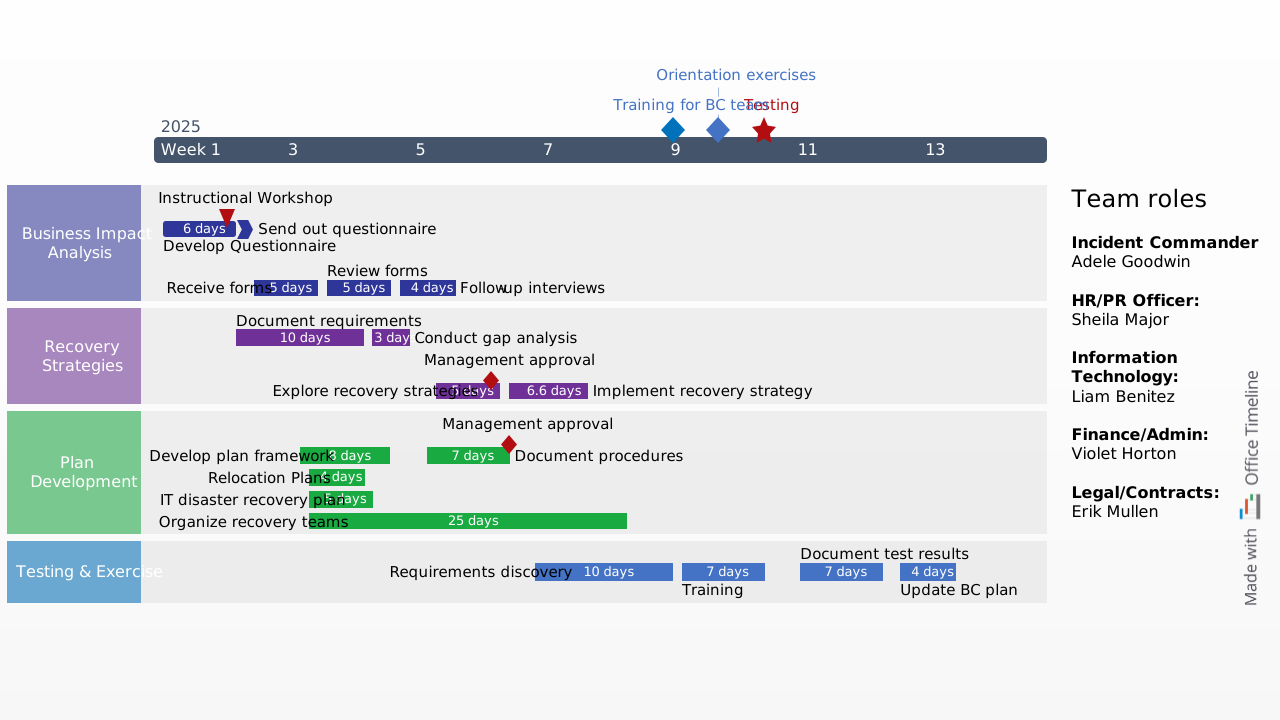
Swimlane Gantt chart template that outlines the major components of business continuity management in order to guide professionals in their risk-mitigating efforts.
Powered by Lucen Timeline (formerly Office Timeline)

To survive on a globalized market, especially in difficult periods of VUCA (volatility, uncertainty, complexity, ambiguity), organizations of all sizes must learn to adapt rapidly. We all know that keeping the business running in times of change and stress has never been more important. One of the best ways to ensure your company is prepared for the unexpected is to create a business continuity plan that helps you act - instead of merely react - when disruption strikes.
That’s why we built the business continuity plan example as a swimlane timeline to help guide you in your risk mitigation efforts. This free template outlines the major components of business continuity management so you can get started quickly and save valuable time. The BCP template has all the major steps already built in for your convenience, from business impact analysis to disaster recovery.
Business continuity planning is a common best practice in the IT field, but the benefits of creating a contingency plan are obvious for any type of project in any industry. Whether you’re working in Operations, Marketing, or Pharma, you can use this template to map out how you respond to change.
The template for this business continuity plan is free to download and easy to edit with the Lucen Timeline PowerPoint add-in, so you spend minutes instead of hours to prepare a clear, crisp visual that gets the point across in one slide. You can use it anytime for a high-level presentation of contingency plans to show your stakeholders the principles of risk management.
Lucen Timeline is a free timeline maker that helps you create and update project visuals using a smart layout engine that does all the work for you. Use the tool’s free 14-day trial to quickly create project timelines or Gantt charts in PowerPoint and to access key features like import, templates, and unlimited rows of data, which help you produce more complex visuals. So, next time your stakeholders ask how you plan to ensure business continuity in times of unprecedented complexity, this template can be your starting point.
Frequently asked questions
A business continuity plan (BCP) is a documented strategy that outlines how an organization will continue operating during and after a disruption. It identifies critical business functions, assesses potential risks, and defines the procedures and resources needed to maintain operations or restore them as quickly as possible. Unlike a simple disaster recovery plan, a BCP covers the full scope of business operations, from IT systems and supply chains to communication protocols and personnel roles.
Project managers are often the first to feel the impact when disruptions hit, whether it's a sudden resource shortage, a vendor delay, or an organizational shift in priorities. Having a business continuity plan gives PMs a structured framework to anticipate risks, protect project timelines, and keep deliverables on track even when circumstances change. It also strengthens stakeholder confidence, because showing that you've planned for contingencies signals maturity and reliability in how you manage projects.
A solid BCP typically includes a business impact analysis (BIA), a risk assessment, a recovery strategy, and a communication plan. The business impact analysis identifies which functions are most critical and what happens if they're disrupted. The risk assessment evaluates potential threats and their likelihood. From there, the recovery strategy lays out specific steps to restore operations, while the communication plan ensures the right people are informed at the right time. Testing and regular updates round out the process, keeping the plan relevant as conditions evolve.
While the two are closely related, they serve different purposes. A disaster recovery plan (DRP) focuses specifically on restoring IT infrastructure and data after a disruption, such as a cyberattack or server failure. A business continuity plan, on the other hand, takes a broader view. It covers the entire organization's ability to maintain essential functions, including operations, staffing, communications, and supply chains, not just the technology side. In practice, a DRP is often one component within a larger BCP.
Business continuity planning works best as a cross-functional effort. Key stakeholders typically include senior leadership, IT, operations, HR, and communications teams, but project managers and department heads also play a critical role since they understand the day-to-day processes that need protection. In smaller organizations, a single team or even one person may lead the effort, but input from across the business is still essential to ensure nothing critical gets overlooked.
Stakeholders rarely have time to read through lengthy documents, so a visual summary is often the most effective approach. A swimlane timeline, like the one in this template, lets you map out each phase of your BCP on a single slide, making it easy to see who's responsible for what and when. This kind of high-level overview works well in executive briefings, board meetings, or cross-departmental reviews where the goal is alignment rather than granular detail.
At minimum, you should review and update your BCP once a year. However, any significant change in your organization, such as a new product launch, a major restructuring, a shift in suppliers, or the adoption of new technology, should also trigger a review. Regular testing through tabletop exercises or simulations helps identify gaps before a real disruption exposes them, and it keeps your team familiar with the procedures they'd need to follow.

Your download should start now. If it doesn’t start click here and check your inbox for tips to get started.