


Clinical trial Gantt chart template
Customizable PowerPoint Gantt chart designed to support clinical trial planning and tracking, with a high-level view of phases I-III and key milestones.
Powered by Lucen Timeline (formerly Office Timeline)

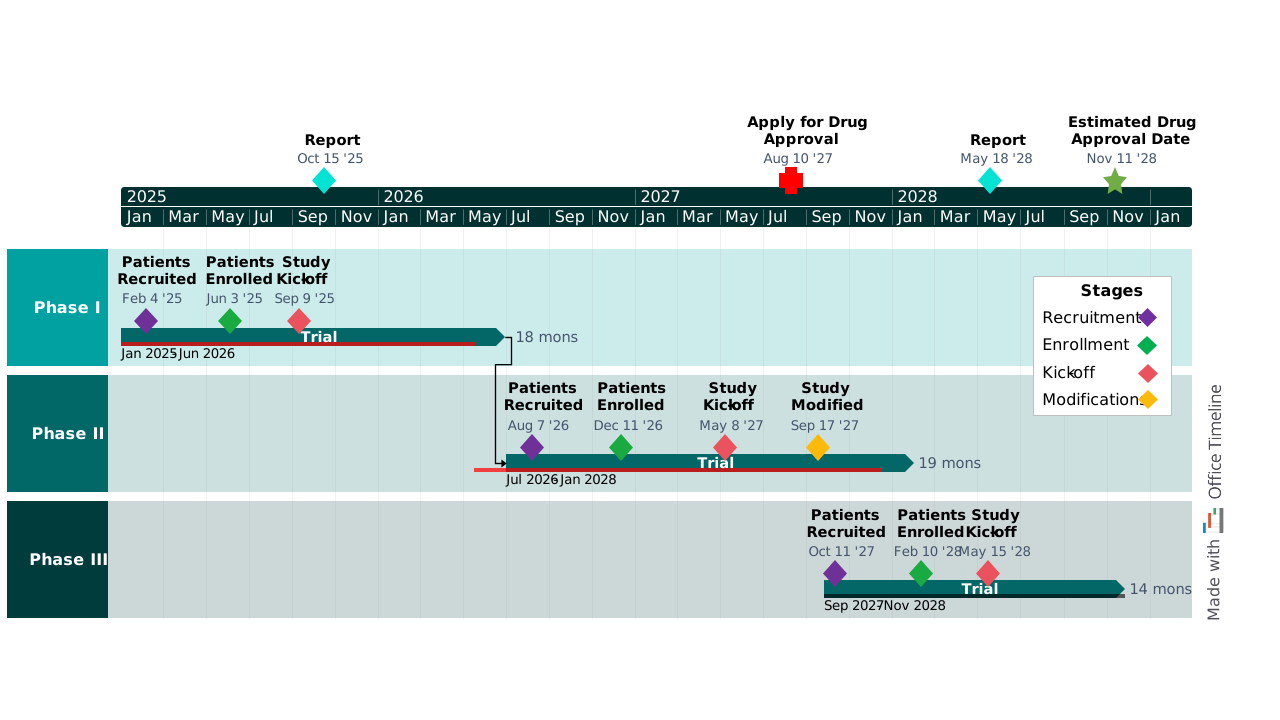
When you’re running a clinical trial, there are so many moving pieces to manage at once. Clinical operations, regulatory affairs, data management, biostatistics, quality assurance, and external partners all move at different speeds. A small delay (often in recruitment or regulatory review) can quietly ripple through the entire development program before anyone realizes what’s happening.
This clinical trial Gantt chart template is meant to prevent that. It gives you a clear, high-level way to plan and track Phase I, II, and III studies in one place. Built in PowerPoint, it maps critical milestones that typically define pharmaceutical development: patient recruitment, enrollment completion, protocol amendments (if needed), and regulatory submissions. Whether you're presenting to sponsors or coordinating with CROs, this free template ensures everyone knows where you are in the process and what’s coming next.
What is a clinical trial Gantt chart?
A clinical trial Gantt chart is a time-based visual representation of a clinical study plan. It plots phases and milestones along a horizontal timeline so you can quickly see sequence, dependencies, and progress across the trial lifecycle. The chart can also visually display the percentage of completion for each phase or activity, helping teams monitor the project's progress at a glance. Depending on your needs, Gantt charts can even show which teams are responsible for each initiative, making accountability clear.
What makes a Gantt chart useful in clinical research is not precision down to the task level, but overall context. With a high-level visual, you can immediately see where Phase II planning overlaps with Phase I execution or how a shift in enrollment affects downstream work. For sponsors, executives and investors, a bird’s eye view matters more than operational detail. A well-structured clinical trial Gantt chart answers the question “How is this program really progressing?” without requiring a deep dive into schedules.
What’s included in this PowerPoint template
The free pharmaceutical template is structured around how clinical trials actually run, with features that reflect the realities of drug development:
- Dedicated swimlanes for Phase I, Phase II, and Phase III for easy clinical trial tracking;
- Color-coded milestones to make cross-phase comparison simple and quick;
- Legend that shows the color coding, so the chart is immediately interpretable without additional explanation;
- Multi-tier timescale that includes both years and months, useful for long-running programs;
- Duration labels for each trial bar, so teams and stakeholders can see time commitments at a glance;
- Planned vs. actual markings to visually compare progress against plan.
Why clinical trial teams use Gantt charts
Clinical trials require coordination across operations, regulatory affairs, data management, quality assurance, etc. Gantt charts such as this free template offer several advantages in pharmaceutical project management, helping you:
1. Visualize overlapping trial phases
In reality, drug development doesn't always follow a linear schedule. Phase II planning may start while Phase I is still enrolling patients. Phase III site selection may begin based on emerging Phase II data. With a clinical trial Gantt chart, your team can identify risks and resource conflicts early and adjust plans and objectives accordingly.
2. Track critical recruitment milestones
Patient recruitment variability may very well be the biggest source of uncertainty in clinical research. A clinical trial Gantt chart puts recruitment milestones front and center, showing when recruitment opens, when target enrollment is achieved, and when the study officially initiates. When Phase II recruitment lags projections, you can easily identify the downstream impact on Phase III planning and adjust stakeholder expectations before minor delays turn into big problems.
3. Communicate regulatory pathways clearly
Sponsors need to understand filing timelines. Investors want visibility into value inflection points. Regulatory affairs needs to plan submission strategies. A Gantt chart that addresses top-level regulatory milestones creates a clear through-line from early reports to final drug approval application.
How to customize the clinical trial Gantt chart template
The free template is provided as a fully editable PowerPoint Gantt chart, so you can customize it using PowerPoint’s controls to make it your own. You can adjust phase durations, shift milestone dates or edit labels directly in PowerPoint to reflect your specific program.
You can also customize the structure itself. For early-stage programs, you may want to remove Phase III and extend Phase I or II follow-up periods. Post-approval commitments can be added as a Phase IV swimlane. If your program includes multiple cohorts within a phase, you may want to add sub-swimlanes to track each cohort independently.
If you and your team need to update pharmaceutical timelines frequently, Lucen Timeline simplifies this process, saving you hours of work before each presentation. Lucen Timeline is a Gantt chart maker for PowerPoint that helps you create and manage one-page project plans effortlessly. Download the free trial here and see how easy it is to customize this template with it.
When to use this clinical trial project management template
The template works particularly well in situations that require coordination across multiple workstreams and stakeholders.
For instance, it’s good for portfolio planning presentations, where sponsors need to understand how multiple programs overlap and compete for resources. It supports investigator meetings by showing how site-level activity fits into the broader program.
Finally, the Gantt chart template is also useful for risk assessment reviews. When enrollment slips, you can see immediately what that means for downstream phases and outline mitigation strategies.
Frequently asked questions
A Gantt chart typically includes tasks or phases, start dates, end dates, durations, dependencies, milestones, and a timescale. In clinical trials, phases and milestones are emphasized because they represent regulatory and operational decision points. Dependencies show how delays in one phase affect downstream activities. Together, these elements create an easy-to-understand view of your project plan.
In healthcare, a Gantt chart is used to plan and track initiatives that unfold over time, such as clinical trials or system implementations. It provides a shared visual reference that helps align teams with different responsibilities. In clinical research, it supports coordination between clinical operations, regulatory affairs, and data management. The focus is often on clarity and alignment rather than task-level execution.
To make a Gantt chart for a research proposal, start with your proposal's timeline requirements and work backwards from there. Break your research into major phases. Within each phase, list specific activities with realistic durations and include milestones that reviewers care about – like, for example, ethics approval, enrollment targets, interim analyses, or publications.
You can use this clinical trial Gantt chart template as a starting point and customize it to fit your proposal. But be realistic about timelines as reviewers can spot overly optimistic schedules, and don’t forget to include enough buffer time for common delays.
ChatGPT is a Large Language Model, so it’s not optimized for creating and updating fully functional Gantt charts like a dedicated tool would. It can help by suggesting sequencing, explaining how to structure your project plan, identifying dependencies between critical tasks, or creating code that can be imported into software. But to create the actual chart, you’ll want to use dedicated tools like Lucen Timeline.
A master chart in research typically refers to a comprehensive tracking document that consolidates key info about a study, like participant data, visit schedules, assessments completed, adverse events, and protocol deviations. In clinical trials, this might be a master screening log or master enrollment log.

Your download should start now. If it doesn’t start click here and check your inbox for tips to get started.