


Construction schedule template
Generic schedule example with timescale set in weeks and task duration in days to give a high level overview of any construction project.
Powered by Lucen Timeline (formerly Office Timeline)

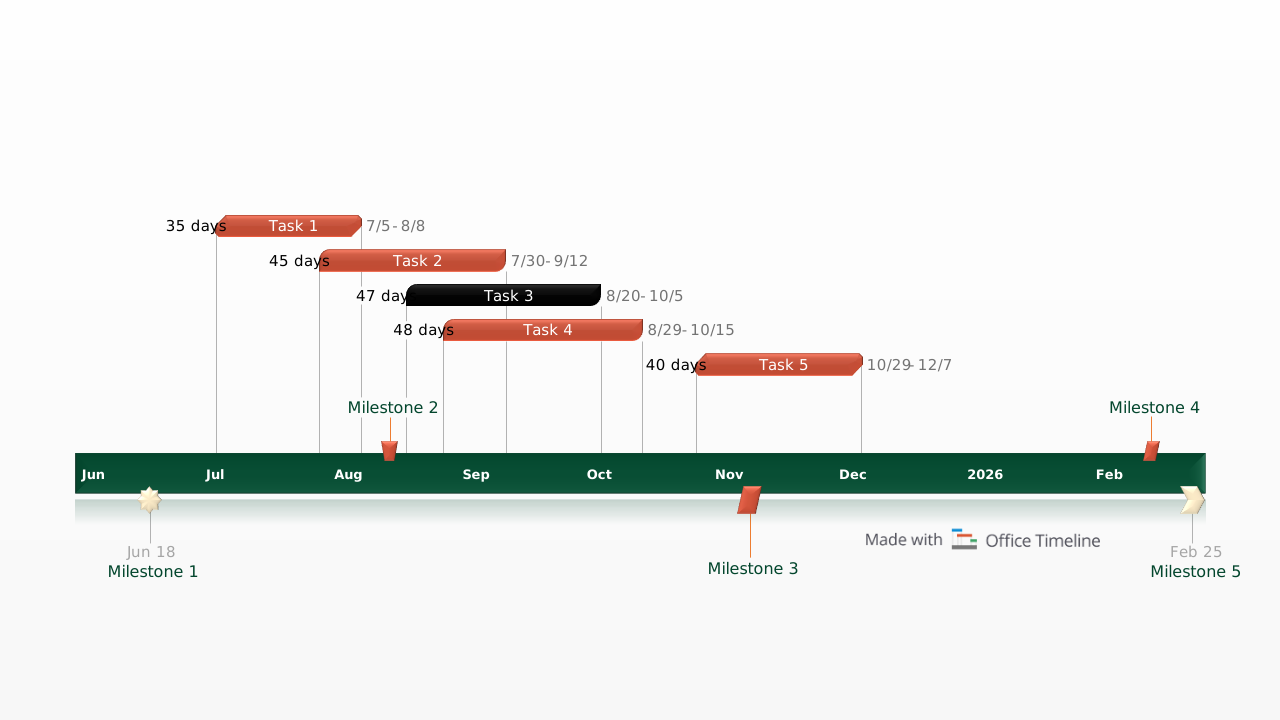
The free construction schedule was designed to graphically present proposals and plans to clients and management. It was created to help any team kick start a project, present a progress report or analyze a project’s as-plan versus its as-built schedule.
A well defined schedule is one of the most important pieces of any construction project. It will be used to measure a project’s success or failure because it clearly outlines the work that needs to be performed alongside the time allotted for completion.
This construction schedule template helps illustrate the prioritization of tasks by visually laying-out the order in which those tasks need to be finished. Once the construction schedule has been established, managers can then evaluate performance by tracking the project’s actual progress against the original construction schedule template.
The construction schedule template was created for high-level presentations. Construction managers and contractors are good at creating complex project schedules with sophisticated project tools however something different is needed when presenting schedules to clients and executives. For this type of communication, a high-level construction schedule is needed. It should visually track the phases and important milestones for any construction project and it must be easily understood when communicating beyond the team.
This template is designed to be easy to present and quickly understandable. It is a native PowerPoint slide so other team members can contribute to the schedule and any stakeholder will be able to read it. The construction schedule template can be edited manually in PowerPoint or it can be automatically updated with the Office Timeline PowerPoint add-in.
Lucen Timeline is a PowerPoint project scheduler that creates construction schedules for executive presentations. It quickly generates and updates schedules based on changes throughout the project. The add-in's most advanced edition, which you can try for free for 14 days, integrates with other project scheduling applications like Microsoft Project, allowing you to import existing data and instantly transform it into a construction schedule slide.
Frequently asked questions
A construction schedule is a structured timeline that outlines all the tasks, phases, and milestones required to complete a construction project from start to finish. Beyond simply listing what needs to happen, it establishes the sequence and duration of each activity, making it the primary tool for measuring whether a project is on track. Without a clearly defined schedule, there is no reliable baseline against which to evaluate progress, manage resources, or communicate expectations to clients and stakeholders.
An as-planned schedule reflects the original timeline agreed upon before work begins, outlining when each phase and task was expected to start and finish. An as-built schedule, by contrast, is a record of what actually happened during the project, capturing real start and finish dates as work progressed. Comparing the two is one of the most effective ways to assess project performance, identify where delays occurred, and build more accurate estimates for future projects.
At a minimum, a construction schedule should include the main project phases, individual tasks within each phase, start and finish dates, and key milestones that mark significant points of progress. For client-facing or executive presentations, the schedule should be visual and high-level, focusing on phases and milestones rather than granular task breakdowns. When the audience is the project team, more detail around task dependencies, resource assignments, and critical path activities becomes relevant.
A detailed construction schedule is built for internal use by project managers and contractors. It captures every task, dependency, and resource involved in the project, often running to hundreds of rows in a specialist scheduling tool. A high-level schedule serves a different purpose: it distills the most important phases and milestones into a format that clients and executives can read and understand quickly, without needing any background in project management. The two are complementary rather than competing, with the high-level version typically derived from the more detailed one.
Yes, and this is precisely why PowerPoint-based templates like the one created with Office Timeline are widely used for construction schedules in client-facing contexts. Because PowerPoint is familiar to almost everyone in a professional setting, a schedule built as a native slide can be opened, edited, and presented by any team member without requiring access to specialist scheduling tools. This makes it far easier to share updates, gather input, and keep all stakeholders working from the same document.
Construction projects rarely unfold exactly as planned, so the ability to update a schedule quickly is just as important as building it correctly in the first place. For manual updates, placeholders on a PowerPoint template can be adjusted directly on the slide. For teams using the Office Timeline add-in, updates can be made automatically, with changes to dates and phases reflected instantly on the slide. If data is being managed in a tool like Microsoft Project, the add-in can also import that data directly, eliminating the need to reformat anything by hand.
The most effective construction schedules for client presentations are visual, concise, and free of unnecessary technical detail. Clients and executives are primarily interested in the big picture: what the key phases are, when major milestones will be reached, and whether the project is running on time. A schedule that communicates this clearly, without requiring the audience to interpret complex tables or dense Gantt data, is far more likely to inspire confidence and prompt productive conversation than one that prioritizes completeness over clarity.

Your download should start now. If it doesn’t start click here and check your inbox for tips to get started.