


IT migration swimlane chart template
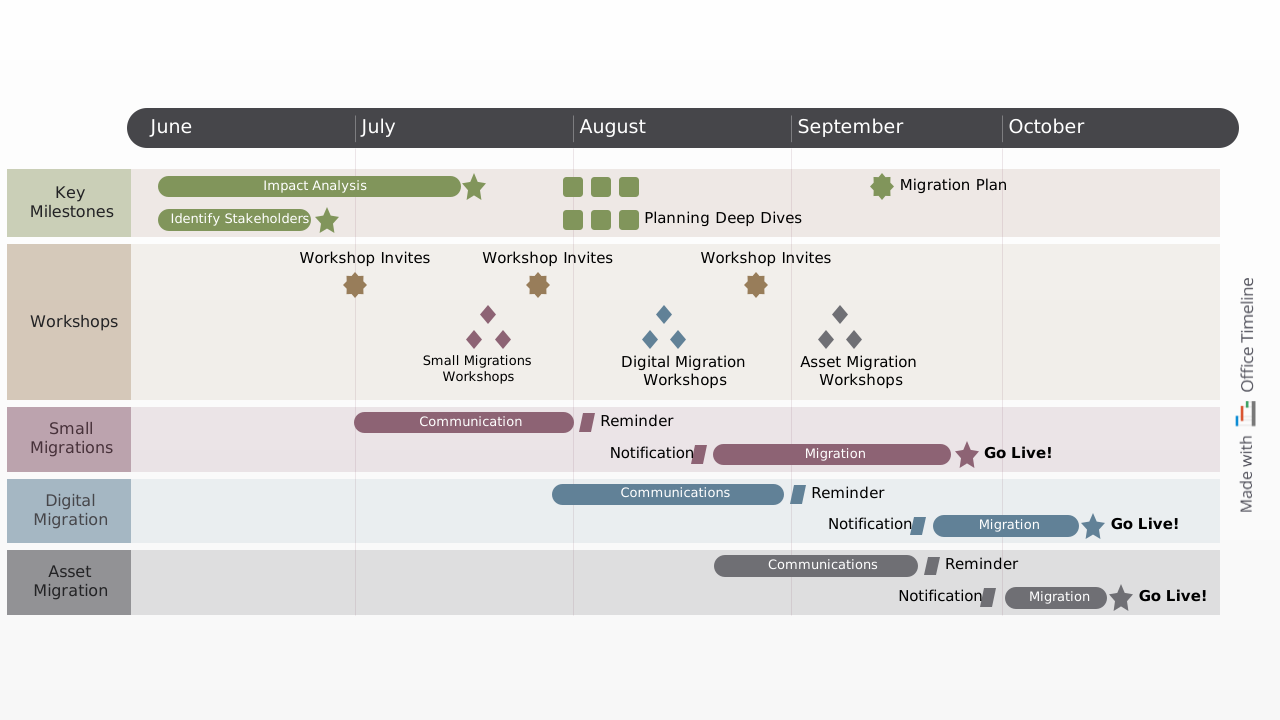
Clear swimlane chart template that lets you easily map out an organization's migration process from one system to another on stages, and organize milestones and tasks according to scheduled intervals.
Powered by Lucen Timeline (formerly Office Timeline)

Tim Berners-Lee, who is virtually the father of the present-day Internet, once quipped that “Data is a precious thing and will last longer than the systems themselves.”. It then comes as no surprise that once the physical servers become deprecated, the infrastructure must be replaced or refitted. The direct result is that all the data stored has to be migrated to newer platforms, a process that’s nowhere near as straightforward as it sounds.
Depending on the size of your operations, you’d need to consider the optimal approach in moving the stored files and databases. If we’re talking about the transition from one application environment to another or when a major overhaul of business processes is involved, things can easily go sideways. Therefore, it’s critical to have a clearly defined roadmap that accounts for all the contingencies.
With this in mind, we have created a free, customizable IT Migration PowerPoint swimlane template for you to download and adapt to your company’s specific needs. A swimlane diagram helps you break down the migration process into stages, making the project more manageable by organizing tasks and milestones according to their scheduled intervals. This approach reduces complexity, minimizes downtime, and lowers the risk of data loss during the transition. Additionally, it provides ample time to address unforeseen issues, such as platform incompatibilities.
You can easily customize the template either manually – by replacing the placeholder data, or automatically, using the Gantt chart maker from Lucen Timeline that you can try for free for 14 days. Alternatively, you can explore more Gantt chart templates made with the Lucen Timeline add-in to find the best starting point for your data migration planning.
Frequently asked questions
The most significant risks typically include data loss, extended downtime, platform incompatibilities, underestimated dependencies, and unclear ownership. Many migration failures stem not from technical limitations but from poor planning and lack of cross-functional coordination. A structured migration plan that clearly maps systems, milestones, and fallback procedures is essential to mitigating these risks before execution begins.
Downtime can be reduced through phased migration approaches, parallel system runs, and carefully scheduled cutover windows. Testing environments should mirror production conditions as closely as possible to validate performance and compatibility in advance. Clear communication plans are equally critical so that internal users and external stakeholders understand what to expect and when.
A phased migration is typically preferable for complex environments with multiple dependencies, critical business systems, or large volumes of data. It reduces operational risk by isolating issues to smaller segments. A big bang migration may be suitable for smaller systems with limited integration points, but it carries higher short-term risk. The decision should be based on system complexity, business tolerance for disruption, and rollback feasibility.
Data integrity depends on comprehensive validation processes before, during, and after the transfer. This includes data mapping verification, checksum comparisons, reconciliation reports, and user acceptance testing. Backup strategies must be clearly defined and tested. Maintaining detailed documentation of data flows and transformation rules significantly reduces the likelihood of corruption or loss.
IT migration affects far more than infrastructure teams. Business units, compliance teams, customer-facing departments, and leadership must understand scope, timing, and potential impact. Clear visual planning tools help communicate timelines and responsibilities, ensuring that expectations are aligned and escalation paths are defined well in advance of critical milestones.
Legacy systems often contain undocumented integrations, custom scripts, or outdated interfaces that complicate migration. Conducting a thorough dependency audit before planning timelines is critical. Identifying which systems can be retired, which require bridging solutions, and which need modernization reduces surprises during execution and prevents last-minute architectural compromises.
Success should not be defined solely by completing the transfer. Key metrics typically include system performance post-migration, data accuracy validation, downtime duration, user adoption rates, and operational stability within a defined stabilization period. Establishing measurable criteria before execution ensures that the migration delivers long-term value rather than simply meeting a deadline.

Your download should start now. If it doesn’t start click here and check your inbox for tips to get started.