


Top 10 Project Timeline Apps with Free Trials and Easy Integrations (2026)
Find the project timeline app that fits how your team plans, updates, and shares schedules.

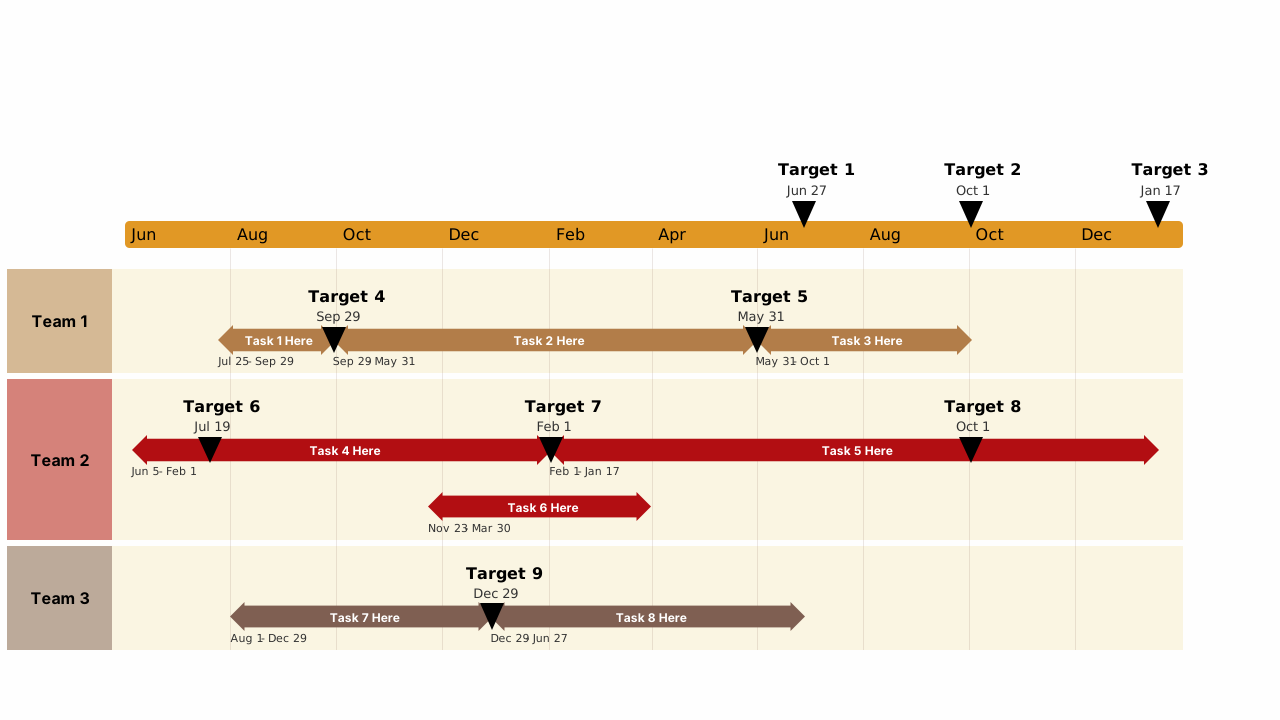
The best project timeline app depends on where your plan lives and where the timeline gets presented. If your team plans in Microsoft 365 and presents in PowerPoint, Lucen Timeline (formerly Office Timeline) is the most direct fit, with a Free plan and a 30-day money-back guarantee on paid plans. Other tools suit teams whose plans live mainly in a project management platform.
This guide compares 10 apps on three things: how easily you can build a timeline or Gantt chart, what happens when dates change, and how well each one connects to the tools your team already uses. Free plans, free trials and plan details are as of Oct 2026, so check each vendor's pricing page before you commit.
How did we choose these timeline apps?
We looked at timeline and Gantt views, whether there is a free trial or free plan, integrations with common planning tools, and how easily a chart updates when dates change. The 10 apps are Lucen Timeline, Microsoft Planner, Smartsheet, Asana, Wrike, TeamGantt, monday.com, Intervals, Bitrix24, and ClickUp.
Top 10 project timeline apps
1. Lucen Timeline
Lucen Timeline (formerly Office Timeline) is a PowerPoint add-in that turns task and milestone data into timelines and Gantt charts built from native, editable PowerPoint shapes. The Free plan covers basic timelines, limited to 10 milestones and/or tasks per slide. The Plus plan adds unlimited swimlanes, dependencies and Excel import, and the Expert plan adds planned versus actual tracking and imports from Microsoft Project, Smartsheet, Jira and Wrike. When the source plan changes, you refresh the chart, review the changed, deleted and new items, and approve what moves, instead of rebuilding the slide. Refresh is manual and one way. Timeline Online builds timelines in the browser on any device, including Mac, and you can download them as PowerPoint slides. Paid plans cost $9 (Lite), $17 (Plus) and $21 (Expert) per user per month, billed annually as of Oct 2026, and come with a 30-day money-back guarantee after purchase.
2. Microsoft Planner
Microsoft Planner includes a Timeline view that shows tasks in a Gantt chart format. Timeline is available in the premium plans, Planner Plan 1 or Planner and Project Plan 3, and is not in the version included with Microsoft 365. Plan 1 supports basic finish-to-start dependencies, and Plan 3 adds advanced dependencies with lead and lag. Planner is also available as an app in Microsoft Teams, and Microsoft offers a one-month free trial of the premium plans.
3. Smartsheet
Smartsheet is a work execution platform built on a spreadsheet-style grid, with a Gantt view generated from the same data. Teams can switch between grid, Gantt, calendar, board and timeline views, and Smartsheet items can be added as tabs in Microsoft Teams channels. With dependencies turned on, changing a task's dates automatically adjusts the tasks that depend on it. New signups get a 30-day trial of the full feature set. Smartsheet's free plan has not been open to new signups since Aug 2024.
4. Asana
Asana is a work management platform with a Timeline view that lays out tasks against dates in a Gantt-style chart. Timeline is included on paid plans from Starter up and is not part of the free Personal plan. Asana connects to Microsoft Teams, Outlook, OneDrive, SharePoint and Power Automate, so schedules can sit alongside the Microsoft tools many teams already use. You can set dependencies between tasks and drag tasks to new dates as plans change. Check Asana's pricing page for current trial terms.
5. Wrike
Wrike builds a Gantt chart from the tasks in a project, with a task table beside the timeline. Wrike for Microsoft Teams lets you open a project as a Teams tab and view its schedule. Lines on the chart show dependencies, and you can drag a task to shift its whole dependency chain. Wrike offers a free trial of its paid plans. Check Wrike's pricing page for the trial length and for which plan includes Gantt.
6. TeamGantt
TeamGantt is a Gantt chart tool built around project scheduling, with task dependencies, milestones, and progress tracking. When you drag a task to a new date, its dependent tasks move with it. TeamGantt has a free plan and a free trial of its paid plans, so check its pricing page for current limits and trial length. It integrates with Basecamp and Trello, among other tools.
7. monday.com
monday.com is a work management platform with Gantt and Timeline views, included from the Standard plan. A free plan is available with limits of up to 3 boards and 3 docs, and a free trial requires no credit card. Dependencies come with the Pro plan and up, and dependent items can shift automatically when you drag an item to new dates. monday.com also connects to Microsoft Teams, Outlook and OneDrive.
8. Intervals
Intervals offers an interactive Gantt chart where you drag tasks and milestones to reschedule them, in the same tool your team uses to track time. A 14-day free trial is available on any plan, with no credit card required.
9. Bitrix24
Bitrix24 includes a Gantt chart in its project tools. The chart shows project tasks on a timeline and supports finish-to-start, start-to-start, and finish-to-finish dependencies. Bitrix24 also offers a free plan.
10. ClickUp
ClickUp is a work management platform with a Gantt chart view where you can set dependencies and drag tasks to new dates. The Free Forever plan includes the Gantt view for 60 uses, and paid plans have unlimited Gantt uses. ClickUp connects to Microsoft Teams, Outlook, SharePoint, and OneDrive.
How do these timeline apps compare?
The first table compares the 10 apps on the timeline itself: the chart, dependencies, and what happens when dates change. Details are as of Oct 2026.
| App | Timeline or Gantt view | Dependencies | When dates change |
|---|---|---|---|
| Lucen Timeline | Timelines and Gantt charts on PowerPoint slides | Plus plan and up | Refresh the slide from the source plan |
| Microsoft Planner | Timeline view, premium plans | Premium plans | Timeline shows updated dates |
| Smartsheet | Gantt and timeline views | Yes, with predecessors | Dependent dates update automatically |
| Asana | Timeline and Gantt, Starter plan and up | Yes | Drag tasks to new dates |
| Wrike | Gantt chart | Yes | Drag to shift a dependency chain |
| TeamGantt | Gantt chart | Yes | Dependent tasks move with a dragged task |
| monday.com | Gantt and Timeline, Standard plan and up | Pro plan and up | Dependent items can shift automatically |
| Intervals | Interactive Gantt chart | Not listed | Drag to reschedule |
| Bitrix24 | Gantt chart | Three dependency types | Not listed |
| ClickUp | Gantt view (Free Forever: 60 uses) | Yes | Drag tasks to new dates |
The second table covers free access and Microsoft integration for the same apps.
| App | Free plan or trial | Microsoft integration |
|---|---|---|
| Lucen Timeline | Free plan; 30-day money-back guarantee on paid plans | PowerPoint add-in; Excel import (Plus); Microsoft Project import (Expert) |
| Microsoft Planner | One-month free trial of premium plans | Part of Microsoft 365; app in Teams |
| Smartsheet | 30-day trial; free plan closed to new signups | Smartsheet items as Teams tabs |
| Asana | Free Personal plan without Timeline | Teams, Outlook, OneDrive, SharePoint, Power Automate |
| Wrike | Free trial of paid plans | Teams tab |
| TeamGantt | Free plan; free trial of paid plans | Not listed |
| monday.com | Free plan (3 boards, 3 docs); free trial | Teams, Outlook, OneDrive |
| Intervals | 14-day free trial, no credit card | Not listed |
| Bitrix24 | Free plan | Not listed |
| ClickUp | Free Forever plan | Teams, Outlook, SharePoint, OneDrive |
How do timeline apps fit a Microsoft 365 workflow?
If your team plans in Microsoft 365, keep the timeline where you already work. Build the plan in Excel or Microsoft Project, import it into a timeline tool, and place the chart on a PowerPoint slide for the weekly steering update. When dates move, update the source plan and refresh the chart, so the slide stays accurate without a rebuild. For example, a PM who tracks a vendor rollout in Excel can import the rows into Lucen Timeline, present the slide on Thursday, then refresh after a delivery slips and review the changes before they reach the slide.
Microsoft retired Project Online on 30 Sep 2026, so teams moving to Planner or Project desktop can export the schedule to Excel and build the leadership timeline in PowerPoint with Lucen Timeline. Here is how the apps above connect to Microsoft tools:
- Lucen Timeline: builds the chart in PowerPoint, imports from Excel on the Plus plan, and imports from Microsoft Project on the Expert plan.
- Microsoft Planner: is available as an app in Microsoft Teams.
- Asana: connects to Teams, Outlook, OneDrive, SharePoint, and Power Automate.
- Wrike: opens a project as a Teams tab.
- Smartsheet: adds Smartsheet items as tabs in Teams channels.
- monday.com: connects to Teams, Outlook and OneDrive.
- ClickUp: connects to Teams, Outlook, SharePoint, and OneDrive.
Which project timeline app should you choose?
If your team plans in Microsoft 365 and presents timelines in PowerPoint, start with Lucen Timeline. Its online version lets you build Gantt charts and timelines in your browser and download them as PowerPoint slides to present in meetings.
Choosing a project timeline app comes down to how often your plan changes, where your data lives, and how easily you can share the result.
Frequently asked questions
Yes. Office Timeline is now Lucen Timeline, a PowerPoint add-in from Lucen Software that builds timelines, Gantt charts and roadmaps as native PowerPoint shapes.
Lucen Timeline has a free plan for basic timelines, limited to 10 milestones and/or tasks per slide. Other tools offer free plans with different limits. Check each vendor's current plan before choosing.
Lucen Timeline works inside PowerPoint, with Excel import on the Plus plan and Microsoft Project import on the Expert plan. Other tools connect to Microsoft Teams or Outlook. Check each tool's integrations page for current details.
If the timeline was drawn by hand, you rebuild it. If it was imported with Lucen Timeline, you refresh in one click and review the changed, deleted and new items before they update on the slide.
Yes. Lucen Timeline builds native PowerPoint shapes, so anyone with PowerPoint can open, present and edit the slide. Data-aware edits, such as refreshing from the source plan, need the add-in.
Project management visualization: tips and tricks

Subscribe to our blog
Get all the tips, tricks and inspiration you need to create professional looking timelines, straight to your inbox.