Lucen Flowchart Add-in updates & release history
What's new?
Complex processes, made clear in PowerPoint.
Describe your process and Lucen AI drafts it on your slide as native, editable PowerPoint shapes. Update it as the process changes, and everyone works from one current view. No exporting, no rebuilding.
Go from idea to diagram in seconds
- Lucen AI draws your flowchart with decision paths and native shapes.
- Refine in the same chat, or start over.
- Plus: upload an image or screenshot and get an editable flowchart.
Keep it current as the process changes
- Auto Layout realigns shapes and reroutes connectors, so updates never mean rebuilding.
- Drag from any shape to add a connected one. Change a shape's type without losing its text or connections.
- Connectors follow your shapes, and copy and paste keep them intact.
- One Ctrl+Z undoes a whole move or resize.
Make every handoff visible
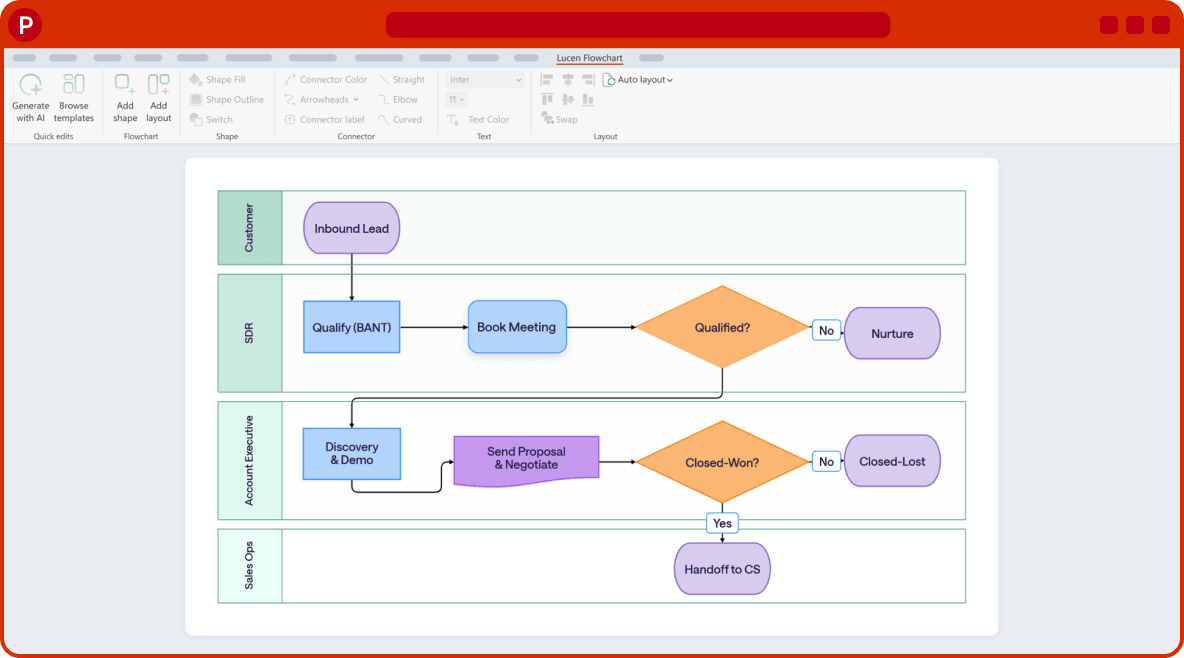
- Swimlanes (Plus) show who owns each step, with the header on any side. Auto Layout keeps your lanes intact.
- Straight, elbow or curved connectors, with labels.
Standardize across teams
- Ready-made templates, including Employee Onboarding, Sales Lead-to-Close, IT Incident Triage, Invoice Approval, Customer Journey and CI/CD Pipeline.
- Shapes use your theme colors and fonts, so every flowchart looks consistent and on brand.
Present and share
- Export as PNG or PDF, or copy to the clipboard.
Plans
- Free: Lucen AI included, up to 10 shapes per slide and 3 diagrams.
- Plus ($9/mo): unlimited shapes, swimlanes and image-to-flowchart.
Requirements
- Windows with PowerPoint 2016 or later.

What's next?
- More ready-to-use templates, so you can build finished flowcharts faster.
- Visio integration, so you can bring your existing Visio diagrams into PowerPoint and keep editing them on the slide.
Release history
Complex processes, made clear in PowerPoint.
Describe your process and Lucen AI drafts it on your slide as native, editable PowerPoint shapes. Update it as the process changes, and everyone works from one current view. No exporting, no rebuilding.
Go from idea to diagram in seconds
- Lucen AI draws your flowchart with decision paths and native shapes.
- Refine in the same chat, or start over.
- Plus: upload an image or screenshot and get an editable flowchart.
Keep it current as the process changes
- Auto Layout realigns shapes and reroutes connectors, so updates never mean rebuilding.
- Drag from any shape to add a connected one. Change a shape's type without losing its text or connections.
- Connectors follow your shapes, and copy and paste keep them intact.
- One Ctrl+Z undoes a whole move or resize.
Make every handoff visible
- Swimlanes (Plus) show who owns each step, with the header on any side. Auto Layout keeps your lanes intact.
- Straight, elbow or curved connectors, with labels.
Standardize across teams
- Ready-made templates, including Employee Onboarding, Sales Lead-to-Close, IT Incident Triage, Invoice Approval, Customer Journey and CI/CD Pipeline.
- Shapes use your theme colors and fonts, so every flowchart looks consistent and on brand.
Present and share
- Export as PNG or PDF, or copy to the clipboard.
Plans
- Free: Lucen AI included, up to 10 shapes per slide and 3 diagrams.
- Plus ($9/mo): unlimited shapes, swimlanes and image-to-flowchart.
Requirements
- Windows with PowerPoint 2016 or later.

Don’t miss out on new features and improvements!
Download the latest version of Lucen Flowchart today.