

Top Power BI templates for Analysing Productivity
Discover the top Power BI templates for analyzing productivity, saving time, and improving efficiency with recommendations and best practices.


Power BI has become an indispensable tool for professionals aiming to transform raw data into insightful visualizations. One of its most impressive features sis to create visualizations from a variety of templates, that are readily available and up to da date thanks to the Power BI community. If you're looking for the best ready-made Power BI templates to analyse productivity, you've found the right articles: this is our carefully curated roundup of the best templates you could find for productivity tracking - from the experts in productivity!
Summary
Templates are a useful way of analyzing data in Power BI to save time, unify the analysis of raw data, and share them with the team. Many templates can be found in the Microsoft community forum, on websites specializing in templates, the Power BI Subreddit or on YouTube.
Why use Power BI for analyzing productivity
Power BI has become a crucial tool for professionals who need to analyze and visualize data. It's a versatile tool that can be used to analyse data across different departments - from hr to business statistics, from sales performance to any type of statistics you need. Another upside is that the visualizations can be easily customized to fit a company0s or a team's needs. Organizations can monitor key performance indicators (KPIs), identify trends, and uncover actionable insights, all of which contribute to improved operational efficiency and productivity.
Benefits of Using Power BI Templates
- Efficiency: Templates are pre-designed, so users don't worry about the initial setup, and can focus directly on data analysis.
- Consistency: Utilizing standardized templates ensures consistency in reports, making them easier to interpret and compare across different departments.
- Customization: Templates can be tailored to specific business needs, offering flexibility without starting from scratch.
How to Access and Download Power BI Templates
Accessing Power BI templates is straightforward. Navigate to File>Import>Power BI Template to load a template file. There are many templates available, many of which are crafted by the Microsoft community or other online resources. Here's where you can typically find them:
- Microsoft's Official Repository: Explore the Power BI Templates community forum for a variety of templates shared by users.
- Social media communities: the Power BI SubReddit and several Power BI-focused YouTube channels share their best templates with their followers
- Third-Party Websites: Platforms like Numerro and Windsor.ai offer libraries of free and premium templates catering to different industries and functions.

How to create your own templates
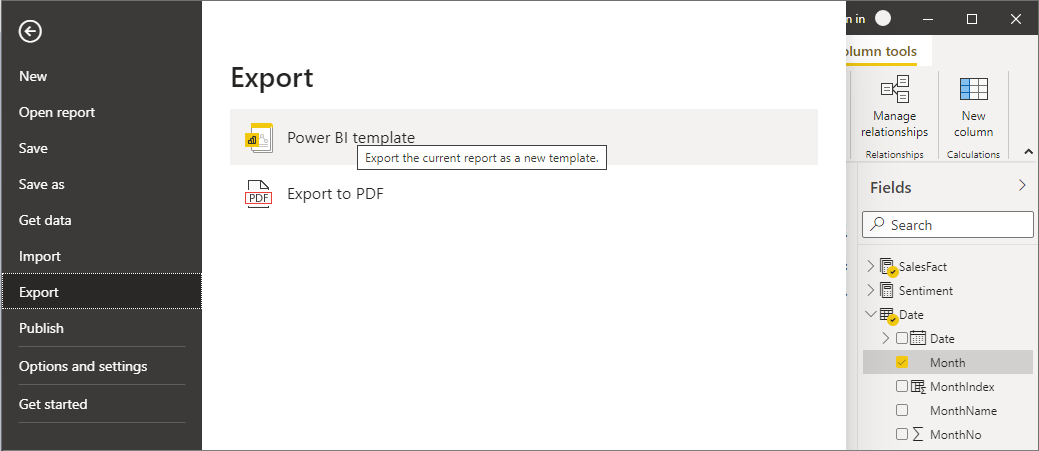
Don't want to go searching for templates? Create your own! To create a report template, select File>Export>Power BI template from the menu, which brings up the following window, which prompts you to provide a description for the template. And that's it, your Power BI report template is created in the file location you specified, with the .PBIT extension.
Top 10 Power BI templates for productivity (with links)
HR Workload Overview Report by Zoomcharts
Productivity analytics presentation on productivity tips and suggestions
Project Management dashboard (guide) a how-to guide on how to build a PM dashboard
Project management Power bi Gantt A template for a classic Gantt chart for project tracking
Project management report (paid) This a template that you can purchase on metricalist.com
Attendance report (paid) by Novi Pro, for HR tracking track of employee attendance
Email communication analysis by Zoomcharts
Timesheet analysis in Power BI video tutorial by ViSIT, is focused on construction workers, but it could be applied in other fields
Project tracking (with budget) free template by Mertricalist.com
Best Practices for analyzing Productivity data in Power BI:
- Ensure your data sources are well-organized and formatted to facilitate seamless readability by the program.
- Prioritize the right metrics and KPIs: focus on those that genuinely reflect productivity and align with your business objectives.
- Utilize time comparisons to discern trends, gauge improvements, and forecast future performance.
- Include data from various sources to ensure a comprehensive analysis, capturing every aspect of productivity from all projects and departments for a 360-degree review.
Lucen Track + Power BI
Lucen Track allows you to efficiently monitor and analyze how you and your team spend time on different tasks and projects. By integrating Lucen Track with Microsoft Power BI, you can gather and analyse data on the time spent on specific activities, track project progress, and delve deep into productivity patterns to identify areas of improvement.
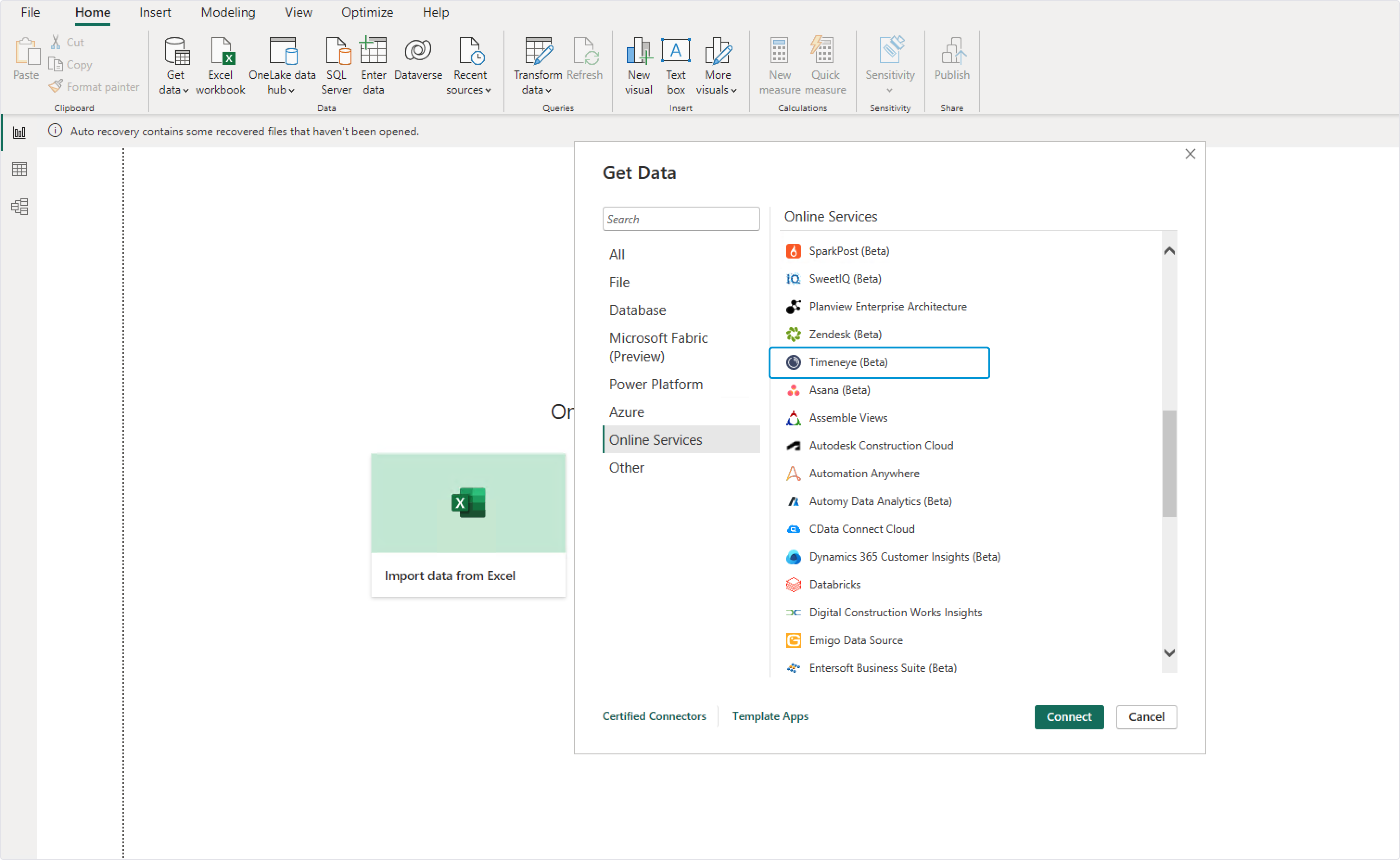
Begin by downloading a connection file to set up Lucen Track as a data source for Power BI. This integration unlocks the potential for more advanced analysis of time tracking data, project timelines, and billable hours, providing a comprehensive overview of your team's productivity.

Conclusion
In conclusion, using Power BI templates supports productivity analysis by simplifying data visualization and ensuring report consistency.
Ready to elevate your productivity analysis? Discover how Lucen Track seamlessly integrates with Power BI today.

Subscribe to our blog
Get all the tips, tricks and inspiration you need to create professional looking timelines, straight to your inbox.