


As Peter Drucker famously said, “What gets measured gets improved.” Tracking time is useful, but the real value comes from understanding how your time is actually spent.
A time audit helps you analyze your work patterns, identify inefficiencies, and compare how you planned to spend your time versus what actually happened.
In this guide, we’ll show you how to use Lucen Track’s reporting features to run a simple but effective time audit and uncover useful productivity insights.
What’s a time audit?
A time audit is an analysis of how you spend your time across tasks, projects, and activities. Its purpose is to help you better understand where your time goes and whether it aligns with your priorities, goals, and expectations.
By reviewing your tracked time, you can:
- Identify productivity patterns;
- Spot distractions and inefficiencies;
- Improve time management habits;
- Create more accurate estimates;
- Set more realistic goals and workloads;
Because time is a limited resource, tracking it consistently is the first step toward using it more intentionally. But tracking alone isn’t enough, you also need to visualize and analyze the data to turn it into actionable insights.
How to do a time audit with Lucen Track
Running a time audit in Lucen Track is simple thanks to the platform’s built-in reporting and tracking features.
To get started, you’ll need:
- A notebook or digital document for your goals and notes;
- A time tracking tool like Lucen Track.
Step 1: Define your goals and plans.
Before starting your audit, write down the goals, projects, or tasks you plan to focus on during the selected timeframe.
These goals will later help you compare:
- What you intended to work on;
- What you actually spent time doing;
This comparison is one of the most valuable parts of a time audit because it reveals whether your daily activities truly align with your priorities.
Step 2: Track your time consistently.
To collect meaningful data, you’ll need to track your time consistently over a set period.
Using a time tracking tool like Lucen Track makes this process much easier and more accurate than manually estimating hours after the fact.
Instead of entering time manually, use the real-time timer feature:
- Start the timer when beginning a task;
- Let it run while you work;
- Stop it when you finish;
This method provides much more reliable data than rough estimates like “I probably spent about an hour on this.”
Wait! What if I forget to track my time?
It happens, especially during busy workdays. But inconsistent tracking can lead to incomplete or misleading audit results.
To make time tracking easier to maintain:
- Ask a colleague or friend to help keep you accountable.
- Enable Lucen Track’s Daily Reminder email from the User Settings section.
- Integrate Lucen Track into your existing workflow and tools.
- Use the mobile apps or browser extension to track time from anywhere.
The easier time tracking becomes, the more accurate and useful your audit will be.
Step 3: Run a time report.
Once enough data has been collected, head to the Reports section of your Lucen Track workspace.
From there, you can:
- Select the timeframe for your audit.
- Filter reports by user, project, or activity.
- Analyze tracked hours and productivity patterns.
The first metrics you’ll usually see are:
- Total tracked time;
- Average tracked time per day;
These numbers immediately give you a high-level overview of how much time was dedicated to your work during the audit period.
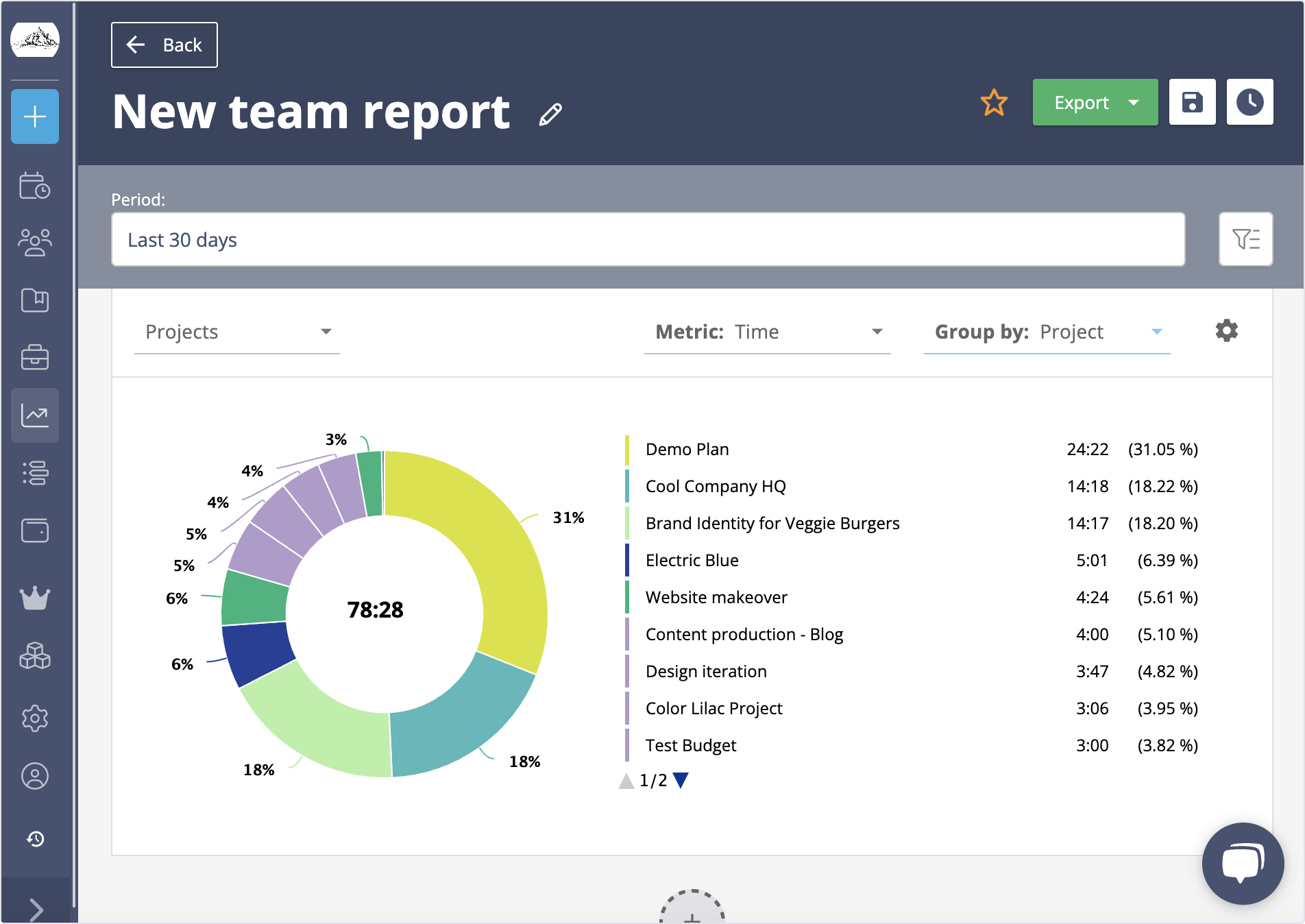
Further down the report is where things get really interesting, in the Projects chart, you’ll see exactly the project you’ve worked on, and how much time you allocated to each.
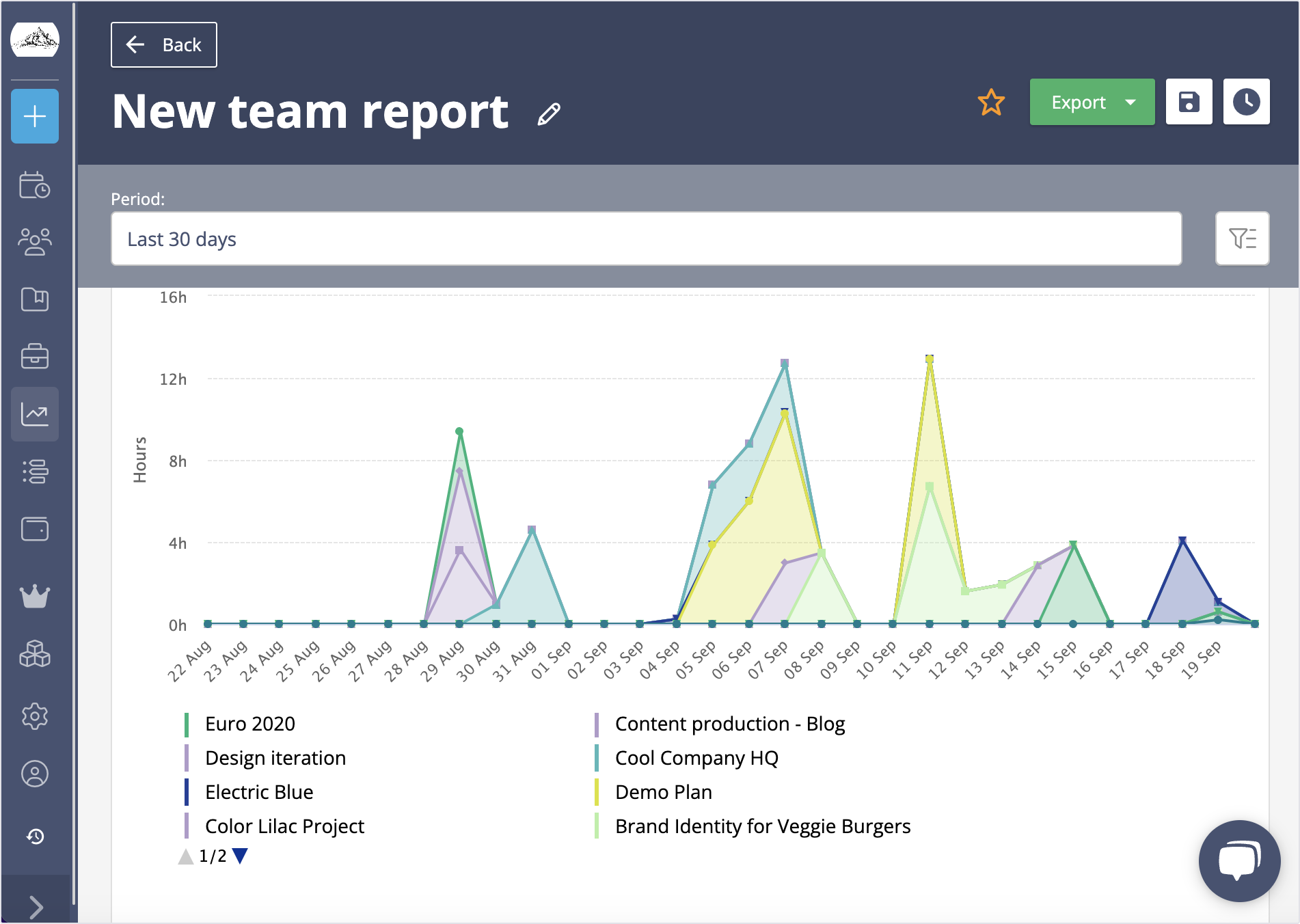
From there you can start analyzing how much time, in proportion, you’ve allocated on each project: which one caught most of your time? Were there days or weeks when one activity seemed to have capitalized your time?
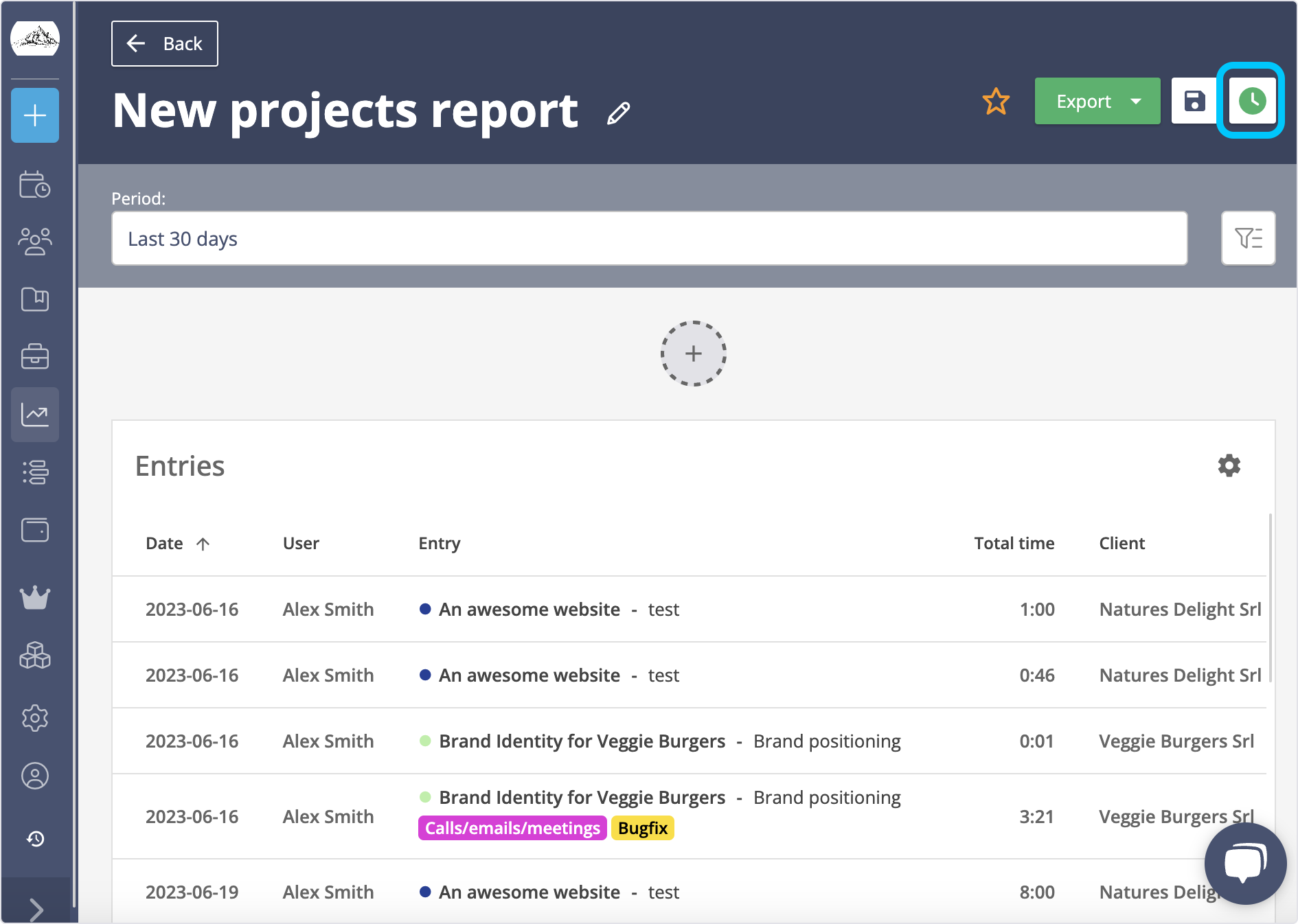
Finally, you should proceed to extract a list of all the activities you tracked in detail. Click on the Total time box, and you’ll see the list of all the time entries that provided the data for your report. Click Export to save the data to CSV.
Step 4: Adjust and improve.
Now that you’ve analyzed how your time was actually spent, go back to the goals and plans you defined at the beginning of your audit.
Ask yourself:
- Did you spend time on the projects and priorities you originally planned for?
- Which activities consumed more time than expected?
- Were there days when you overworked or underutilized your time?
- Which tasks or habits reduced your productivity?
Reviewing this information will help you identify areas where adjustments and improvements are needed.
A time audit shouldn’t be a one-time exercise. Repeating the process regularly can help you build better time management habits, improve productivity, and maintain a healthier balance between projects and workloads.
To make recurring audits easier, Lucen Track allows you to save reports as favorites, so you can quickly reuse the same reporting setup whenever you want to review your time data again.
Conclusion
The more you analyze how you spend your time, the easier it becomes to understand your work patterns and make smarter decisions about where your energy and attention should go.
Because people are naturally bad at estimating and perceiving time accurately, using a time tracking tool helps replace assumptions with real data and eliminate guesswork.
Understanding where your hours go is one of the most effective ways to improve productivity, optimize workloads, and free up more time for meaningful and creative work.


Subscribe to our blog
Get all the tips, tricks and inspiration you need to create professional looking timelines, straight to your inbox.