


Lucen Track OR Timeclock 365: which one should you choose?
Compare Lucen Track and Timeclock 365 for your business needs. Choose wisely for optimal productivity!

Lucen Track and Timeclock 365 are both excellent software solutions that help teams with time management, time tracking, and productivity. But which one is best for your business?
This guide provides an in-depth, honest review of both tools, highlighting their main features, pros, cons, and price points. Save this article to choose your next favorite software!
Summary
While both Lucen Track and Timeclock 365 are designed to fit with the Microsoft suite, they differ in many aspects. Lucen Track focuses on users seeking time tracking and project management features, integrating seamlessly with Microsoft tools to avoid switching between multiple apps. Timeclock 365 is geared towards companies needing solid payroll and attendance tracking, with the ability to integrate with physical hardware for secure access management and clock-in/clock-out systems.
Lucen Track VS Timeclock 365: a detailed comparison
Lucen Track
Overview
Founded in 2013, Lucen Track has been a reliable time-tracking software for hundreds of companies worldwide. With its calendar-style, colorful dashboard, time and project tracking, customizable reporting, and user-friendly experience, Lucen Track simplifies time management for managers and team members alike, all at an accessible price point.
.png)
Features
Lucen Track primarily focuses on project tracking, allowing users to track time spent on projects and tasks, and then aggregates the data into recaps and reports. Users can track time and allocate it to projects, tasks, and phases. Budgets (time-based or monetary budgets) can be assigned to projects, with alerts that managers can set up when budgets are reached. For billing purposes, hourly rates can be assigned to projects or users, and the platform automatically calculates total revenues, costs, and profits:

Integration with Microsoft
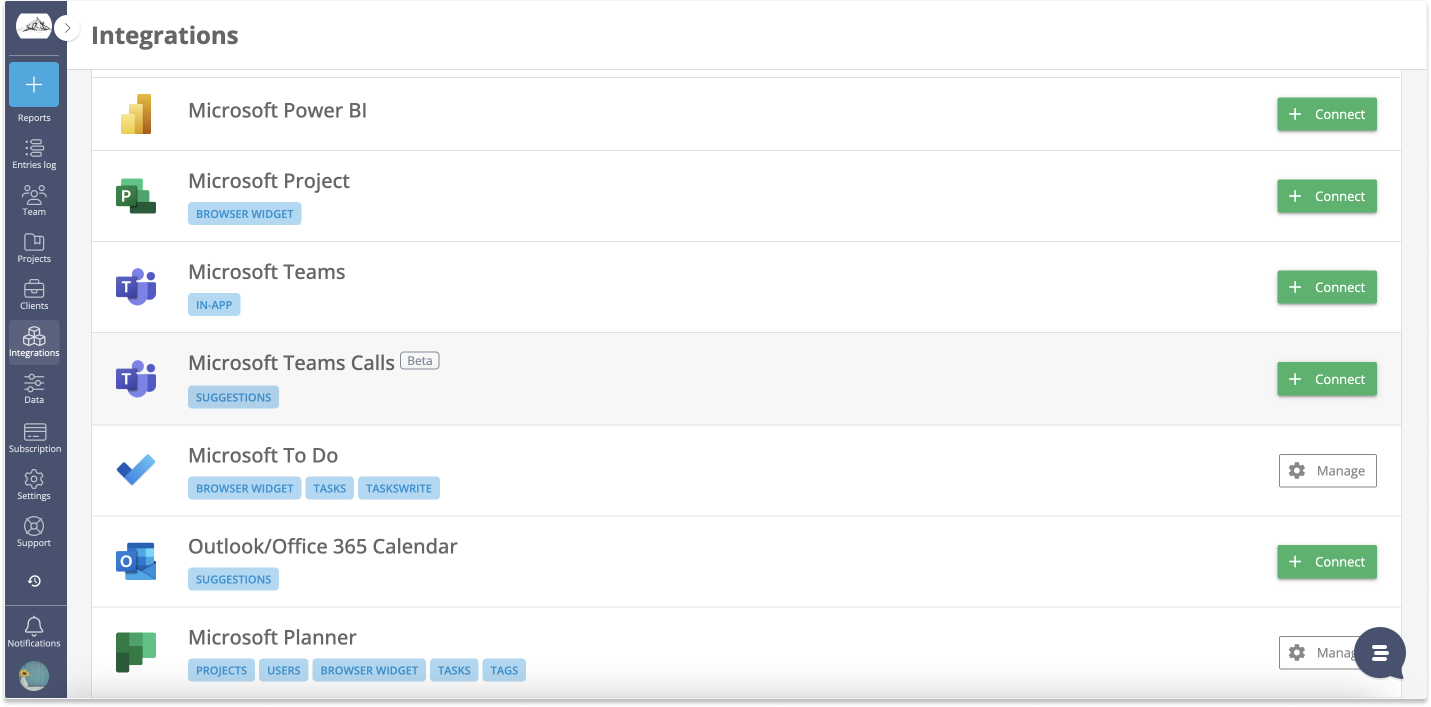
One of Lucen Track's core features is its integration with the Microsoft suite. Tracking time across the many apps in Microsoft 365 can be challenging, but Lucen Track makes it easy by integrating seamlessly with Microsoft. All the features mentioned above are accessible within the Microsoft suite, thanks to the Lucen Track app for Microsoft Teams, one of the top-rated apps in the store with over 500 monthly downloads. Lucen Track also allows users to track time for tasks in Microsoft Planner, Microsoft Projects, Microsoft To Do, and Outlook Calendar events. For business analysis, Lucen Track can serve as a data source for Microsoft Power BI, to dive deeper into productivity data.
Who is Lucen Track for?
Lucen Track is ideal for companies in various industries that need visibility over time, budgets, tasks, profitability, and are power users of the Microsoft Suite.
Lucen Track Pricing
- multiple plan available that unlock different features: pricing starts at $9 per user per month
Pros
- Seamlessly integrated with Microsoft 365
- Visual, colorful, and simple to use
- Customizable reports
- Project recap views
- Centralized platform to track expenses, budgets, billable rates
Cons
- No real clock-in/clock-out feature
- No native invoicing or PTO tracking
- No integration with Invoicing services
Timeclock 365
Overview
Timeclock 365 is a popular cloud-based employee management system built to comprehensively track time and attendance for payroll purposes. It integrates with services like Microsoft Teams, Azure, Jira, and Slack. Unlike other time and attendance software, Timeclock 365 integrates with physical hardware for access control, providing a precise and secure way to track access and attendance.
For the sake of writing this review, I created a trial account to explore the features (the trial lasts 7 days):

Main features
Timeclock 365 covers all aspects of employee management. It offers an easy way for users to track time for projects and tasks and allows managers to handle PTO and leave requests digitally. For companies and distributed teams, team leaders can see which employees are currently available for work and track their location while working off-site. Users can easily log their time and managers can assign tasks.

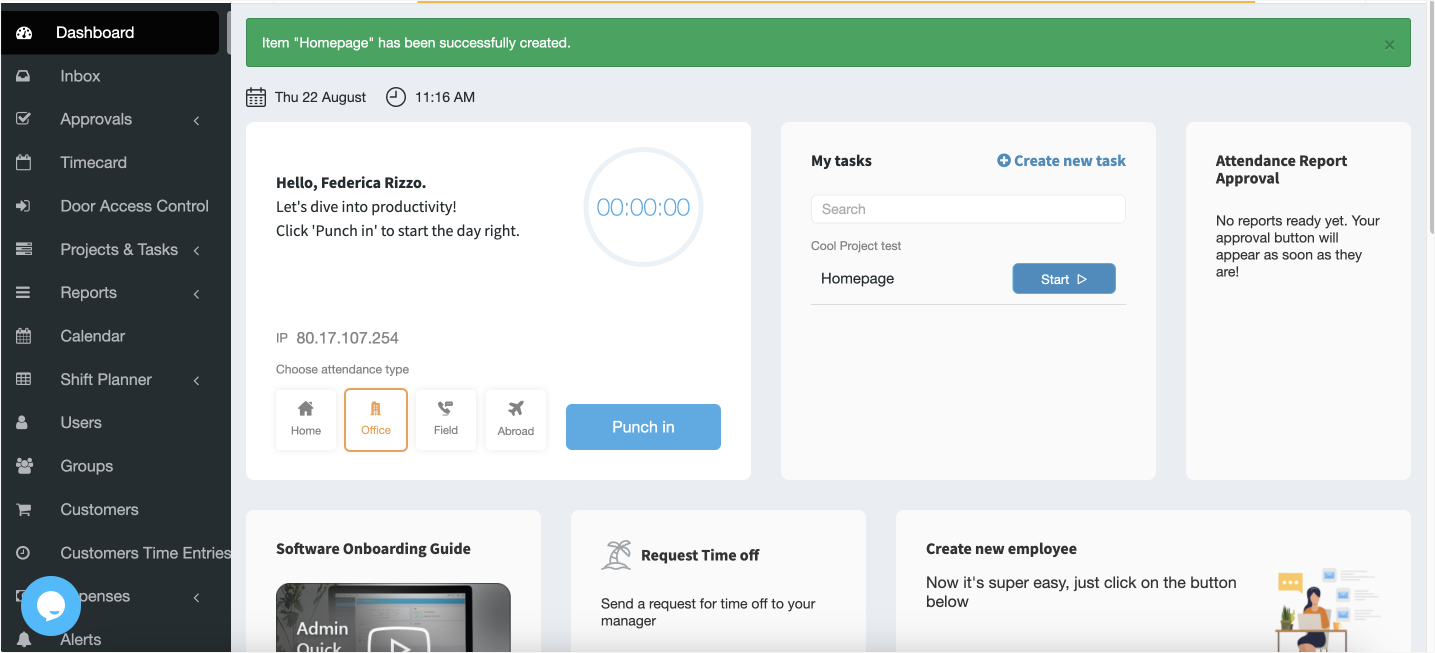
Microsoft Teams users can benefit from the Timeclock 365 app, making it easy to punch in and out directly from Teams. Similarly, users can conveniently request time off and access their timesheets within Timeclock 365 directly on Microsoft Teams. Timeclock 365 also integrates with hardware for attendance access control, including biometric clocks and door access. But the web app alone is solid and user-friendly, even when not associated with Microsft Teams. As you can see from the screenshot below, users can punch in, start tracking time, and request PTO from their dashboard. Meanwhile, managers can access approvals and assign tasks with ease from the left-side menu.
Who is Timeclock 365 for?
Timeclock 365 is suitable for companies across various industries relying on attendance tracking for payroll. Its biometric control is particularly beneficial for manufacturing industries or industries requiring high-security clearance.
Pricing
- Multiple plans available
- Basic plan: $3 per user
- Premium plan: $13 per user
Pros
- Easy to use, fast deployment
- Connection to several types of hardware/attendance tracking devices
- Integration with third-party applications
- Simple attendance tracking and PTO approval
Cons
- Reporting is not a core feature
- Some user reviews report a lack of flexibility
- Limited integration compared to other software in the same niche
Lucen Track: the all-around tool for the Microsoft suite
We have now reviewed the main features, target users, pros, and cons of both Lucen Track and Timeclock 365. While both tools integrate with Microsoft, the extent of their integrations differs.
Lucen Track integrates not only with Microsoft Teams but also with Microsoft Planner and Microsoft Projects, addressing project management needs and assisting is tasks and resource tracking.
The Outlook Calendar integration ensures that client meetings and events are included in timesheets.
For personal productivity, Lucen Track imports and tracks tasks from Microsoft To Do. Dev and agile teams can rely on the integration with Microsoft Azure. Those needing accurate insights on productivity and profitability can take advantage of Microsoft Power BI.
Lastly, Lucen Track just released a beta feature that automatically tracks Microsoft Teams calls. This will be a godsend for busy salespeople who are always on calls with clients.
Conclusion
Both Lucen Track and Timeclock 365 are solid tools for time management, time tracking, and productivity, with each offering unique strengths tailored to different business needs. So which one are you going to choose? If you're uncertain, you can start by discovering Lucen Track's unique, seamless Microsoft-oriented features in a stress-free 14-day trial!

Subscribe to our blog
Get all the tips, tricks and inspiration you need to create professional looking timelines, straight to your inbox.
.png)
