

.png)
If you've ever felt frustrated by unproductive tasks and endless meetings, you're not alone. Managing schedules and completing daily time tracking and timesheets can be a challenge, especially during the busiest times. Luckily, tools like Outlook Calendar and a time tracking tool built to connect with your calendar can help you keep your day under control, and accurately capture the time spent in meetings. Need a handy guide to choose the best time tracking software that integrates with Outlook Calendar? Look no further: this guide will show you the top 3 options and their use case - with a useful recap and step-by-step guide on how to choose the one that works for you.
Key Takeaways
- Why Outlook Integration Matters – Syncing time tracking tools with Outlook Calendar reduces manual entry, ensures accurate billable hours, and provides valuable productivity insights for individuals and teams.
- Top Tools Compared – Lucen Track: Best for Microsoft 365 users, offering automatic event-to-timesheet sync, tagging, and reporting. Toggl Track: Lightweight, flexible, and great for freelancers or teams wanting quick auto-tracking. Harvest: Ideal for agencies and consultants, combining time tracking with invoicing, budgeting, and expense tracking.
- How to Choose the Right Tool – Define your team size, budget, and must-have features; evaluate integrations beyond Outlook; and test free trials/demos to ensure a smooth fit into your workflow.
Key features to look for in a time tracking tool for Outlook
The offer of time tracking software is huge, with tools that offer somewhat similar features and some variations of the features that serve specific industries. Many of these software offer integration with calendars and other tools. For the purpose of this article, and to help you decide the best tool for you, these are the features that I think you should look for:
- Automatic sync with Outlook events
- Meeting-to-time-entry conversion
- Project & task tagging from Outlook events
- Reports and insights
- Automated or semi-automated tracking to reduce manual work
Why Outlook Integration Matters for Time Tracking
Using time tracking software that syncs directly with Outlook calendar and tasks brings major advantages for professionals and teams, in terms of both organizational clarity and accurate data for billing. Some of the biggest benefits include:
- Accurate billable hour tracking that ensures client invoices reflect the actual time spent on projects
- Productivity insights for individuals and teams based on Outlook calendar data
- Less manual entry, allowing more focus on high-value work instead of repetitive admin
- Better time management for meeting-reliant professionals such as consultants, freelancers, and agencies
Top time tracking software for Outlook
The best options for time tracking that seamlessly sync with Outlook Calendar are Lucen Track, Toggl, and Harvest. Other popular choices can also include ClickTime (time tracking for enterprise), HubSpot (with geolocation features), Clockify (simple and affordable).
Lucen Track: Seamless integration with Outlook & M365
In the time tracking landscape, Lucen Track stands out as the solution that's specifically built for integration with Microsoft 365. While this article focuses on Outlook Calendar specifically, Lucen Track also supports native integrations both within the Microsoft ecosystem (Microsoft Planner, Microsoft Teams) and beyond (Jira, Asana).
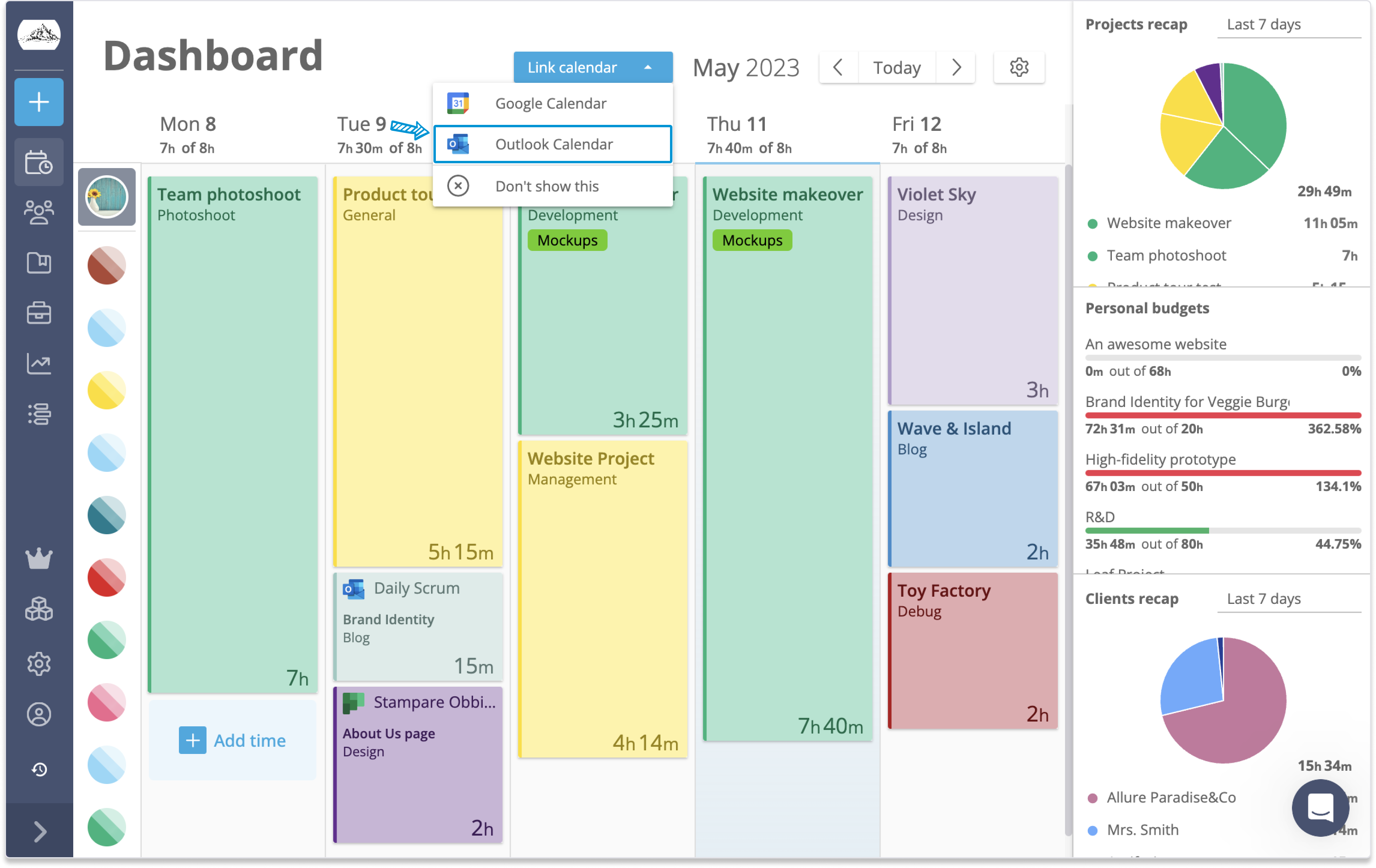
Lucen Track integrates with Outlook Calendar via a Native integration, in just a few clicks. You can set it up during onboarding after signup, or later from the integrations section, or even directly from the calendar-style dashboard. Once connected, Outlook events appear as suggestions in the Lucen Track interface. With a single click, users can log the event or start a real-time timer while the meeting is in progress.

These entries can be added to timesheets and submitted for approval. Both users and managers can then generate reports for valuable productivity insights, both at the individual or team level.
Lucen Track + Outlook Calendar: key highlights:
- One-click setup & connection
- Regular 15-minute syncs
- Automated calendar suggestion
- Automated project tagging
- Reporting & Insights
Who is it for: for companies that are heavy Microsoft users (Lucen Track connects to other tools of the M365 suite)
Toggl Track: Lightweight and Effective Tracking for Calendar Events
Toggl Track (formerly known as only Toggl) is a time tracking tool designed for simplicity, with robust features for project management, billable hours tracking, and multiple integrations— including Outlook Calendar. Once Outlook Calendar and Toggl are integrated, events will appear in the Toggl Calendar View alongside Toggl time entries, where users can manually start or copy them as time entries, or enable the Auto-track option to have Toggl automatically create entries within five minutes of each event starting. This feature saves time, prevents missed hours, and helps you stay on top of your schedule seamlessly.

Toggl + Outlook Calendar: key highlights
- Outlook calendars synced directly into Toggl Track’s Calendar View
- Start time entries from calendar events
- Auto-track to automatically turn events into time entries
Who is it for: smart teams, freelancers and teams looking for stress-free, easy implementation
Harvest: Strong Tracking for Billable and Invoicing
In addition to time tracking (manual entry mode or timer mode), Harvest offers budget and expense tracking, invoicing, and a workload planning and management tool called Forecast.
Harvest’s features make it a good fit for agencies, consultants, freelancers, and businesses that need strong invoicing tools.

Harvest integrates with many tools, including Outlook calendar. Setup is simple: either connect your calendar from your timesheet, or integrate from your profile under "Integrations". Once integrated, you can select events to create time entries, edit project and task details, and save—while Harvest remembers recurring event settings for faster future tracking.
Harvest + Outlook Calendar: key Highlights:
- Create time entries from Outlook calendar events.
- Automatically assigning project/task selections for recurring events.
- Available on mobile apps for iPhone and Android.
Who is it for: agencies and businesses that need client billing + invoicing
Time Tracking for Outlook Comparison Table
How to select the best tools for your workflow
- Evaluate how many users will need to be onboarded right away, and how many will be on board after full rollout;
- Know your budget and make sure to understand what each plan includes;
- Understand how the tools need to fit with your current workflow, and the depth of integration required;
- Make a list of how many tools you need to integrate with, besides Outlook;
- List the core features/must-have features, as well as the nice-to-have features;
- Take full advantage of free trial, free demos, and training to evaluate the tools before committing.
Use case: Using Lucen Track, Outlook, and MS Teams to track virtual calls
Just to show you how easily you can take advantage of time tracking to help you manage one of the biggest time drains: virtual meetings (Teams Calls specifically). As we already said in our review, Lucen Track connects with Outlook to automatically retrieve your calendar events. You can also connect Lucen Track to Microsoft Teams, not only to track time directly from Teams, but also to track time for your Microsoft Teams calls, to make sure even the time spent in calls with clients is accounted for. But the two integrations can also talk to each other, to ensure total accuracy on how your time was spent.
-png.png)
For example, let's say you have a virtual meeting with a client from 09:00 to 9:30. One the calendar suggestion, you'll see your meeting already assigned to the correct project and client, as well as a suggested duration of 30 minutes. If the meeting runs long ( for example, 45 minutes) Lucen Track will automatically update the entry with the actual duration when you log back in.
Conclusion
Connecting time tracking to Outlook ensures three key benefits: improved accuracy in capturing every billable minute, streamlined workflows with less manual entry, and practical productivity insights. By integrating a smart time tracking tool like Lucen Track, your team can stay organized all day long.
Ready to see how seamless time tracking can elevate your business? Discover more about Lucen Track and start your journey to smarter work today.
Frequently asked questions
Using a tool that syncs with Outlook helps capture every meeting and task automatically, reduces manual data entry, improves billing accuracy, and provides actionable productivity insights.
The top three tools are:
- Lucen Track – Seamless for Microsoft 365 users, with automated calendar sync, project tagging, and reporting.
- Toggl Track – Lightweight, easy to use, and perfect for freelancers or small teams.
- Harvest – Strong invoicing and expense tracking features, ideal for agencies and consultants.
Consider your team size, budget, and required features. Check how well the tool integrates with your current workflow, explore additional integrations beyond Outlook, and take advantage of free trials or demos before deciding.
Yes. Lucen Track, Toggl Track, and Harvest all offer free plans with limited features, along with paid upgrades for advanced functionality like reporting, invoicing, and automated tracking.


Subscribe to our blog
Get all the tips, tricks and inspiration you need to create professional looking timelines, straight to your inbox.