


Task list template
Swimlane-based timeline sample that helps better organize and track tasks across departments and teams, highlighting the impact of changes on other stages of the project.
Powered by Lucen Timeline (formerly Office Timeline)

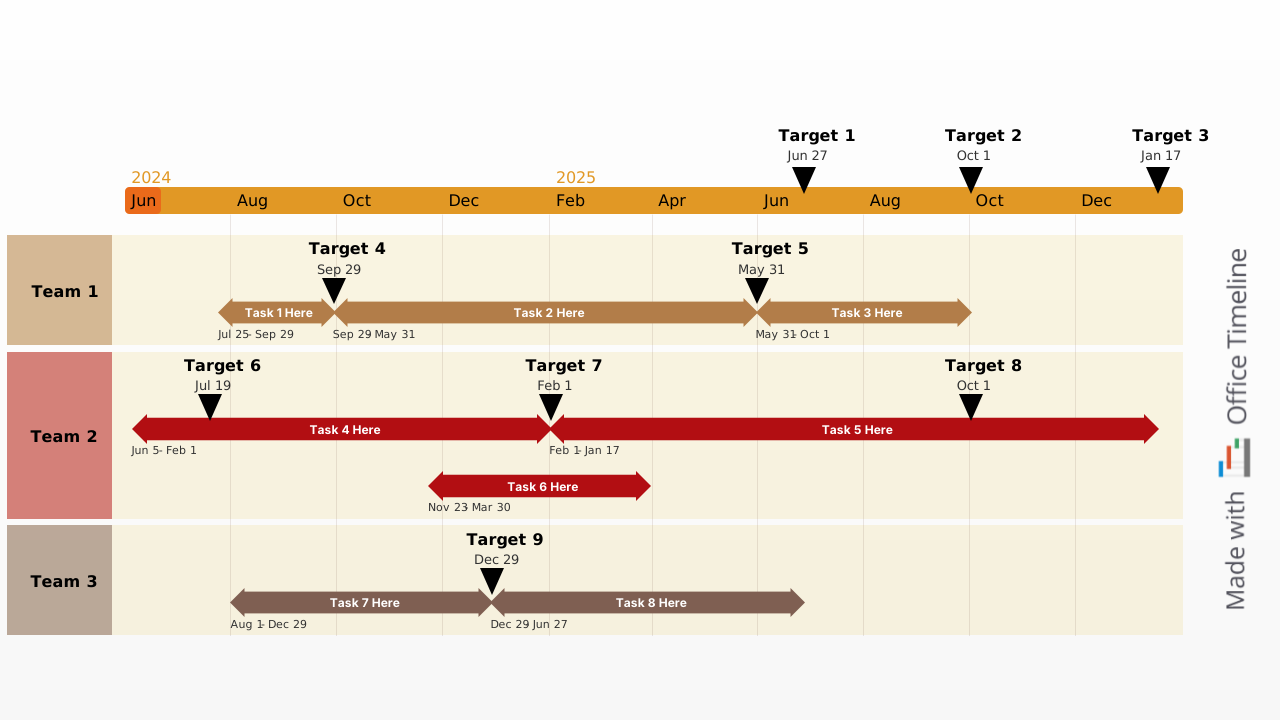
A task list template is a pre-formatted document that helps professionals organize, assign, and track project activities against deadlines. Rather than building a tracking system from scratch every time a new initiative kicks off, a well-designed template gives you a ready-made structure — complete with fields for task names, owners, due dates, statuses, and priorities — so you can jump straight into planning.
The most effective task list templates go beyond simple checklists by placing tasks along a visual timeline. This timeline-based format lets you see at a glance how activities are sequenced, where deadlines overlap, and which teams are responsible for what. It's the kind of clarity that keeps projects moving forward and makes status updates far easier to communicate to stakeholders and leadership.
Our free task list template, built as a native PowerPoint slide, does exactly that. It maps your project's tasks across a timeband and organizes them into swimlanes by team, giving you a professional visual you can customize in minutes and present with confidence. Download it as-is or use the Lucen Timeline add-in to update it instantly with your own project data.
Why use a task list template?
Tracking tasks without a consistent structure leads to missed deadlines, unclear ownership, and wasted time re-creating formats for every project. A task list template solves these problems by providing a standardized, reusable framework that keeps your entire team aligned. It reduces the setup time for new projects, makes it easy to monitor progress at a glance, and ensures that nothing falls through the cracks — whether you're managing a small team initiative or coordinating work across multiple departments.
When that template takes the form of a timeline, the benefits multiply. You gain a clear picture of task sequencing and duration, can quickly spot scheduling conflicts, and have a presentation-ready visual that communicates project status far more effectively than a spreadsheet ever could.
How do you start a task list?
When you decide to simplify your life by creating a task tracking list it’s important to start out on the right foot, as this ensures your list will not just be a never-ending catalog of activities you feel guilty over. Here are some pointers that can help:
- Try out a time tracking free app or two before you find one that matches your needs. Even the best app for tracking time can be too complex or too basic for your purposes, and it’s important that you feel comfortable with it, otherwise you will probably stop using it altogether. On a side note, digital daily task list solutions are superior to their paper counterparts thanks to features like reminders, easy customization, collaboration, and cloud storage.
- When you need to make more than one list – and you will – look for apps that allow you to create a reusable task list template. Task management templates allow you to spend less time fiddling with the design and items, and more time on crossing off said item.
- Use project tracking tools that allow you to set due dates for the tasks rather than simple checklist whenever you can, even if not all the items really require a hard and fast completion date. This allows you get a sense of how to prioritize the activities and make adjustments in case of schedule conflicts.
- Don’t use the project tracking software for big picture objectives or desirable outcomes that are difficult to estimate and quantify. Instead, focus on tangible tasks that can be completed and crossed off.
- Check your task tracker app frequently. Even a perfectly compiled schedule won’t help you improve productivity if you don’t stick with the plan and start working on random things.
Project management tracking with task lists
Using task lists to monitor project progress is not entirely different from employing these tools to optimize your own schedule. If your task management template is in the task timeline format, you just need to ensure is that you’re setting attainable due dates for the activities at hand. The main difference in the case of the group project task list is that each activity needs to be assigned to a specific member or team.
You can also create an employee task list template to simplify the job of allocating everyone tasks by hand every single time. At the same time, make sure that the relevant information for each task is available to the team; cryptic annotations might work for personal task lists, but you will end up being constantly prompted for clarifications if the instructions are confusing.
Advantages of teams tracking on a task timeline template
When it comes to picking the optimal project management time tracking solutions, we think nothing beats timelines and Gantt charts. Adding swimlanes to these data visualization solutions makes it so much easier to figure out immediately which team is handling which side of the work, if they are on track or if rescheduling is required, the impact of changes on other stages of the project, etc. Communication between the PM, collaborators, stakeholders and executives is also facilitated by these project time tracking tools, thanks to their intuitive nature, and using a professionally designed timeline template can really speed things up.
The task list template can be downloaded free of charge and you can update the default items with your project’s specifics in PowerPoint, but it’s much easier and quicker to do so with the Lucen Timeline add-in’s free 14-day trial. Avoid falling behind on your work projects, stay up to date with the progress of the teams you’re managing or simply bring more structure in your life with the help of our task timeline.
Frequently asked questions
A task list template is a pre-structured document that provides a ready-made framework for organizing, assigning, and tracking project tasks. Instead of building a tracking system from scratch for every new project, a template gives you a standardized layout — typically with fields for task names, owners, due dates, statuses, and priorities — that you can reuse and customize as needed. Task list templates range from simple checklists to visual formats like timelines and Gantt charts that display activities along a timeband, making it easier to see how work is sequenced and where deadlines fall.
An effective task list template should include a task name, an assigned owner, a due date, a status indicator (such as not started, in progress, or completed), and a priority level. For team projects, it's also helpful to include notes or descriptions so that task instructions are clear to everyone involved. The best templates go a step further by organizing these elements visually. Lucen Timeline's free task list template, for example, places tasks along a timeband and groups them into swimlanes by team, so that scheduling conflicts, dependencies, and overall progress are immediately visible at a glance — and presentation-ready from the start.
A checklist is a simple list of items to be completed, typically with checkboxes to mark each one as done. It works well for straightforward, sequential activities where order and timing don't matter much. A task list is more detailed: it assigns ownership, sets due dates, and tracks the status and priority of each activity. When a task list is formatted as a timeline, it also shows how long each task takes and how activities relate to one another over time, which makes it a far more useful tool for managing projects with multiple contributors and deadlines.
Start by listing every task the project requires, then break large activities into smaller, actionable items. For each task, assign an owner, set a realistic due date, and define a priority level. Group related tasks together — ideally by team or department — so that responsibilities are clear. Finally, choose a format that makes progress easy to track. A timeline-based task list template is particularly effective for team projects because it visualizes who is working on what and when, highlights overlapping deadlines, and gives stakeholders a clear picture of project status without needing to dig through spreadsheets.
Yes. A PowerPoint-based task list template lets you build a professional, presentation-ready project visual that you can share in meetings, include in status reports, or distribute to stakeholders — without switching between separate planning and presentation tools. Lucen Timeline's free task list template is built as a native PowerPoint slide that organizes tasks across a timeband with swimlanes for different teams. You can customize it manually in PowerPoint or use the Lucen Timeline add-in to update dates, tasks, and styles instantly.

Your download should start now. If it doesn’t start click here and check your inbox for tips to get started.