

Maximize your efficiency by using Microsoft tools to track your time. Learn how in this step-by-step guide.
A fully integrated ecosystem, such as Microsoft 365, benefits companies, but you need more than those tools to get the insights you need to move your business forward. Instead, time tracking helps you monitor your time investment and labor costs. By syncing Lucen Track with your favorite project management tool, you can keep track of all your projects' profitability and delivery status.
How does it work? When you connect Lucen Track to a Microsoft tool of your choice, we sync all your projects automatically, including phases, tags, budgets, and team members.
All the time you track with our integration is securely stored inside Lucen Track. Every time you make a change in one of Microsoft's platforms, Lucen Track will sync this update automatically.
This way, you save precious time in admin work and timesheet filling, and your productivity reports will always show the freshest data. And turning your working time into data is essential for invoicing your clients accurately. Lucen Track allows you to export a detailed breakdown of all the billable work you have done – and how much you are owed for it.
In this article, we'll show you how to integrate Lucen Track seamlessly with the following Microsoft tools:
Microsoft Azure DevOps
Let's dive deep into each Lucen Track integration! 🚀 😉
How to track time in Microsoft Teams
Overview
Microsoft Teams is one of the most popular video conferencing platforms. So, chances are you are working with Microsoft Teams running in the background or constantly present on your side monitor. And since you already use this platform, wouldn't it be practical to keep track of your projects here too? That's what we thought!
With the Lucen Track integration for Microsoft Teams, you can track the time of your project life cycle, keep an eye on budgets and stay connected with your team.
How to integrate Lucen Track with Microsoft Teams?
- Add the Lucen Track app to Microsoft Teams
- Automatically add your team members from your Microsoft account;
- Start tracking time!
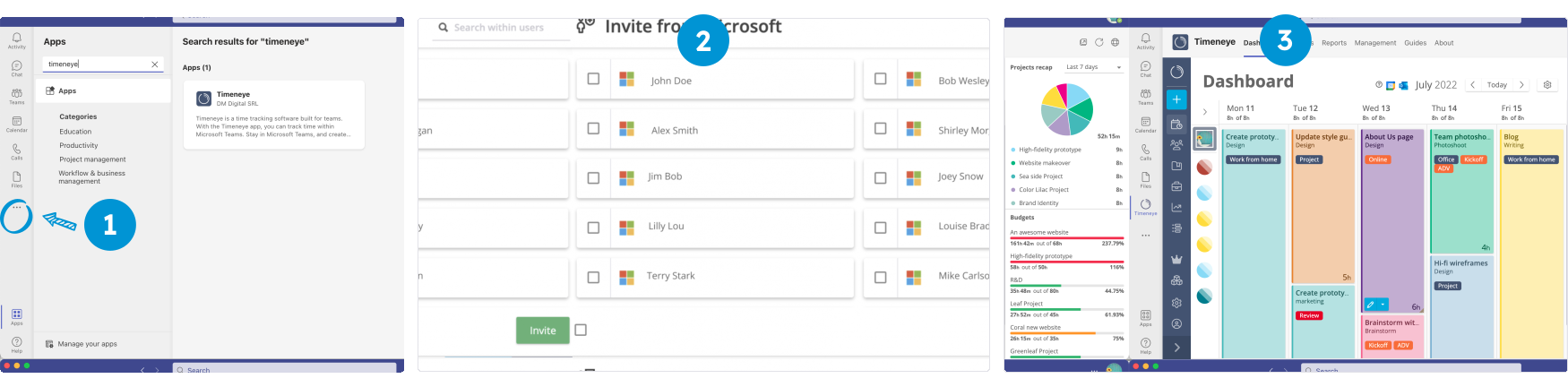
For more info, check out our video on how to integrate Lucen Track with Microsoft Teams
What are the benefits of tracking time in Microsoft Teams?
- Keep your team on the same page: whether your team works fully remotely, in-office, or in hybrid mode, Lucen Track allows you to keep your team accountable and have an overview of your project lifecycle and client's deliverable.
- Increase productivity: by spotting your most productive system and prioritizing the most vital activities, businesses can optimize their schedules and work habits to achieve better results and higher revenue.
- Profitability: Time spent in calls, meetings and planning can often slip through the cracks, quickly turning into undetected company-sunk time. Lucen Track captures every billable minute worked across the team.
How to track time in Outlook Calendar
Overview
Your work calendar already holds most of the data needed for a timesheet. That brainstorming meeting with the marketing department? It counts as work. And that site inspection at your client's firm? It also counts as work.
It is pivotal for a successful business to keep track of billable and non-billable hours to stay profitable. Speed up the process by connecting your Outlook calendar to your Lucen Track account to automatically populate your dashboard with your work events.
How to integrate Lucen Track with Outlook Calendar?
- Sign up/Log in to Lucen Track
- Connect Outlook calendar: click on the “Link Calendar” button on your Lucen Track Dashboard
- Select your work calendar and sync events as suggested entries
- Your work event will start populating your Dashboard so that you can track time on them
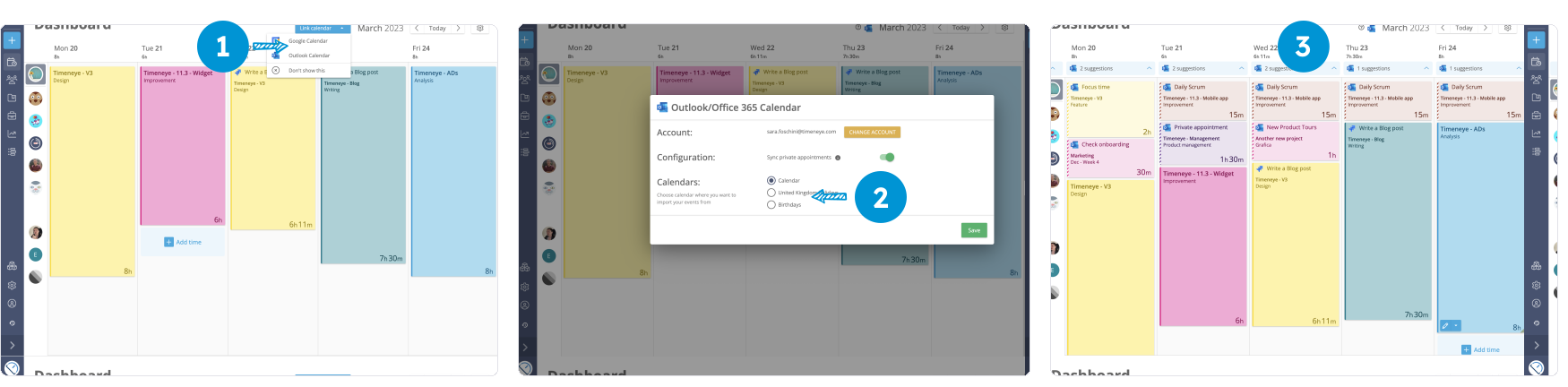
For more info, check our page on how to integrate Lucen Track with Outlook Calendar
What are the benefits of tracking time in Outlook Calendar?
- Optimize your schedule: 78% of employees believe their meeting schedule to be messy. Use the information provided by Lucen Track to help you make the necessary adjustments and enjoy a better work-life balance.
- Accurate time tracking & billing: if a client or partner needs to review their timesheets for billing purposes, you can easily export the appropriate time report with a click. With Lucen Track you can recall exactly what you were working on at any given time.
- Capacity: Understanding what you can and can't do during your workday is critical: in Lucen Track you can set daily capacity and labor costs for each user and establish realistic goals for your team.
How to track time in Microsoft Planner
Overview
Teams rely on Planner to provide a simple, visual way to organize their work, collaborate effortlessly, and stay on track.
Lucen Track's integration with Microsoft Planner lets you track time directly on your tasks. When Lucen Track is connected to Microsoft Planner, time tracking controls will appear in the interface. As a native integration, Lucen Track will automatically sync the updates whenever you make changes, and it will always display the most up-to-date data.
How to integrate Lucen Track with Microsoft Planner?
- Sign up/Log in to Lucen Track
- Move to our Integrations tab and add our Browser extension for Chrome, Firefox and Edge.
- Automatically import your Planner projects in Lucen Track
- Start tracking time!
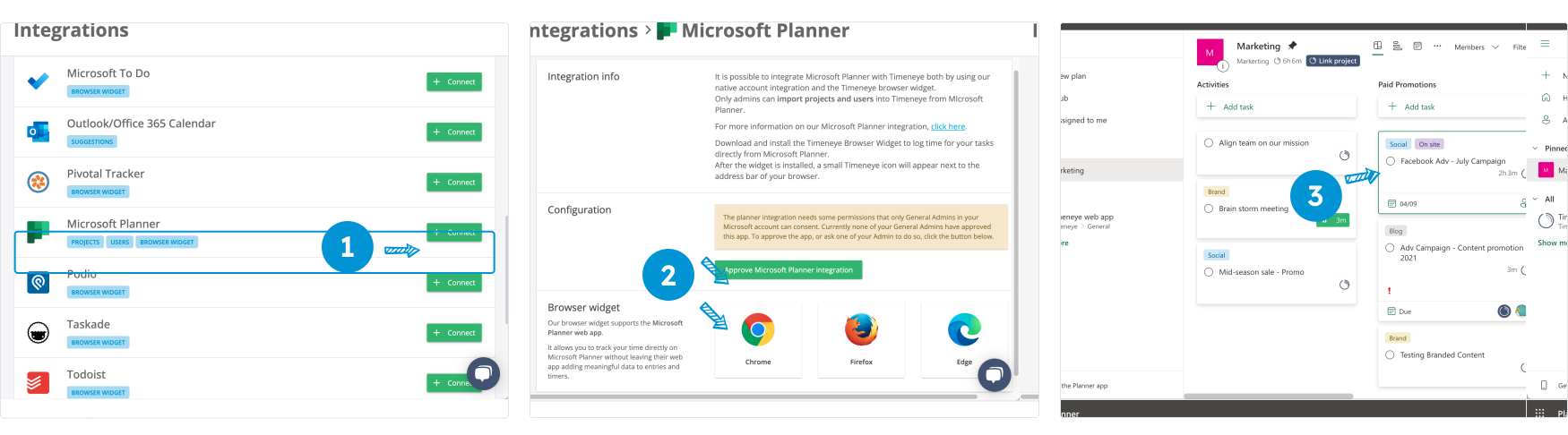
For more info, check out our page on how to integrate Lucen Track with Microsoft Planner
What are the benefits of tracking time in Microsoft Planner?
- Efficient project management: The project management features of MS Planner combined with Lucen Track's capabilities, help you track time spent across multiple projects and departments, while generating insightful reports of your work patterns.
- Prioritize tasks: long meetings and unnecessary micro-tasks can eat up time quickly, adding to internal costs and lowering profit margins. Lucen Track's goal is to inform you of how you use your time and resources, eventually streamline your work processes, and prioritize your activities.
- Avoid bottle-neck situations: Are your projects and milestones regularly delayed? Does this situation create a stressful work environment? If so, reviewing your project timeframes and schedules is a good idea. Lucen Track tells you the status of your project and notifies you when you are approaching the deadline.
How to track time in Microsoft To Do
Overview
While Microsoft Planner is made for team and project management, Microsoft To Do is designed for personal use. However, large teams occasionally find it helpful for planning daily activities.
Employees, for example, are frequently expected to submit timesheets for productivity and payroll purposes and they may rely on Microsoft To Do to recall what they have been working on. Timeneye’s integration allows users to track time directly on their list items.
How to integrate Timeney with Microsoft To Do?
- Sign up/Log in to Lucen Track
- Move to our Integrations tab and add our Browser extension for Chrome, Firefox and Edge.
- Click the Lucen Track widget next to your Microsoft To Do tasks and you are ready to track time!
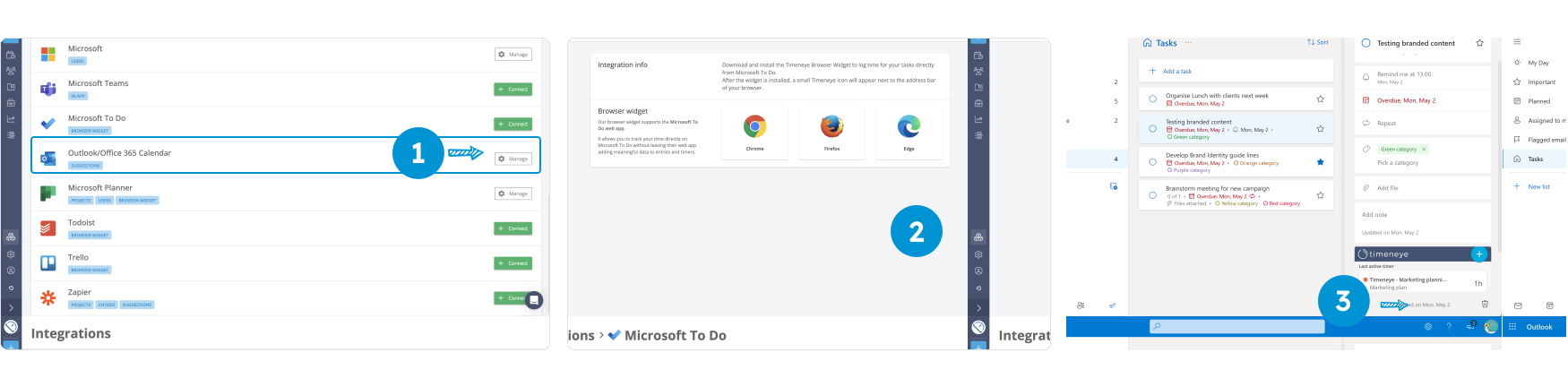
For more info, check out our page on how to integrate Lucen Track with Microsoft To Do
What are the benefits of tracking time in Microsoft To Do?
- Personal task management: when you have multiple important duties, prioritizing them is more challenging than it sounds. Lucen Track provides an overview of your time management and enables you to identify the most urgent tasks.
- Reducing Your Stress Level: quickly diagnose activities that are taking too long and causing undue stress. You can then reprioritize your tasks based on importance and urgency to ensure that your time and energy are focused on what matters most.
- Stay focused: starting a timer for a task puts you in the right mind frame and allows you to focus on one task at the time, without the risk of counterproductive multitasking.
How to track time in Azure DevOps
Overview
Agile teams and development teams who need to ship fast and solve bugs will need an easy way to track, monitor, and update their issues' status. Azure DevOps allows them to do all that.
By adding time tracking to Azure DevOps, teams can monitor the time spent on your tasks, backlog items, and bug fixing. Time tracking won't disrupt their work because it happens right there in Azure DevOps, thanks to the Lucen Track Browser widget that will add a small button to track time, might there in the issue.
How to integrate Timeney with Azure DevOps?
- Sign up/Log in to Lucen Track
- Move to our Integrations tab and add our Browser extension for Chrome, Firefox and Edge.
- Click the Lucen Track widget next to your Azure DevOps ossies and you are ready to track time
What are the benefits of tracking time in Microsoft To Do?
- Timesheet without the stress: devs can finally take care of filling the timesheets in just a few clicks, and then go back to focus on the work without interruptions;
- Turn time into actionable insights: all the time is gathered in Lucen Track and aggregated into actionable insights. You can run reports to discover productivity patterns, pinpoint areas for growth, and streamline your workflow to meet deadlines and exceed client expectations.
Wrapping up
At Lucen Track we believe that time management should be an essential component to run a successful business.
By gathering useful insights about how the time has been allocated, you will be able to analyze it and eventually optimize it. To reach the next step in your business growth, you need to combine project management tools and timekeeping.


Subscribe to our blog
Get all the tips, tricks and inspiration you need to create professional looking timelines, straight to your inbox.