


Project to do list template
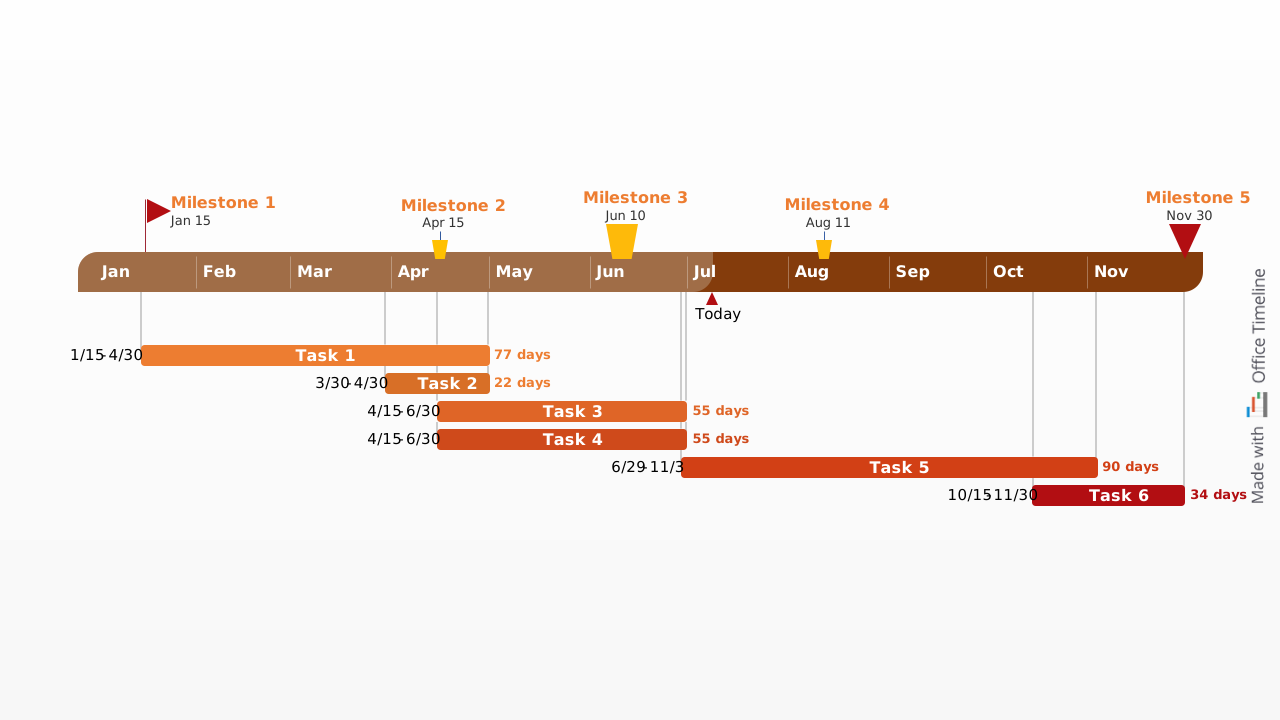
A graphical Gantt chart template using a chromatic theme to convey your project's pipeline at a glance
Powered by Lucen Timeline (formerly Office Timeline)

Overview
A project to-do list lies at the foundation of any project. Outlining the main tasks that need to be carried out, project to-do lists help you work more efficiently, and play an essential role in the successful delivery of a project schedule.
Given that clear project to-do lists inspire the best task management practices, this page will cover the basics on the nature, benefits and structure of such visual tools. Moreover, it offers a free downloadable project to-do-list template that you can use it for task tracking and optimizing your workflow.
What is a project to-do list?
A project to-do list, also referred to as a project task list or checklist, shows all the steps that need to be taken towards the completion of a project. Typically created at the start of the project and agreed upon by the main participants, a project to-do list communicates specific tasks, their due dates and, sometimes, assigned owners.
If you want your project to-do list to convey more details, you can add priority and note deadlines to your tasks, or create sub-tasks.
Why use a project to-do list?
Listing major tasks and their sub-units, a project to-do list acts as a rudimentary project schedule that assembles all the work that needs to be performed in one place. This, in turn, helps with:
- Organization – the task list ensures that no relevant step is overlooked and provides an overview of the whole project, serving as a reference point to everyone involved in its delivery;
- Motivation – as each task is checked off the list, it tracks their status and progress, motivating you to continue towards the finish line;
- Productivity – by presenting the main workflow, a project to-do list ensures clarity and streamlines efforts; as you’re moving along in the project, you can look back over the checklist and analyze your work to better organize and execute future steps;
- Delegation – using a project checklist enables you to break down projects into specific tasks that can be delegated to certain teams or team members; when main activities involve sub-tasks, the project to-do list helps you document and display all these details so that work gets done more quickly and accurately;
- Milestones – pinpointing the tasks that a team needs to complete, a project management to-do list translates a plan into a step-by-step guide for everyone to follow, and provides a series of goals to look forward to.
How to make a project to-do list?
The creation of a clear and effective project to do list relies on the following three steps:
- Write down all the tasks and subtasks that need to be completed – start off with the outline of what needs to be done.
- Break up the larger activities into smaller, manageable units so that the amount of work involved be fairly divided.
- Categorize your tasks based on priority – determine which steps should come first, and then assign each of them accordingly.
Why use the Project To-Do List Template?
The free Project To-Do List template was created as a graphical way of showing your project’s pipeline at a glance. Once updated with your data, it will illustrate the activities and any important milestones required for the successful delivery of your project.
Usually aimed at developing detailed Gantt charts and timelines, project management applications and other task management tools can often prove overly complex for small projects. Plus, when it comes to generating simple representations of a project schedule, many of these tools produce task lists displayed in a table or as a spreadsheet - an output which can be difficult to present and difficult for others to understand.
Bearing these challenges in mind, we have created this project to-do list template to enable you to manage small projects in a simple and more familiar way. Designed in PowerPoint, this template - and all our other Gantt chart task list samples - can be easily edited and customized. The familiarity of the popular presentation platform will help you to quickly and efficiently communicate progress reports about your plans to team members, management and clients.
Displaying your project tasks and their due dates on a timeline, the project to-do list template allows you to better prioritize activities and plan ahead. Creating a project checklist as a visual instead of a spreadsheet or document can also make it easier to set expectations with others. Deliverables and due dates are clearly illustrated on the template so all stakeholder expectations will be aligned around the timeline.
How to update the Project To Do List Template
To do this, simply download the template and manually replace the placeholders with your own data. If you want to have this done automatically, use the LucenTimeline add-in for PowerPoint, which will instantly lay out your task list on the slide. The add-in can also be used to quickly update an existing project to-do list if anything has changed or to instantly re-style this template.
Frequently asked questions
A project to-do list is a streamlined breakdown of the tasks and subtasks required to complete a project, focusing on what needs to be done, by when, and by whom. A full project plan goes further, incorporating resource allocation, budget tracking, risk management, and dependencies between tasks. For smaller projects or early-stage planning, a to-do list is often all you need to keep things moving in the right direction.
The right level of detail depends on the complexity of the project and the size of the team involved. As a general rule, each task should be specific enough that whoever is responsible for it knows exactly what completing it looks like. If a task feels too broad or could take more than a few days to finish, it is worth breaking it down into smaller, more manageable subtasks so that progress stays visible and accountability remains clear.
Ideally, yes. Assigning due dates to tasks is one of the most effective ways to prevent bottlenecks and keep a project on schedule. Even rough target dates are more useful than none at all, because they create a shared sense of urgency and help team members prioritize their workloads. If deadlines shift as the project evolves, updating them promptly ensures everyone stays aligned.
A Gantt chart lays your tasks out on a timeline, which instantly makes the sequence of work, key deadlines, and overall project duration much easier to read than a plain checklist or spreadsheet. Rather than just listing what needs to be done, it shows when each task is expected to start and finish, giving everyone involved a shared visual frame of reference. For a project to-do list, that combination of structure and clarity is hard to beat, especially when you need to communicate progress to stakeholders quickly and without ambiguity.
While the project manager typically takes the lead, the best to-do lists are built collaboratively. Involving key team members and stakeholders early on helps surface tasks that might otherwise be overlooked, encourages buy-in from everyone responsible for delivery, and ensures that estimates around effort and timing are grounded in reality rather than assumption.
Absolutely. In fact, tracking progress is one of the most valuable things a project to-do list can do. By updating task statuses as work moves forward, checking off completed items, and flagging anything that has stalled, the list becomes a live record of where the project stands at any given moment. Presented visually on a timeline, this kind of ongoing update makes it much easier to communicate progress to stakeholders in a way that is quick to absorb.
The first step is to understand why. Delays can stem from unclear ownership, underestimated effort, dependencies on other tasks, or competing priorities. Once the root cause is identified, it may be necessary to reassign tasks, adjust deadlines, or break down large items into smaller steps that feel more achievable. Keeping the to-do list visible and regularly reviewed makes it much easier to catch these issues early, before they have a chance to derail the broader project timeline.

Your download should start now. If it doesn’t start click here and check your inbox for tips to get started.