
Top 6 Time Tracking Tools for Microsoft 365 Users in 2026
Discover the top time tracking software for Microsoft in 2026. These tools boost productivity and streamline your workflow in the Microsoft Suite.


Keeping productive every day and taking the chore of time tracking done quickly? You can do it with these 5 amazing software that integrates directly with Microsoft 365.
While Microsoft 365 offers undeniable benefits, tracking time within the suite can be a daunting task.
This is why we have carefully reviewed these five tools that will not only help you effortlessly track time and projects, but also monitor attendance, meet deadlines, and ultimately enhance productivity.
1) Lucen Track
We admit our bias here, but Lucen Track is truly the best time tracking option for Microsoft 365 due to its seamless integration and compatibility with multiple Microsoft tools. If you're skeptical, the 400+ installs in the past month of our app for Microsoft Teams will speak for themselves!
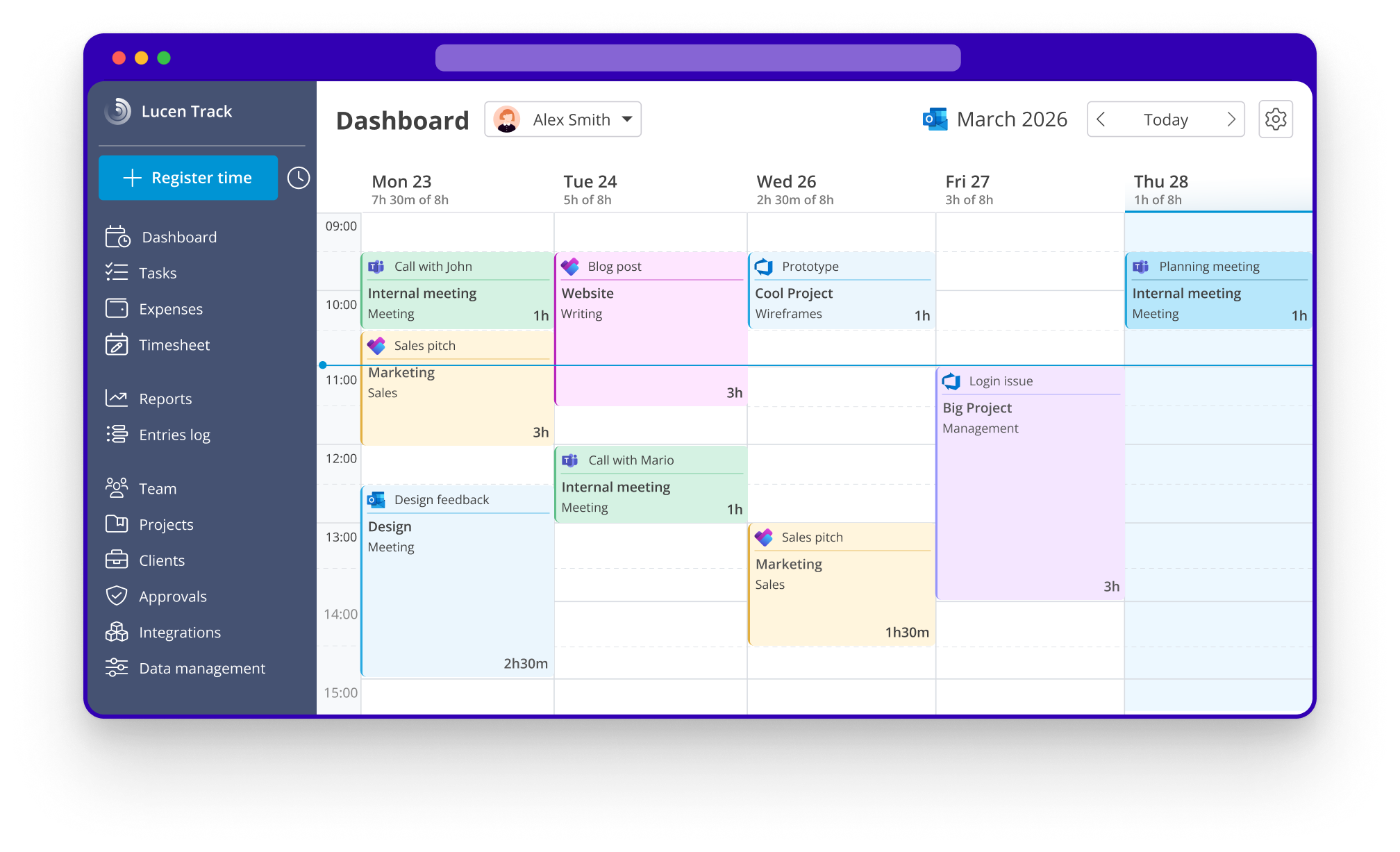
Unlike other time tracking software, Lucen Track is specifically designed to integrate effortlessly with Microsoft 365, making it a convenient choice for users of the suite.
One of the standout features of Lucen Track is its integration with Microsoft Teams to bring time tracking right in the Microsoft Teams desktop app.
But the range of integrations doesn't stop there: Lucen Track connects with Microsoft Planner, Azure DevOps, Microsoft To Do and Outlook Calendar. Lucen Track has also introduced an integration with Microsoft PowerBI, (one of the few time tracking tools to do so!) which allows users to visualize and analyze their time tracking data in Microsoft Power BI in a comprehensive and insightful manner.
Lucen Track helps users to keep track of their time more efficiently and meet deadlines. To make it even more convenient, there is an app available on Appsource for Microsoft Teams that brings the time tracking dashboard directly into the application. Additionally, other integrations are available that allow users to add a smart time tracking button to other Microsoft tools.
.png)
Lucen Track pros: seamlessly integrated with Microsoft Teams, Microsoft Planner, Azure DevOps, Microsoft To Do, Outlook Calendar.
Pricing: a variety of plans starting from $7
Key features: time tracking, light project management, task management, time estimates, expense tracking, smart suggestions from Outlook Calendar events
Best for: teams of any size who need a deep connection with the Microsoft Suite
2) Timesheet Pro 365
According to its page on Appsource, Timesheet Pro 365 is "an easy-to-use add-in which works with SharePoint 2013, SharePoint 2016, and SharePoint Online (Microsoft 365)". It is a productive way of tracking hours spent by your employees on all tasks under different projects within your SharePoint environment".
Not only does Timesheet Pro 365 allow employees to easily track their daily work hours on tasks and projects, but it also provides an intuitive system for managers to review and approve timesheets.
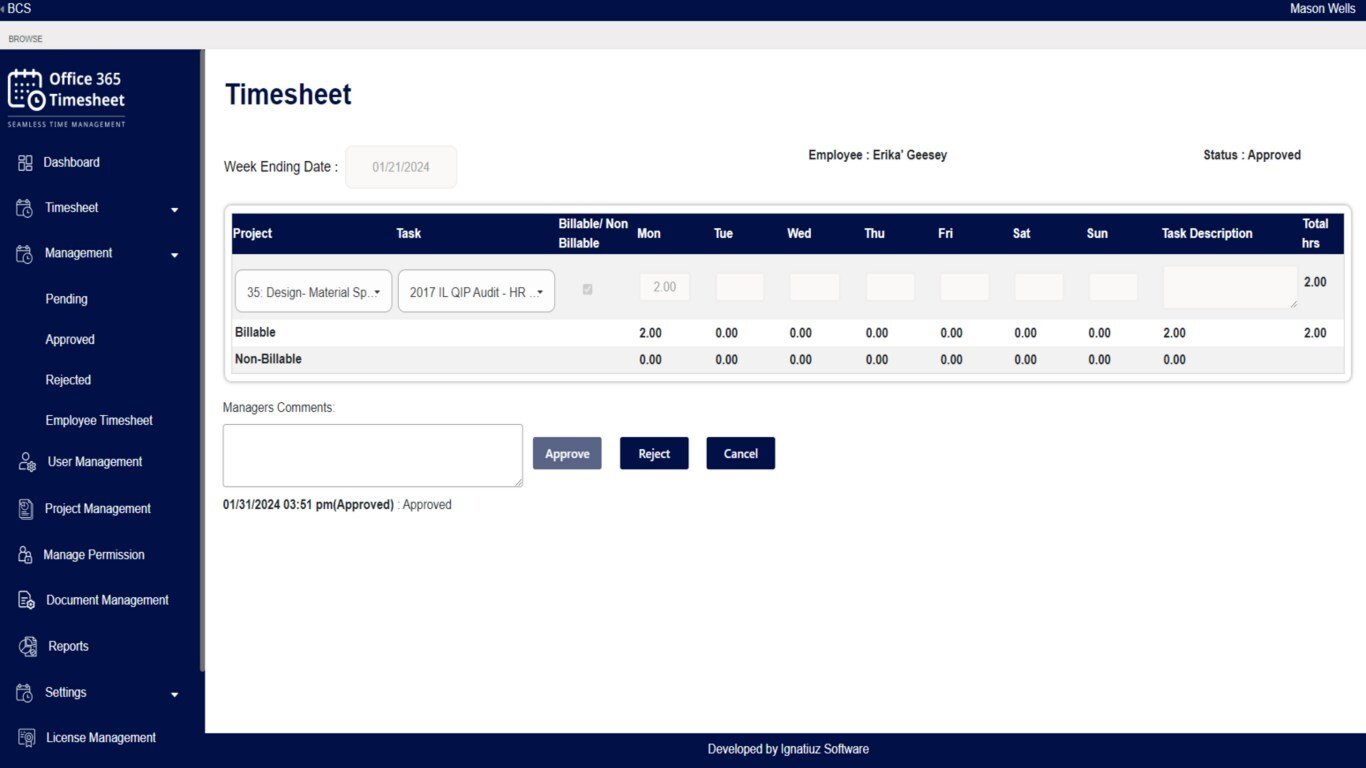
With user-friendly reporting features, managers and administrators can generate and export reports for payroll and invoicing purposes. Employees are able to easily track time and submit timesheets, while managers can approve and keep track of the hiurs in the admin dashboard.
Timesheet Pro 365 pros: simple and straightforward for timesheet creation, billable hour management, Microsoft Teams and SharePoint integration
Pricing: free plan available, paid plans starts from $499 per year (unlimited users)
Key features: timesheet approval, timesheet submission and modification, reporting, Email notifications on submission and approval/rejection of timesheets
Best for: managers and administrators who need to speed up the timesheet approval process
3) Jibble
Jibble provides a seamless integration with Microsoft Teams, directly within its chat interface. Once the Jibble bot is connected with Microsoft Teams, users can simply type "in" to clock in and start their day. This method offers a straightforward and efficient way to track time and get started on tasks.
Additionally, Jibble offers reporting and monitoring dashboards, along with customizable notifications. Users can receive updates on their daily entries, tracked hours, and even payroll hours, all conveniently sent within Microsoft Teams.
Jibble pros: simple time tracking easily available for Microsoft Teams, Azure DevOps and Outlook Calendar integrations
Pricing: generous free plan for unlimited users, paid plans for additional features starting at $2
Key features: Time and attendance tracking, IN or OUT commands, GPS tracking, overtime tracker
Best for: SMEs and enterprises across multiple industries who need to track attendance
4) Timeclock 365
Timeclock 365 is the solution for effortlessly tracking attendance and monitoring employees.
With its mobile apps and Microsoft Teams integration, Timeclock offers a simple punch in/punch out experience. Remote workers can easily clock in at the start of their workday and even request time off. Meanwhile, managers have full visibility into who is actively working on any given day. Timeclock 365 is the perfect tool to simplify attendance tracking and keep your team connected and productive, wherever they are. But the offer doesn't stop there:
Timeclock also offers advanced employee monitoring tools like GPS location trackers and Biometric Time Clocks, for those industries that need a clear track of attendance for security and compliance purposes. It also integration with hardware for door access control.
Timeclock 365 pros: the simplest way to take and monitor attendance
Pricing: plans start at $5 user/month
Key features: punch in/punch out, integrations with Microsoft Teams and Microsoft Dynamics CRM
Best for: teams with
5) Timeghost.io
The Timeghost team specializes in developing apps for Microsoft 365: Timeghost time tracking is one of them. Timeghost allows you to simply log in with a Microsoft 365 account (no extra registration needed) to access its time tracking functionalities. It allows users to track project times directly in Microsoft Teams, and like Lucen Track, it offers intelligent suggestions from your Outlook events, Teams calls, Planner tasks.
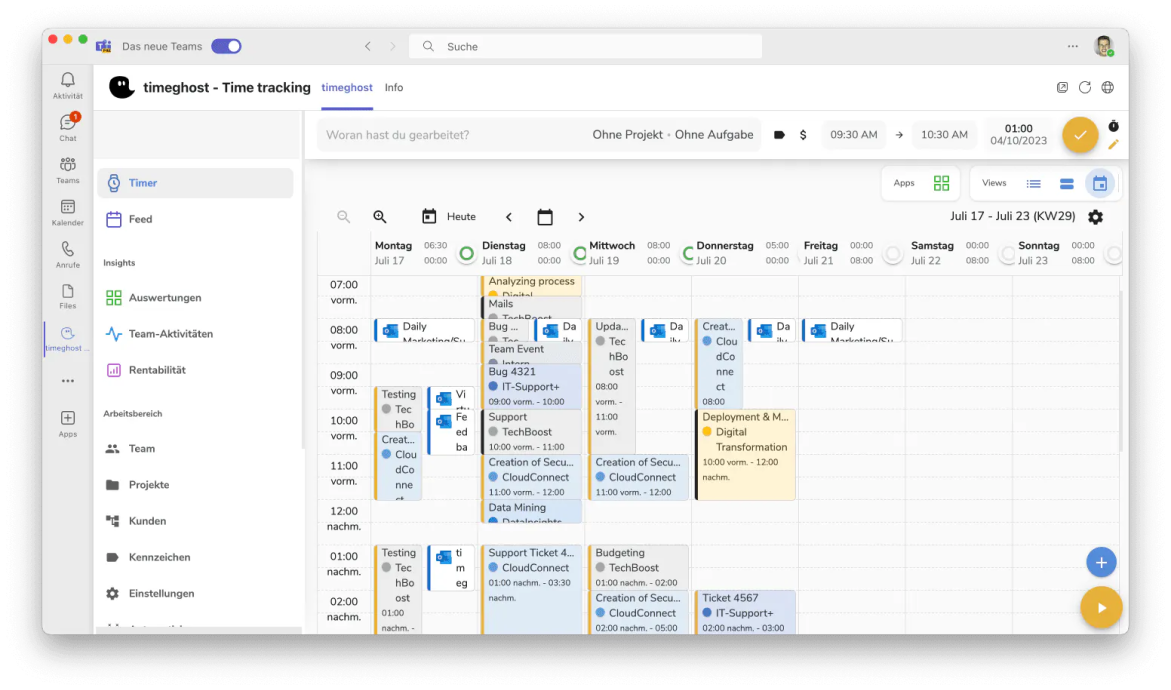
Users have the flexibility to track time either by using a timer or by manually entering their time, and they can easily associate the tracked time with specific projects or clients.
Timeghost pros: simplicity and ease of use with virtually little to no training required
Pricing: N/A
Key features: multiple languages supported, timers and manual mode, smart suggestions from Calendar events, reminders, integration with Microsoft teams
Best for: project managers who need to monitor the progression of the work, from tasks to billable hours
6) Beebole
Beebole s a project time tracking tool trusted by over 1,000 companies across 60+ countries since 2008. It connects resource planning directly to the timesheet — work assigned in the planning view appears pre-populated for each employee, so managers can see planned versus actual time in real time. Teams can manage tasks on a Kanban board or a Gantt chart, and set billing rates by person, project, task, or tag for accurate cost tracking. Beebole makes it simple to run in-depth reports on your company's key metrics, and thanks to an Excel add-in and Sheets add-on, it’s easy to continue analyzing in more complex data models. Beebole is GDPR- and DCAA-compliant, can connect to Microsoft 365 with SSO, and offers native integrations with Asana, Google Calendar, Outlook Calendar, QuickBooks Online, BambooHR, Webhooks, and more. It also offers an API for custom integrations.
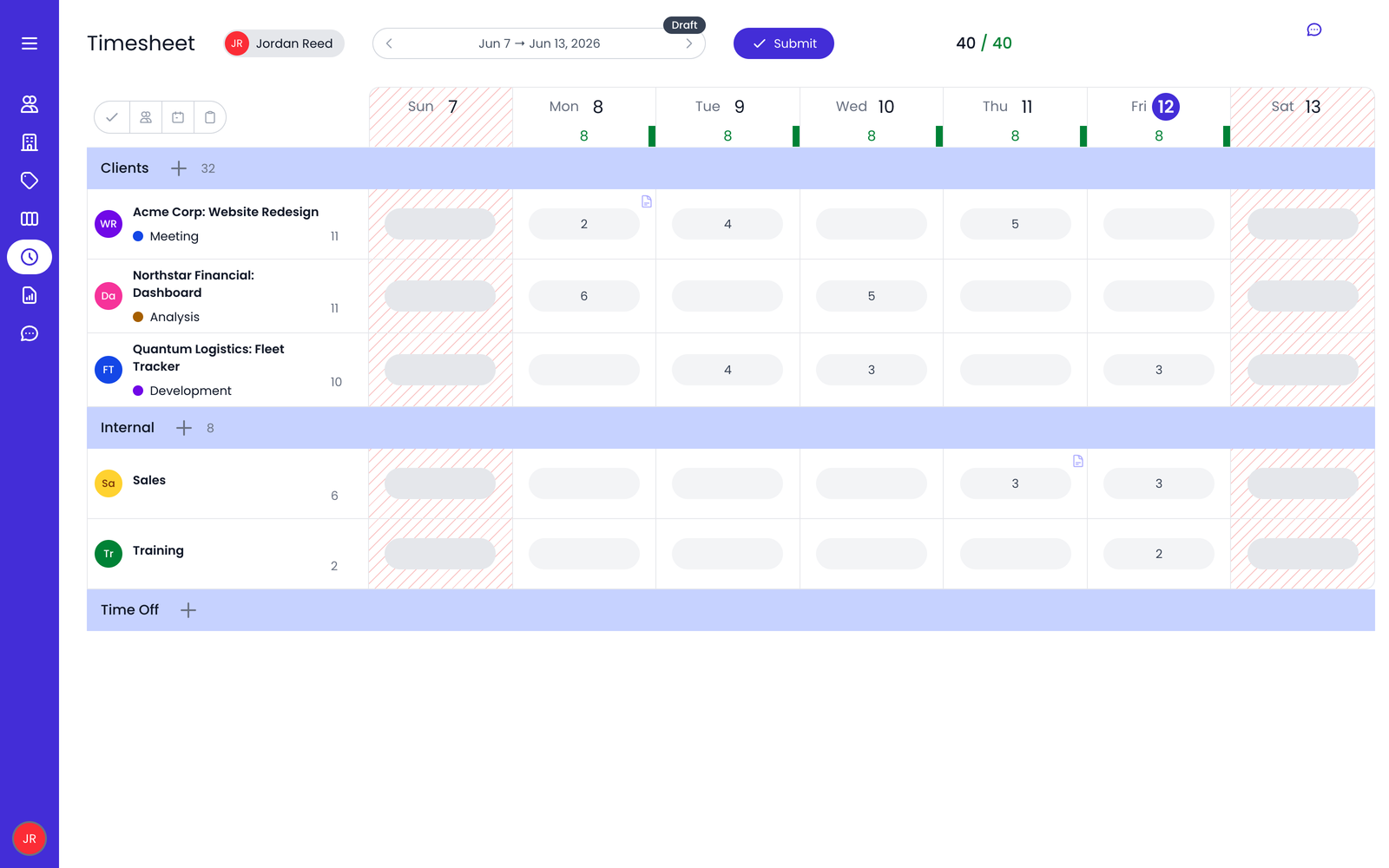
Beebole Pros: Customizable to fit each team's needs, configurable billing rates by person, project, task, or tag, multi-dimensional reporting, multi-stage approval workflows, guided onboarding that's quick to set up, and in-app support with 1:1 sessions for paid users.
Pricing: Free plan for up to 5 users; paid plans from $9 per user/month (billed annually);
Key features: Project time tracking, budget &cost management, reporting & KPI dashboards, time off and attendance tracking, resource planning with Gantt and Kanban views, approval workflows, and native integrations.
Best for: Project managers and finance professionals at mid-market companies who want visibility into project costs, performance, and overall project financials — budgets, margins, and profitability — alongside time tracking.
Why you should track time (benefits for Microsoft Users)
- Having crucial visibility over workload and project timelines;
- Access to data and insights can help with productivity analysis, leading to faster timesheet completion;
- By reducing time spent on administrative tasks, more time can be allocated to valuable work;
- Visibility over the team's performance can help identify areas of improvement and reduce time wasted on unproductive activities such as meetings;
- Increased transparency and accountability;
- Accurate time tracking can help with better time estimates for future projects.
Why you should start with Lucen Track time tracking
While all these 5 software have their pros and cons, Lucen Track is the best and most complete time tracking solution for Microsoft. While integrating seamlessly with the Microsoft 365, it also provides advanced reporting, while at the same time respecting the employee's privacy and avoiding intrusive monitoring.
Whether you use Lucen Track or any other software on this list, you'll be in good hands.
Frequently asked questions
The best time tracking tool for Microsoft 365 in 2026 depends on your specific needs:
- Lucen Track – integrates seamlessly with Microsoft Teams, Planner, and Outlook Calendar.
- Timesheet Pro 365 – ideal for SharePoint users.
- Jibble and Timeghost – offer built-in time tracking inside Microsoft Teams.
- Beebole and Timeclock 365 – focus on attendance tracking, reporting, and compliance.
No. Microsoft Planner does not include built-in time tracking.
However, you can integrate third-party tools (like Lucen Track or Timeghost) to track time directly within your Planner tasks.
Microsoft doesn’t offer a dedicated, standalone time tracking tool. Instead, different Microsoft apps include partial time-tracking features:
- Microsoft Shifts: provides scheduling and clock-in/out for shift-based teams.
- Dynamics 365: includes a timesheet functionality for project and resource tracking.
- Microsoft Project: offered timesheets, but it’s being phased out in favor of Microsoft Planner.
- Windows “Clock” app: includes alarms, timers, a stopwatch, and Focus Sessions to support personal productivity.
Time tracking tools enhance productivity by giving visibility into workload, project timelines, and team performance. They automate timesheets, improve accountability, and help businesses optimize resources, ensuring better project estimates and reduced time spent on administrative tasks.

Subscribe to our blog
Get all the tips, tricks and inspiration you need to create professional looking timelines, straight to your inbox.
-1.png)