


Milestone chart template
Milestone chart sample that focuses on the main sequence of events, targets and objectives that need to be achieved throughout a project’s lifecycle.
Powered by Lucen Timeline (formerly Office Timeline)

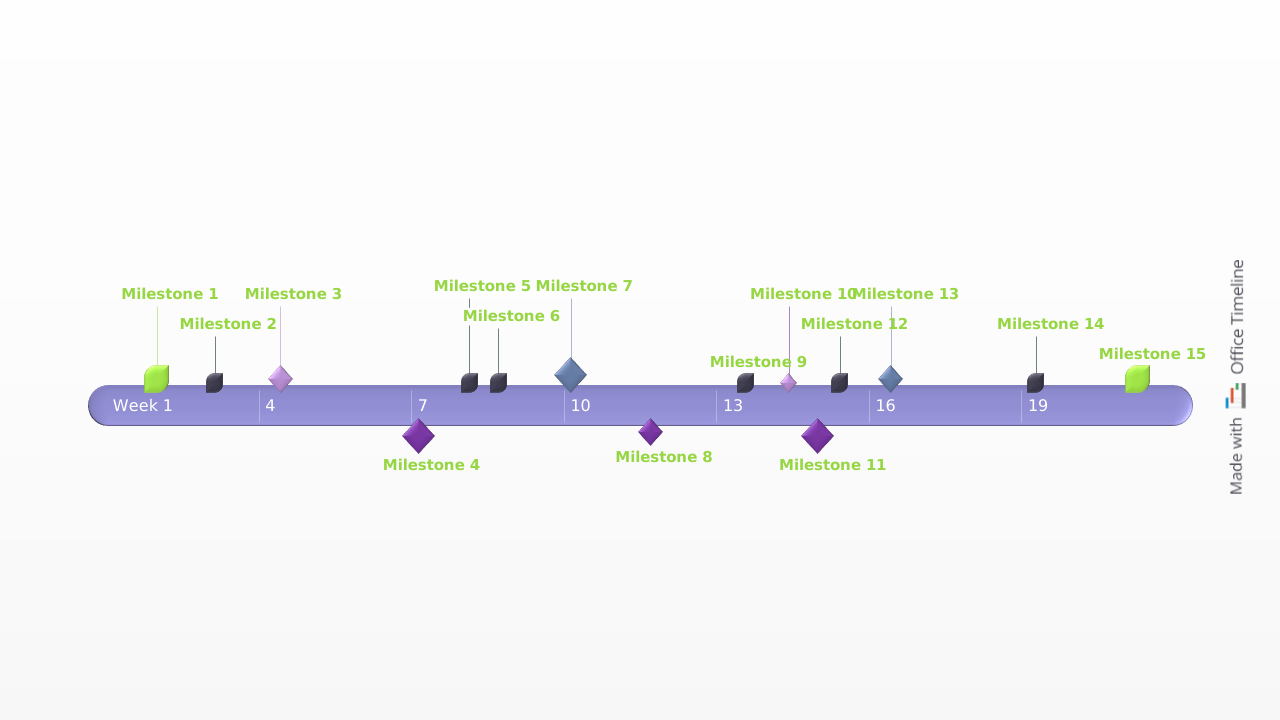
A milestone chart helps project or program managers, stakeholders and team members to visualize and easily track the progress of a project. Illustrating planned significant events that are scheduled to occur at a certain time, a milestone chart allows for corrective actions to be taken if the project is falling behind and, thus, ensures that efforts successfully stay on target.
Learn more about what a milestone chart is and how it can be used in project management with the help of our Q&As below. We’ve also included here a free downloadable milestone chart template that you can customize to build a clear, professionally looking visual mapping of your project.
Using and updating the milestone chart template
Use the milestone chart template as a simpler way to illustrate, schedule and report your project. A milestone chart will provide a snapshot of your project for important presentations and communications with management or customers. This particular sample is a downloadable PowerPoint template so you can use the familiar application to easily change the milestone chart for any purpose.
Milestone charts can be used to illustrate the key events, objectives and targets of any project or plan. This makes the milestone template an excellent tool for planning projects or managing programs where visualizing the key components need to be displayed in chronological order on a time schedule. The free milestone chart template should be used for top level reviews. It was made for reporting to management and clients, or any audiences who should not be overwhelmed with the detailed minutia of a plan or project.
Since milestone charts provide a summary view of a project, they are easier to communicate than other complicated project charts made from long lists of tasks. Milestone charts are also excellent planning tools because they show key events on a timeline culminating in the completion of the plan.
Planners can use the free project milestone template to visualize the sequence of events they need to achieve, from which they can build more comprehensive plans for reaching each milestone. The timeline can be updated with your own milestones by manually adding them to the template with PowerPoint.
The milestone chart template was created with the milestone chart maker from Lucen Timeline. Lucen Timeline is a free plug-in for PowerPoint users. Using its free 14-day trial, you can create a simple milestone chart or even add tasks and multi-level swimlanes, if necessary. The Lucen Timeline add-in will quickly edit the styles, shapes, colors and design of any of the objects on the milestone chart.
Frequently asked questions
A project milestone chart or milestone schedule is a visual display of important events (also known as milestones) that make up the planned course of a project’s timeline.
The usual format of a milestone chart is that of a timeline that uses various symbols (squares, diamonds, circles etc.) to separate a project schedule into major phases. It typically contains a horizontal timescale for the whole project’s life cycle along which milestones, their descriptions and due dates are shown vertically.
Through this simple yet clear type of display, milestone charts provide essential information about planned and actual completion dates of a work schedule.
Here are the basic steps you need to take in order to create a clear project milestone chart:
- Identify major milestones – think of all the key achievements you want to reach along your project timeline. Milestones act as checkpoints that mark shifts in a project’s development or the completion of important tasks.
- Set dates for each of your milestones – estimate the dates when your milestones are expected to be completed.
- Create your milestone chart from a timeline template like the one provided here.
Alternatively, you can learn how to make a timeline or a milestone schedule using various office tools like Excel or PowerPoint with our step-by-step tutorials.
Examples of project milestones include:
- the beginning or completion of a particularly critical activity;
- equipment deliveries;
- approval dates;
- press releases;
- hiring staff;
- contract signings etc.
A (project) milestone template is any pre-built timeline chart that gives a predefined format to your list of milestones. Milestone templates are useful because they:
- Save you time and effort since you don’t have to start from scratch in creating a milestone chart.
- Enable you to clearly visualize the outline of your project.
- Act as a guide and reference map for those who are new to your project.
Milestones are tools typically utilized on timelines, Gantt charts, roadmaps or swimlane diagrams to mark a turning point in the schedule. More specifically, they can signify the completion of a phase, the starting or the end point of the project, and virtually anything that must be highlighted along the way. If the role of tasks is to break the total work into manageable chunks, milestones are there to segment the project into distinct phases that are easier to schedule and execute.
On a Gantt chart, milestones are points set along the project’s timeline to determine progress and keep track of critical tasks. Defined correctly, the number of the milestones reached is directly proportional to the project’s completion percentage. On a Gantt chart, the milestones that are part of the Critical Path can help better partition phases or confer each phase its own slack. More uses for milestones include:
- Enhanced project visualization: on a Gantt chart, milestones offer the viewer a high-level understanding of the key events, without the need to examine the tasks involved in each phase. Find out more about data visualization practices, tools and trends on our blog.
- Determining bottlenecks and delays: milestones can also be used as progress markers for more minor events; doing so allows project managers to determine which team isn’t meeting which milestones, thus being able to address the issue before it impacts the entire schedule.
- Mark accomplishments and provide motivation: aside from scheduling-related functions, Gantt chart milestones are great for keeping the teams excited about the work and will come in handy when presenting progress to stakeholders.
On visual representations like Gantt charts or timelines, tasks have a start date and end date, as they represent the duration of completing an activity or process. Conversely, milestones constitute events with no (zero) duration. They primarily have the role of marking an achievement or the completion of specific project phases.
Effectively track the progress of your project using our milestone chart template that can be easily customized in PowerPoint using the Lucen Timeline add-in’s free 14-day trial.

Your download should start now. If it doesn’t start click here and check your inbox for tips to get started.