



Track billing & invoicing

Turn tracked hours into client-ready invoices

Track connects time tracking and invoicing, so the hours your team logs become accurate, client-ready invoices, with nothing lost or re-entered in between.

Free for 14 days · Native to Microsoft 365

A Lucen Track invoice for Contoso Ltd., made from 64.5 approved hours and a travel expense: four line items and a total of $10,095.00, with Void invoice, Download PDF and Mark as paid.

Works inside the Microsoft 365 tools your team already uses

  • Microsoft Outlook
  • Microsoft Power BI
  • Microsoft Teams
  • Microsoft Planner

Billing and invoicing

Billing that starts where the work does

Create, issue, and manage client invoices directly from your approved hours and expenses. No spreadsheets, no manual exports, no billable hours left behind.

  • Every billable hour, counted

    Set your hourly rates, log time, and let Track do the math. See what each project has earned, broken down by phase and team member.

  • Invoices in minutes, not hours

    Pull approved hours and expenses straight into an invoice. Review the totals, download a PDF, and send it to your client.

  • Keep more of what you earn

    Separate billable from non-billable time so you can see which projects make money, and which ones quietly cost it.

Billing and invoicing in action

From logged hours to paid invoice in four steps

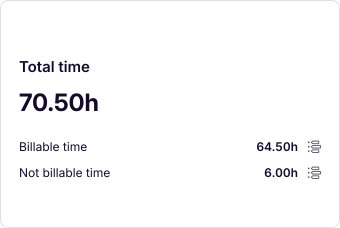
  1. Lucen Track's Total time for a project: 70.50 hours, 64.50 billable and 6.00 not billable.

    01

    Track billable and non-billable time

    Log both on the same project and see it all in one view. Client meetings from your Microsoft Outlook calendar come into Track too, so time with clients is always accounted for.

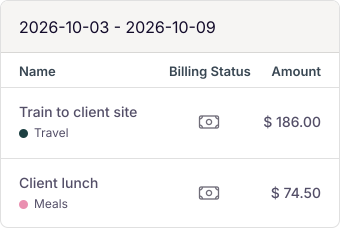
  2. Lucen Track's Expenses list: Train to client site, Travel, $186.00, and Client lunch, Meals, $74.50, both billable.

    02

    Add your expenses

    Record and categorize work expenses, from travel to meals and supplies. Bill them to clients or use them for team reimbursements.

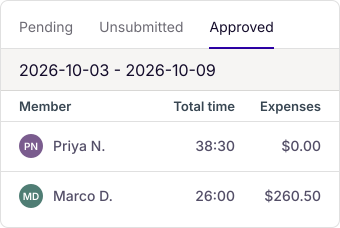
  3. Lucen Track's approved timesheets for the week: Priya N., 38:30, and Marco D., 26:00, with $260.50 of expenses.

    03

    Review and approve

    Approved hours and expenses become the source for every invoice, so what you bill always matches the work that was done.

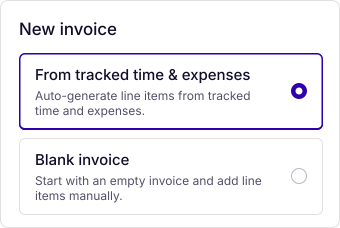
  4. Lucen Track's New invoice dialog, with From tracked time and expenses chosen over Blank invoice.

    04

    Create and issue the invoice

    Turn approved time into an invoice or start from a blank one. Issue it, download it as a PDF, and mark it as paid, all from Track.

Invoicing in Track

Everything you need to invoice with confidence

Track handles the steps between finished work and a paid invoice, so your team spends less time on admin and more on client work.

  • Invoices from tracked time

    Billable entries become invoice line items automatically. Nothing to re-enter.

  • Start from blank

    Add charges manually for work that isn't tied to tracked time.

  • Expenses on the invoice

    Bill expenses alongside hours on the same invoice.

  • Clear invoice status

    Issue invoices and mark them as paid without leaving Track.

  • PDF download

    Client-ready PDFs to send to clients or keep for your accounting records.

  • Detailed breakdowns

    Export a breakdown of billable work so clients see exactly what they're paying for.

  • Flexible permissions

    Owners and admins invoice by default. Give project managers access when it makes sense.

  • Included in all paid Track plans

    Starter, Premium, and Enterprise

    Compare plans
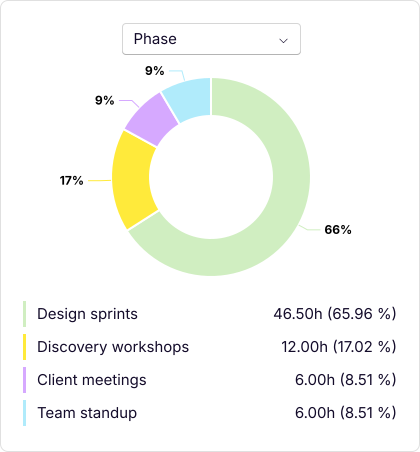
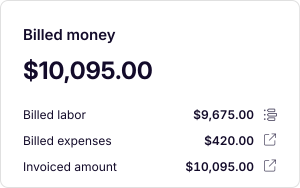
Lucen Track's project report for Brand refresh: 70.50 hours by phase, Design sprints 46.50, Discovery workshops 12.00, Client meetings 6.00 and Team standup 6.00, and $10,095.00 billed.

Reports

See where your time turns into revenue

Every hour tracked flows into clear, easy-to-read reports and charts. Compare billable and non-billable time, see earnings by project, phase, and team member, and share results with clients and stakeholders.

Go deeper with Microsoft Power BI

Connect Track to Microsoft Power BI to build custom visualizations of your billable time and profitability, in the dashboards your leadership already uses.


Microsoft-native

Built for Microsoft 365, ready for everything else

Track works inside the Microsoft tools your team already uses, so billable time gets captured as part of the workday, not pieced together at the end of the month.

  • Microsoft Outlook

    Bring client meetings from your calendar into Track, so every billable conversation is accounted for.

  • Microsoft Power BI

    Visualize billable time and margins alongside the rest of your business data.

  • Microsoft Teams and Microsoft Planner

    Log time where the work happens, against the tasks your team already manages.

“As a company, striking the right balance to maintain overall profitability is key. That's why Track is essential for monitoring our internal costs and hourly rates.”

Adam Fraser

Technical Manager, DACI

Ready to bill for every hour your team works?

Start your free 14-day trial and create your first invoice from tracked time today.

FAQ

Common questions about billing and invoicing

What is invoicing in Lucen Track?

Invoicing is a feature in Lucen Track that lets you create, issue, and manage client invoices directly from the billable time and expenses you've already tracked, without exporting data to a separate invoicing tool.

Which Lucen Track plans include invoicing?

Invoicing is included in all paid Lucen Track plans: Starter, Premium, and Enterprise. It is not available on the Free plan.

Do I need to re-enter my tracked hours to create an invoice?

No. Billable time entries already logged in Track are pulled directly into an invoice as line items. You can also start from a blank invoice if you prefer to enter charges manually.

Can I track billable and non-billable hours in Track?

Yes. You can log billable and non-billable time on the same project, set hourly rates, and see both side by side in one view and in your reports.

Can I add expenses to an invoice?

Yes. Track lets you record and categorize work expenses such as travel, meals, and supplies, then add them to client invoices or use them for team reimbursements.

Who can issue invoices in Track?

Owners and admins can issue invoices by default. You can also give project managers invoicing permissions so the people closest to client work can bill for it.

Can I download invoices as PDFs?

Yes. Any invoice created in Lucen Track can be downloaded as a PDF, ready to send to a client or keep for your accounting records.

Can I build reports on billable time?

Yes. Track turns tracked time into reports and charts showing billable and non-billable hours and earnings by project, phase, and team member. For custom analysis, you can connect Track to Microsoft Power BI.

How does Track work with Microsoft 365 for billing?

Track is built for Microsoft 365. Client meetings from Microsoft Outlook come into Track so they're accounted for, Microsoft Power BI lets you visualize billable time and profitability, and you can log time from Microsoft Teams and Microsoft Planner where the work happens.