


Lucen logo
Products
Products

Products

Timeline
Track
Flowchart
Plan
Beta
Timeline

formerly Office Timeline

Build executive-ready timelines and roadmaps in PowerPoint.

Download free

Premium plans

LitePlusExpert
Also available online
Timeline Online
Build, update and share timelines together in your browser.
→
Main features →Integrations →Pricing →

Main features

Tasks & milestonesSwimlanesPlanned vs. actualSub-swimlanesImport dataDependencies & critical pathCustom themesReady-made templatesMultiple timescales
All Timeline features →

Integrations

ExcelPowerPointMicrosoft ProjectSmartsheetWrikeJiraGoogle DocsGoogle SheetsGoogle Slides
All Timeline integrations →
Track

formerly Timeneye

Track time, strengthen profitability, right inside Microsoft 365.

Try Track for free

Premium plans

StarterPremiumEnterprise
Integrations →Pricing →
For your team
Book a demo
See how Track turns tracked time into billed revenue.
→

Main features

Billing & invoicing

Integrations

Microsoft TeamsMicrosoft PlannerOutlook CalendarMicrosoft To DoAzure DevOpsPower BIMicrosoft Teams callsAzure ADGoogle CalendarQuickBooks OnlineXero
All Track integrations →
Flowchart

Build clean, auto-aligned flowcharts in PowerPoint, without the manual formatting.

Download free

Premium plans

Plus
Pricing →
Built in
Lucen AI
Go from idea to polished diagram in seconds.
→
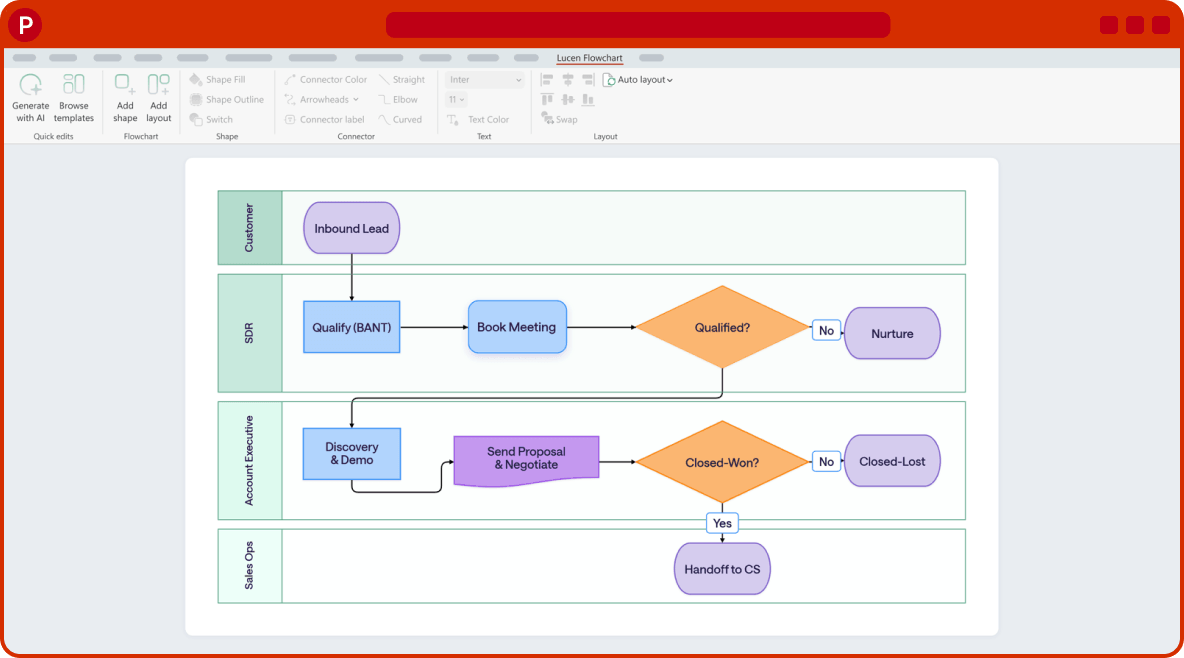
Lucen Flowchart in PowerPoint: a swimlane flowchart on a slide
Plan

Beta

Turn Excel sheets into visual project plans in minutes.

Download free
Made for Excel
Live Gantt charts
Update once and everything stays in sync.
→
Lucen Plan in Excel: a task list beside its Gantt chart
See product overview →
Solutions
Solutions
By industry
PharmaSoftwareHealthcareProfessional servicesConstructionManufacturing
By role
Project & program managersIT & license administratorsConsultantsExecutivesFinance managers
ReckittBOK FinancialSpectral EnergyDaci

Customer stories

Explore success stories from our customers.

Read customer stories
See all solutions →
Resources
Resources

Free templates

Kick off your projects with free PowerPoint templates.

Browse templates

Learn

Tips & tutorials
BlogLearning centerVideo tutorialsLive trainingGuides & toolkitsCustomer storiesEnterprise solutions
Project visuals 101
TimelinesGantt chartsProduct roadmapsDiagramsSwimlane diagrams
Help center
Guides and answers for every Lucen product, in one place.
→
Visit the learning center →
Pricing
Contact
General inquiries
Timeline sales
formerly Office Timeline
Track sales
formerly Timeneye
Login
Lucen Timeline
Lucen Track
Try Timeline free

Andrea Ognibene

Product Manager, Lucen Flowchart

All newest articles

Sort by
Newest
NewestOldest

Lucen Flowchart Is Now Available: Complex Processes, Made Clear in PowerPoint

Andrea Ognibene
·
October 1, 2026
·
6
min read
Read more →

Best Flowchart Diagram Software for PowerPoint Users in 2026

Andrea Ognibene
·
August 14, 2026
·
7
min read
Read more →
1
...

Subscribe to our blog

Get all the tips, tricks and inspiration you need to create professional looking timelines, straight to your inbox.

Thank you! Your submission has been received!
Oops! Something went wrong while submitting the form.

Follow us on
Social Media

Lucen logo
The Microsoft-native clarity platform.
Formerly Office Timeline · Austin, TX.
Login
Timeline
(formerly Office Timeline)
Track
(formerly Timeneye)
Try free
Products
Timeline
Application tourIntegrationsFeaturesDownload freeOnline versionPricingVersion history
Track
Application tourIntegrationsProduct roadmapPricingService statusAPI documentation
Flowchart
Application tourDownload freePricingVersion history
Plan
BETA
Download free
Company
About usRebrandLegalTimeline privacy policyTrack privacy policy
Contact
General inquiriesContact Timeline salesContact Track salesLucen SupportTrack support
Explore
BlogTemplatesSolutionsLearning centerVideo tutorialsLive trainingProject managementTask managementSwimlane diagramScorecard management
Copyright © 2026 - Lucen Software. All rights reserved.
Microsoft® PowerPoint®, Excel®, Project®, Word®, Office 365® and Windows® are registered trademarks of Microsoft Corporation.
All trademarks or registered trademarks are property of their respective owners.
English
English
German
French
Dutch